

Review: Cscape Software for Horner PLCs with Integrated HMI

For efficient work with Horner panels (PLCs with integrated HMI), you need a reliable and intuitive programming tool. The Cscape software allows configuration of both the PLC and the integrated HMI within a single environment—and it’s free. Once again, we asked specialist Jaroslav Blažek (blaja.cz) to take a closer look at the software. You can find out how the installation and registration went in his review:
Review by Jaroslav Blažek
Programming software Cscape version 10 for PLCs with integrated HMI from Horner Automation: we will go through installation as well as registration, where things don’t always go exactly as expected—but more on that in this article.
Cscape 10 is the latest current version. Information, manuals, and downloads can be found on our e-shop:
Cscape Software – download and more information
Version 10 plus Service Pack 1 supports Windows 10 (64-bit) and newer versions of Windows.

It is available for free download both on the FOXON e-shop and on the Horner website. The package is about 500 MB. On the Horner website, registration is required before downloading. It’s nothing complicated—just an email and a few details. The software itself will also need to be registered, as we will see later, but again, it’s straightforward. A single account is sufficient for everything.

The installer also configures all Visual C++ redistributables.

It also installs a USB driver, which you can skip if you don’t plan to use USB.

Then the installation runs smoothly—nothing unexpected happens.

This is what gets installed besides the main software.

And that’s it. No lengthy installation process—those 500 MB are done almost instantly.

Each launch of Cscape requires login/registration—but only once. This must be done online, as the software needs to verify the account. The account is the same one created for downloading the software. (Editor’s note: the software can also be downloaded directly from our e-shop.)

If you are not connected to the internet, the software runs in a time-limited trial mode, but otherwise fully functional. You can log in later at any time.

The trial period lasts one month, during which you can complete the login whenever convenient.

Everything works normally; only a notice about the trial version appears in the top white bar.

At this point, we encountered a situation where we were online, but login still didn’t work. This happens only to a very small number of users. Why? And how to fix it? Simply:

Enter the Horner licensing server address into your browser: https://licensing.hornerautomation.com
If the page opens normally, everything is fine—and you don’t even need to check, login will work without issues.
However, if you want to use remote access to the PLC, you will need to register the PLC here as well, including its MAC address. We’ll cover that another time.

However, if you are redirected elsewhere or see a similar security warning, the login will not succeed. According to technicians, the issue may be caused by DNS protection on your internet provider’s side or similar security measures. The solution is simple—use a different connection, for example by sharing internet via a mobile LTE network, and everything should work correctly.

You can easily try this yourself. In the left screenshot, the phone is connected at work via Wi-Fi through a local provider—you can see the Wi-Fi icon in the top right. In the right screenshot, the connection is via an LTE network, and the website opens normally.
We also tested it from a pub and various other locations, and everything worked fine—only in our office it didn’t. 🙃
Our internet provider is currently addressing this together with their DNS security supplier, so we’ll see how it turns out. That said, we seem to be an exception—so far, it has worked for everyone else without any issues.

We shared the internet connection via a mobile device and got it done, so we wouldn’t have to keep dealing with it over and over again.

It’s not lying—we haven’t completed the registration yet. :)

And that’s it! Just a few seconds and you’re all set.

We are now logged in using our credentials—specifically our email address.

Everything is also OK in the “Account” section. If we happen to log out here, we’ll need to go through the login process again the next time we start Cscape.

Cscape Software – download and more information
Conclusion:
It’s not as complicated as it might seem. Registration systems like this are used by most PLC and software manufacturers for user management and protection. By the time we finished everything over a few days, the link was already working, and the Horner website had been approved as safe by Whalebone. Horner’s technical support confirmed that we were among the few users who encountered this issue.
Watch the video:
Author: Jaroslav Blažek
Recommended products16

HORNER XL10 Prime PLC HMI controller with 10,4″ colour touchscreen, analog / digital inputs and outputs
2 637,80 EUR Incl. VAT

HORNER XL4 Prime PLC HMI controller with 3,5″ colour touchscreen, analog / digital inputs and outputs
1 030,92 EUR Incl. VAT

HORNER X5 Prime PLC HMI controller with 4,3″ colour touchscreen, analog / digital inputs and outputs
1 126,51 EUR Incl. VAT

HORNER XL15 Prime PLC HMI controller with 15″ colour touchscreen, analog / digital inputs and outputs
3 447,29 EUR Incl. VAT

HORNER XL6 Prime PLC HMI controller with 5,7″ colour touchscreen, analog / digital inputs and outputs
1 375,77 EUR Incl. VAT

HORNER XL7 Prime PLC HMI controller with 7″ colour touchscreen, analog / digital inputs and outputs
1 747,24 EUR Incl. VAT

HORNER XLW Prime PLC HMI controller with 7″ colour touchscreen, analog / digital inputs and outputs
1 545,17 EUR Incl. VAT

HORNER CANVAS 4 PLC HMI controller with 3.5″ colour touchscreen, analog / digital inputs and outputs
1 066,01 EUR Incl. VAT

HORNER CANVAS 5 PLC HMI controller with 4.3″ colour touchscreen, analog / digital inputs and outputs
1 161,60 EUR Incl. VAT
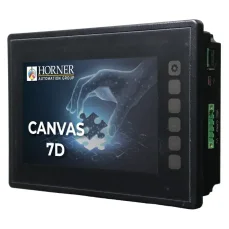
HORNER CANVAS 7D PLC HMI controller with 7″ colour touchscreen, analog / digital inputs and outputs
1 840,41 EUR Incl. VAT

HORNER CANVAS 10D PLC HMI controller with 10.1″ colour touchscreen, analog / digital inputs and outputs
1 978,35 EUR Incl. VAT

HORNER CANVAS 7 PLC HMI controller with 7″ colour touchscreen, analog / digital inputs and outputs
1 580,26 EUR Incl. VAT

HORNER XLE PLC HMI controller with 2.2″ monochrome screen, analog / digital inputs and outputs
498,52 EUR Incl. VAT

CANopen – license for Horner PLC HMI controllers X4, X7 and X10
54,45 EUR Incl. VAT

HORNER X2 PLC HMI controller with 2.2″ monochrome screen, analog / digital inputs and outputs
335,17 EUR Incl. VAT

SmartMod – remote Modbus RTU I/O modules for HORNER PLCs
234,74 EUR Incl. VAT