

Collects data from PLCs, stores it in a database, and converts it to MQTT and OPC UA – SIA Connect SW - SIA Connect SW: 0-500 items

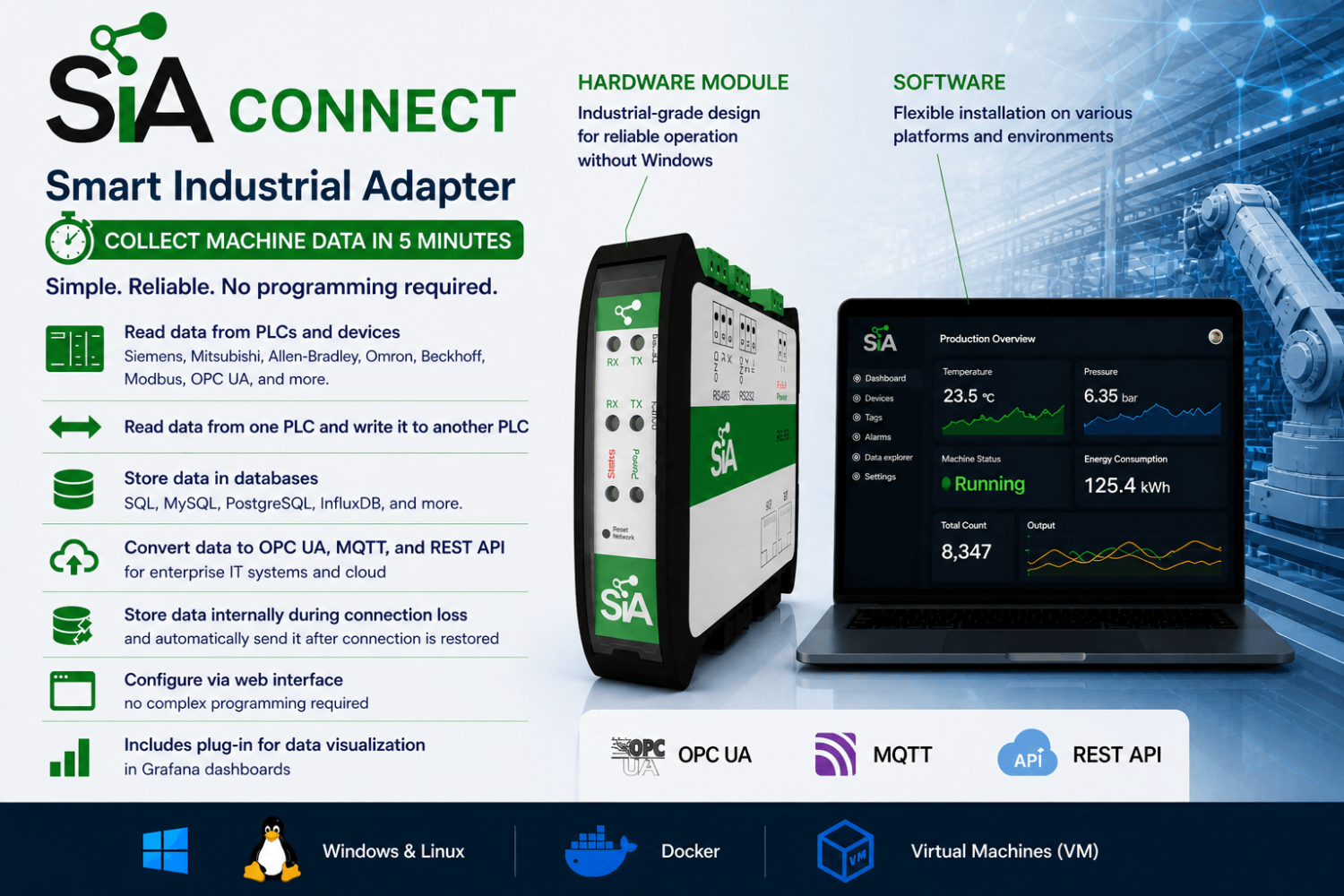
Software for reading data from PLCs and devices such as Siemens SIMATIC S7 / LOGO!, Mitsubishi, Allen-Bradley, Omron, Beckhoff, Modbus, OPC UA, etc. Enables reading data from one PLC and writing it to another PLC. Thanks to built-in connectors, it stores data in databases (SQL, MySQL, PostgreSQL, InfluxDB, etc.) and can also convert it to OPC UA or MQTT protocols for higher-level IT systems or the cloud. In case of connection loss, data is stored internally and automatically sent once the connection is restored. Configuration is done via a web interface without the need for complex programming. Includes a plug-in for data visualization in Grafana dashboards.
The software can be installed on any hardware and run on various platforms (Linux, Windows via Docker, virtual machines, embedded devices, etc.). More
Code: SIA-ANYWARE-PERP-500
Software for reading data from PLCs and devices such as Siemens SIMATIC S7 / LOGO!, Mitsubishi, Allen-Bradley, Omron, Beckhoff, Modbus, OPC UA, etc. Enables reading data from one PLC and writing it to another PLC. Thanks to built-in connectors, it stores data in databases (SQL, MySQL, PostgreSQL, InfluxDB, etc.) and can also convert it to OPC UA or MQTT protocols for higher-level IT systems or the cloud. In case of connection loss, data is stored internally and automatically sent once the connection is restored. Configuration is done via a web interface without the need for complex programming. Includes a plug-in for data visualization in Grafana dashboards.
The software can be installed on any hardware and run on various platforms (Linux, Windows via Docker, virtual machines, embedded devices, etc.). More
Code: SIA-ANYWARE-PERP-500
Options 5
| SIA Connect SW | Code | Availability | Price excl. VAT | |
|---|---|---|---|---|
| 0-500 items | SIA-ANYWARE-PERP-500 | In stock 9 pcs |
600 EUR
|
|
| 501-2000 items | SIA-ANYWARE-PERP-2000 | In stock 10 pcs |
1 320 EUR
|
|
| 2001-5000 items | SIA-ANYWARE-PERP-5000 | In stock 10 pcs |
2 640 EUR
|
|
| 5001-7500 items | SIA-ANYWARE-PERP-7500 | In stock 10 pcs |
3 960 EUR
|
|
| 7500+ items | SIA-ANYWARE-PERP-UNLIMITED | Inquire product |
On request
|
Who is SIA Connect SW intended for?
- Manufacturing plants – data collection from machines with storage in databases for subsequent reporting and monitoring; suitable if you want to run on your own server or PC.
- System integrators – easy integration of data between different PLCs and devices, with the option to store data in databases and enterprise IT applications.
- Machine builders (OEMs) – a cost-effective and reliable solution for collecting data from machines worldwide (condition monitoring, reports, etc.); the ability to choose a license based on the number of read values (items); easy deployment on own hardware.
- Building and energy management (BMS) – data collection from building technologies (heating, cooling, ventilation, energy metering) and transfer to central systems for monitoring and reporting.
- Projects with multiple manufacturers and protocols – integration of data between devices that do not normally communicate with each other, including device-to-device communication.
- Projects with a higher number of values – when 500 values are not sufficient and you need hundreds to thousands of values (up to 7,500+ depending on the license).
- Companies using virtualization / Docker – suitable for native operation on Linux or via Docker (on Windows and macOS via Docker only) and for leveraging existing server infrastructure.
This SW variant is not intended for users who want a ready-made device for installation in a control cabinet without their own PC/server. For such use cases, the SIA Connect HW hardware variant (up to 500 values) is more suitable.
SIA Connect use cases
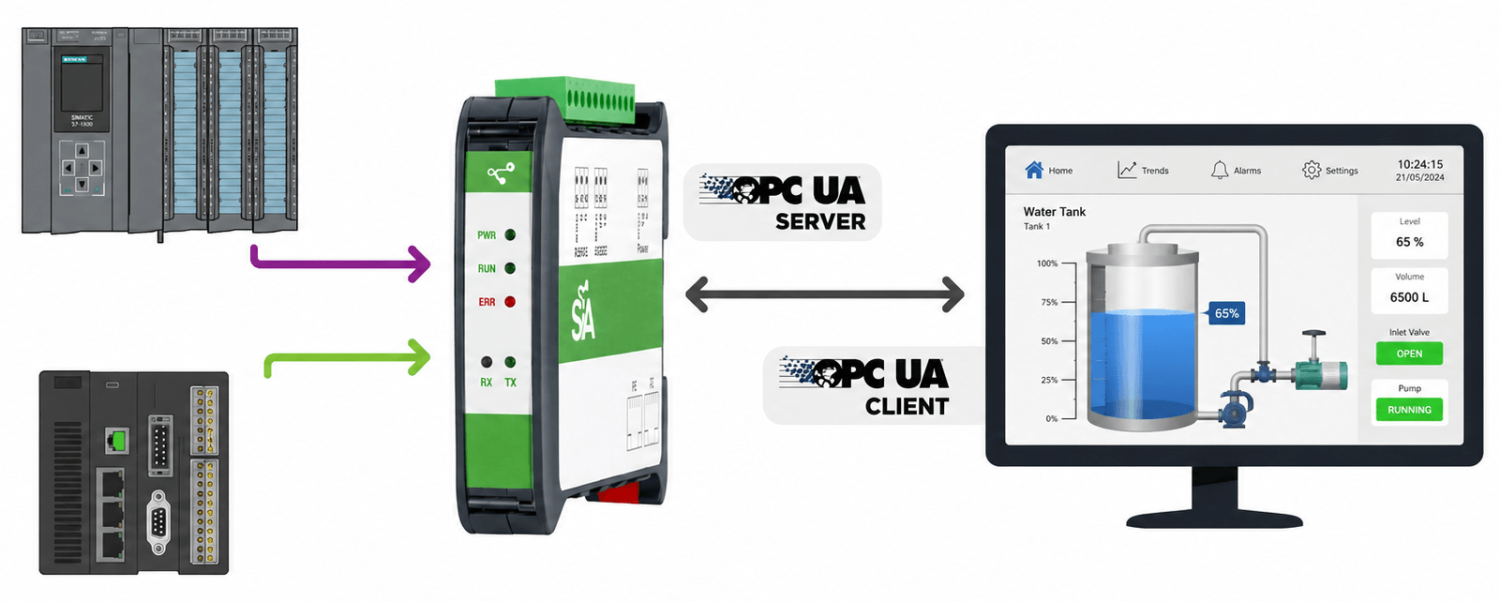
SIA Connect reads data from various PLC types using built-in drivers and, as an OPC UA Server, provides the data in OPC UA format to SCADA, HMI and IT applications for further processing.
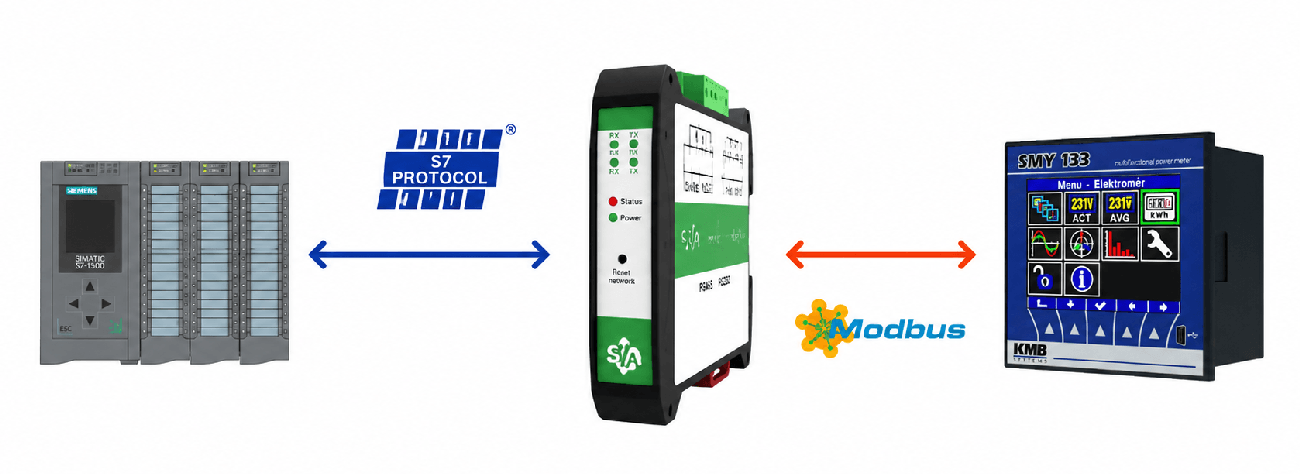
SIA Connect acts as a data gateway between different types of devices using built-in communication drivers. It enables continuous or logic-based data exchange between these systems.
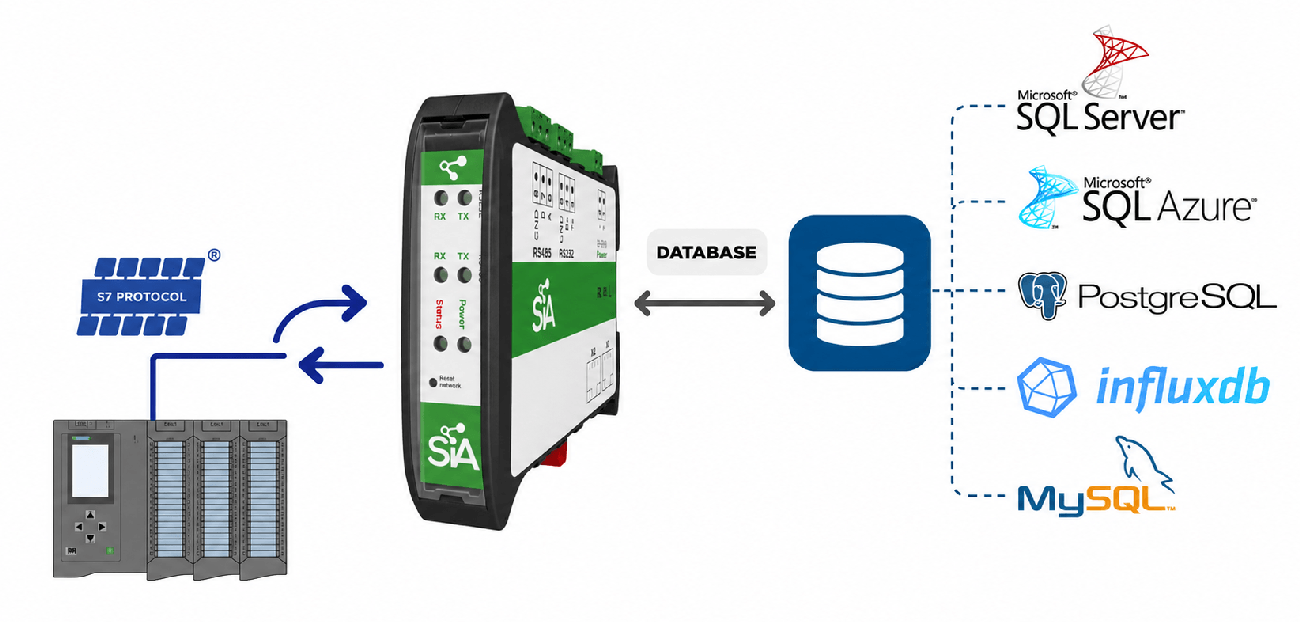
SIA Connect collects data from connected devices and stores it in databases using built-in database connectors. It also works in reverse, reading data from databases and writing it to PLCs. Data transfer can run continuously or according to defined rules. Allows creating SQL SELECT queries for reading database information and sending it to PLCs (e.g. production orders). Also enables custom SQL commands (INSERT, UPDATE) using PLC variables (e.g. writing production batch results to a database).
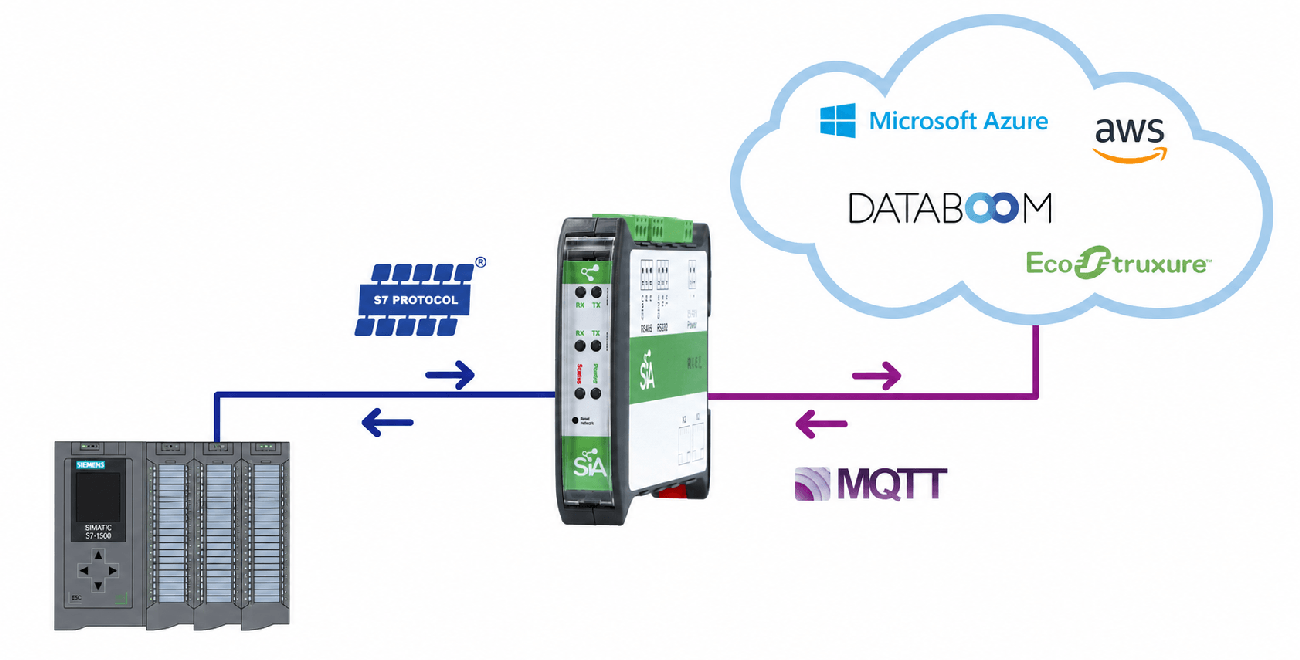
SIA Connect collects data from connected devices and sends it to the cloud using built-in cloud connectors. In the event of a connection loss, data is temporarily stored in internal memory and automatically sent to the cloud once the connection is restored. It also works in reverse, writing cloud data back to PLC systems.
Why choose SIA Connect SW?
- Complete solution – a single software platform reads data from PLCs, stores it in databases, sends it to the cloud, and interconnects devices (PLCs, machines, etc.).
- Bidirectional data transfer – reads data from devices and writes data back.
- Integration of devices from different manufacturers and protocols – supports more than 30 industrial protocols, enabling integration of data across multiple vendors.
- Reliable data transfer – in the event of a database/cloud connection outage, data is stored locally and automatically sent after reconnection.
- Grafana visualization – a plug-in is available for direct use of data in Grafana dashboards.
- Security and access management – encrypted communication (TLS), certificate management (e.g. DigiCert IoT Trust), and user role control.
- Deployment on own hardware – installation on an existing server/PC or embedded device; native on Linux, on Windows and macOS via Docker.
Key features
- Software solution for installation on your own PC/server/embedded device
- Native installation on Linux or operation in Docker (on Windows and macOS via Docker only)
- Licensing based on the number of values (items) – hundreds up to 7,500+ depending on the variant
- Configuration via a web interface without complex programming
- Functions as both an OPC UA server and client for standardized OT/IT communication
- Bidirectional data transfer (OT ↔ IT) – reading and writing values/parameters
- Support for 30+ industrial protocols for devices from different manufacturers
- Local data buffering and delivery during communication outages (store-and-forward)
- Encrypted communication (TLS), certificates, and user roles
- Grafana visualization plug-in (dashboards)
SIA Connect SW is software for collecting data from devices (PLCs, machines, measuring instruments, and building management systems), storing it in databases, and transferring it to the cloud. It is used where there is a need to unify data from devices from different manufacturers and using different protocols (supports 30+ industrial protocols). Data transferred to IT systems (databases, APIs, MQTT) is available for monitoring, reporting, analysis, and visualization. It also enables communication between different connected systems (for example, linking data between Siemens S7 PLCs and Allen-Bradley PLCs, or writing values from an energy meter into a PLC, etc.).
In the event of a connection outage, data is stored locally and automatically sent once the connection is restored (store-and-forward). In practice, this means that data is not lost even during a temporary interruption of the connection to the database or the cloud.
The software can run on a PC, server, or embedded devices. It can be installed either natively on Linux or as a Docker container (on Windows and macOS via Docker only). Connect the PC/device to the Ethernet network and configure the software via the built-in web interface.
Depending on the selected license, it is possible to process hundreds to thousands of values (items) from one or multiple connected devices (temperatures, consumption values, states, number of produced pieces, OK/NOK parts, and other variables). This software variant is suitable where you need higher performance, the option for future expansion, and the ability to leverage existing server or virtual infrastructure.
If, on the other hand, you are looking for a ready-made compact device for installation in a control cabinet that does not require your own server or operating system, and reading a maximum of 500 values is sufficient, you can choose the SIA Connect HW hardware variant.
Installation on any platform
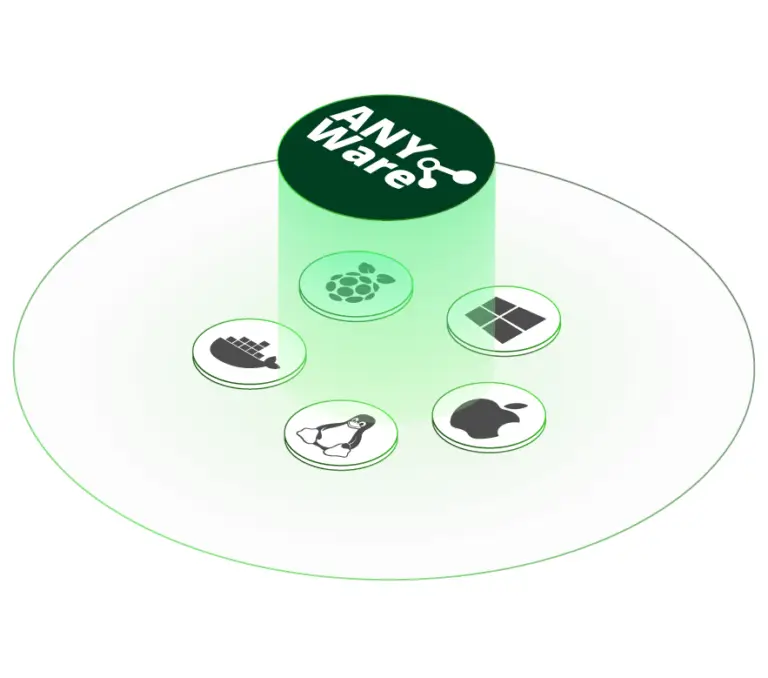
SIA Connect SW (ANY-Ware) can be easily installed and operated on virtually any system anywhere in the operational environment.
- SIA Connect SW for Docker
As a virtualized Docker image, it can be installed on any system: Linux, macOS, Windows, or industrial PCs.
- SIA Connect SW for Windows
Built on Docker Desktop and delivered with ready-to-use executables, enabling easy startup and management.
- SIA Connect SW for Linux & Yocto
Can be installed natively as a service on any Debian-based OS, such as Ubuntu, or deployed using a Yocto build for embedded devices.
SIA Connect SW is included as part of a compact hardware module designed for plug-and-play deployment.
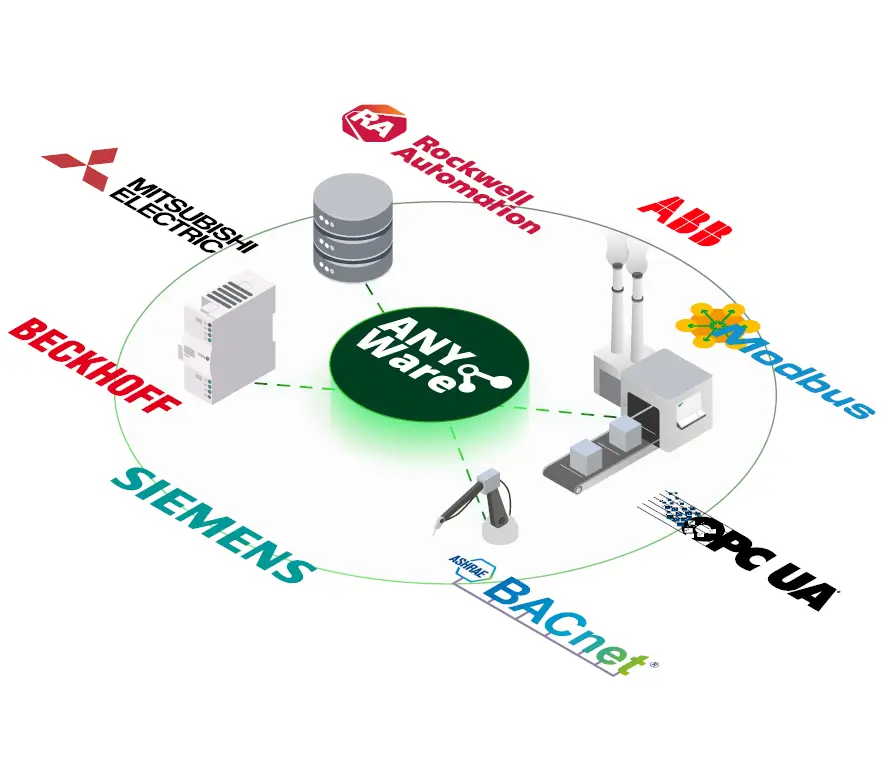
Connection to any industrial device
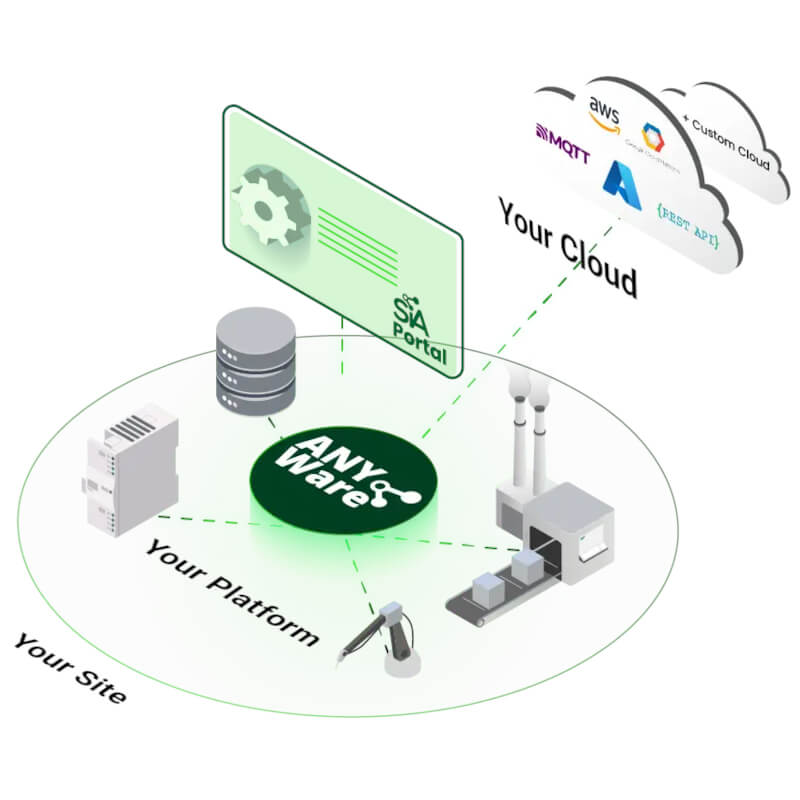
Thanks to a rich library of connectors, various devices on the production line can be easily interconnected and industrial systems can be efficiently bridged with IT. SIA Connect enables fast integration of PLCs, machines, and sensors from different manufacturers, allowing data to be collected from across the entire technology stack from a single point. Deployment takes just minutes via an intuitive web interface, without the need for programming.
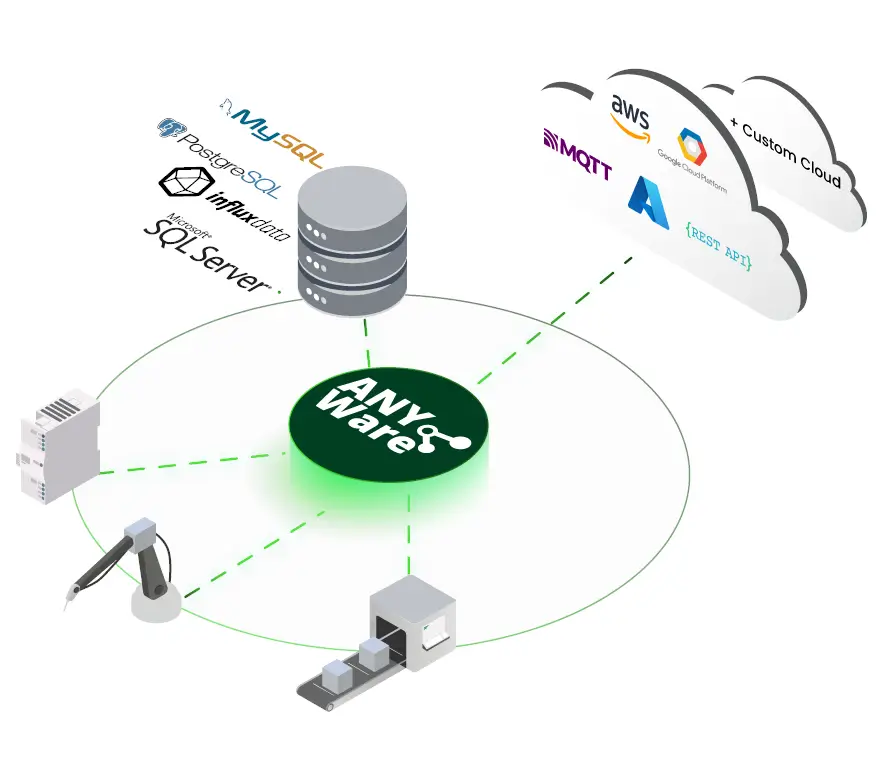
Connection to any cloud and database
Data can be collected and flexibly transferred to any database or cloud platform. The transfer is bidirectional, allowing not only telemetry and historical data to be sent, but also commands or parameters to be received back from higher-level control systems. SIA Connect supports modern IoT standards and, thanks to its open approach, enables integration with any enterprise system or analytics platform.
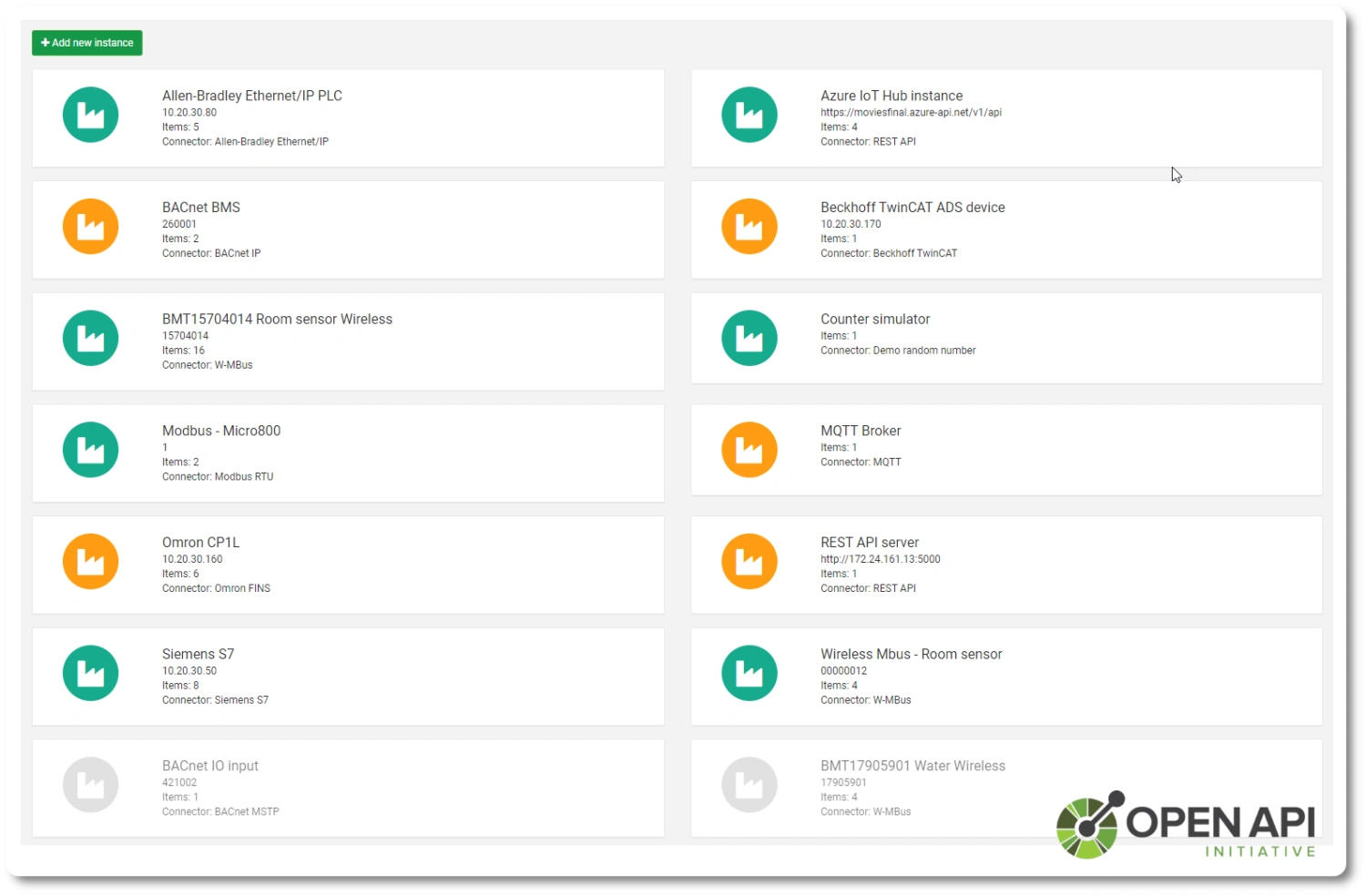
Open REST API
SIA Connect includes an open REST API that allows developers to integrate the gateway into their own solutions and tailor it to their needs. It provides all the functions required to build a custom user interface (dashboards, monitoring, and data management).
Data processing using a specific example
The PLC sends the temperature as an integer. SIA Connect converts it, adds the machine identifier and passes it to the application in the required format.
PLC value
237The temperature is stored in tenths of a degree.
Unit conversion
23.7 °C237 ÷ 10The mathematical expression divides the input value by ten.
Build the message
{"machine":"demo-01",
"temp_c":23.7}
Add the machine ID and the converted temperature to the JSON message.
Passing to the application
MQTT / SQLSend the message to an MQTT broker or map the value to a database connector.
The change filter will limit duplicate values
PLC inputWith the change filter enabled, the second identical value is not sent. The destination receives 23.7 °C, followed by 24.1 °C.
Data transfer in the event of a target connection failure
23.7 °C → MQTT
Values are collected and passed to the target application.
23.7 · 24.1 · 25.0 °C
When Store & Forward is enabled, values are queued locally.
23.7 → 24.1 → 25.0 °C
In the example using FIFO mode, the oldest stored values are dispatched first.
Queue capacity, read intervals and transmission mode are set according to the project. The diagram illustrates a failure of the target connection whilst SIA Connect is running.
This demonstration explains the principle. It is not a real measurement recording or a finished configuration; you will need to set up the connectors, mappings and storage settings for your own application.
SIA Connect practical videos
Selected manufacturer’s guides show the actual configuration. The videos are in English; the titles and explanations can be found below.
Common data functions for V1, Plus and ANY-Ware. The interface varies depending on the software version.
Connecting PLCs and industrial devices to MQTT
Retrieving data from industrial equipment and making it available via MQTT for other applications.
Open on YouTubeSIA Connect manufacturer video · in English
Consolidating data from a PLC into an MQTT message
Prepare PLC values and build a custom message for the destination application. This complements the example of data conversion and formatting.
Open on YouTubeSIA Connect manufacturer video · in English
Installing ANY-Ware using Docker Compose
Instructions for deploying the software on your own hardware. It demonstrates how to set up the project, configure the password and run SIA Connect in Docker.
Open the manufacturer’s instructionsSIA Connect manufacturer video · in English
Dashboard showing collected data in Grafana
Enabling logging, connecting the SIA Connect data source and creating your first visualisation. This demonstration is intended for Plus and ANY-Ware with Docker support.
Open the manufacturer’s instructionsSIA Connect manufacturer video · in English
Grafana and containerised applications: Plus and ANY-Ware. Operation depends on the installation and available resources.
Supported Industrial Devices and Protocols
SIA Connect ANY-Ware supports more than 40 industrial and IT protocols for communication with PLCs, robots, measuring devices, building automation systems and other industrial equipment. Supported connectors are included in the software without separate fees for individual protocols.
- Allen-Bradley (Rockwell Automation)
- ControlLogix, CompactLogix, FlexLogix
- MicroLogix, Micro8xx
- SLC500*, PLC5* (* support via DH+ bridge)
- BACnet IP
- BACnet MS/TP
- Beckhoff TwinCAT ADS
- TwinCAT 2, TwinCAT 3
- BX9xxx, BC9xxx
- EtherNet/IP (CIP)
- GenICam
- GigE Vision, USB3 Vision
- Industrial camera systems
- ifm VSE
- VSE153, VSE151, VSE150
- VSE101, VSE100, VSE003, VSE002
- Keyence KV Ethernet
- KV-3xxx, KV-5xxx
- KV-700, KV-7xxx, KV-8xxx
- KV Nano
- Mitsubishi MELSEC Ethernet
- FX3, FX5
- iQ-F, iQ-R
- A, L, Q, QnA
- Modbus TCP
- Modbus RTU
- Modbus RTU over TCP
- M-Bus
- Requires an M-Bus to RS-232 or RS-485 converter.
- Wireless M-Bus (wM-Bus)
- C, S and T modes
- Requires a compatible Wireless M-Bus USB receiver.
- MTConnect
- NITP in CAMP
- Siemens TI505
- National Instruments TI505
- CTi (Control Technology) Series 2500 and Series 500
- Omron EtherNet/IP
- Omron FINS Ethernet
- CP, CJ, CS, CV, NSJ, NX, NJ
- Omron Host Link
- Communication via RS-232
- OPC UA client
- OPC UA server
- Siemens S5
- Support via an adapter, such as IBH Link S7++
- Siemens S7
- S7-200, S7-300, S7-400, S7-1200, S7-1500
- Support for absolute addressing
- S7-200 requires an Ethernet module, such as CP243.
- Siemens S7 Plus
- S7-1200, S7-1500
- Support for optimized data blocks and symbolic addressing
- Siemens LOGO!
- Socket TCP server
- Communication using custom TCP-based protocols
- Socket TCP client
- Communication using custom TCP-based protocols
- TRUMPF
- Machine tools and laser machines
- Universal Robots RTDE
- UR3, UR5, UR10, UR16
- Simulator
- Integrated data simulator
Additional Supported Industrial Devices
Devices from other manufacturers can also be connected using supported standard protocols.
- ABB – devices communicating via Modbus TCP or Modbus RTU
- Schneider Electric – devices communicating via Modbus TCP or Modbus RTU
Compatibility with a specific device depends on its communication interface and supported protocol.
Supported Cloud and API Connectors
ANY-Ware enables bidirectional data transfer between industrial devices, cloud platforms and enterprise applications.
- MQTT
- Publish/subscribe and wildcards
- QoS, TLS, certificates and retained messages
- REST API
- GET, POST, PUT and DELETE methods
- Basic, Bearer, JWT, API key and OAuth authentication
- CoAP
- Constrained Application Protocol
- GET, POST, PUT and DELETE methods over UDP
- Azure IoT
- Azure IoT Hub
- Device Provisioning Service (DPS)
- Digital Twin
- IoT Edge module
- Authentication using X.509 certificates and symmetric keys
- Device-to-Cloud and Cloud-to-Device communication
- AWS IoT Core
- Apache Pulsar
- Cumulocity IoT
- Siemens MindSphere
- Virtual Data
- Virtual data values
- File / FTP connector
- Local file storage and transfer via FTP
- CSV, JSON, XML and YAML formats
Additional Cloud and Enterprise Integrations
Using standard interfaces such as MQTT and REST API, the software can also be connected to other compatible services and applications. The manufacturer lists the following examples:
- Google Cloud Platform
- IBM Cloud
- PTC ThingWorx
- AVEVA Insight
- Schneider Electric EcoStruxure
- Bosch IoT Suite
- Microsoft Power BI
- Grafana – data visualization and dashboard creation
- KaaIoT
These platforms may not have a dedicated native connector. The integration method depends on the interfaces supported by the respective service.
Supported Database Connectors
ANY-Ware enables reading and storing data in databases for further processing, analysis and historical data storage.
- Microsoft SQL Server
- Encrypted TLS connection
- Execution of stored procedures
- Azure SQL
- MySQL / MariaDB
- PostgreSQL
- InfluxDB
- Communication via REST API and InfluxDB API
- MongoDB
Additional Databases Supported on Request
The manufacturer's technical documentation also lists the following databases as available with support on request:
- Oracle – via Oracle Call Interface
- IBM DB2
- SQLite
Additional Software Features
- SIA Web Portal (Edge Portal)
- Web-based interface for software configuration and management
- Configuration of connected devices and data values
- Data mapping between devices and connectors
- Monitoring of current values
- Industrial protocol conversion
- Bidirectional data transfer between devices using different protocols
- Transfer of process values, setpoints and commands
- Historian
- Local storage of historical data
- Display of historical values in charts
- Data export to CSV
- Store-and-forward
- Temporary data storage during communication outages
- Transmission of stored data after the connection is restored
- REST API
- Access to device functions via API
- Shadow API
- Remote API access via MQTT
- Edge computing
- Filtering and processing data directly on the device
- Remote access
- Option to use tools such as Tosibox, Secomea, NetBird and zrok
- DigiCert IoT Trust
- Device certificate registration, issuance and renewal
Software Installation Requirements
SIA Connect SW (ANY-Ware) can run in a Docker environment or as a natively installed application on Linux.
Docker Installation
- Operating system: Windows 10 (version 1903, build 18362 or later), Windows 11, Windows with WSL support, macOS, Linux or another Docker-compatible system
- Architecture: x86 (32-bit), x86_64 (64-bit), ARM64 (64-bit), ARM32 (32-bit)
- Memory: minimum 1 GB RAM
- Storage: minimum 1.5 GB
Native Installation on Linux
- Operating system: Debian-based Linux with support for .deb packages
- Architecture: x86 (32-bit), x86_64 (64-bit), ARM64 (64-bit), ARM32 (32-bit)
- Memory: minimum 1 GB RAM
- Storage: minimum 1.5 GB
Web Browser Requirements
The SIA web portal (Edge Portal) is used to configure and manage the software. The manufacturer lists compatibility with the following browsers:
- Google Chrome
- Microsoft Edge
- Mozilla Firefox
- Opera
- Safari
- Other compatible modern web browsers
Device Requirements
The SIA web portal (Edge Portal) is a web-based application. It can be accessed from any device with a compatible web browser.
- Computers: Windows, Linux, macOS, ChromeOS
- Smart devices: Android, iOS, Tizen, webOS
Access from a Smartphone or Tablet via Wi-Fi
To access the software from a smartphone or tablet, the device running SIA Connect ANY-Ware must be accessible over the network. Access is provided through the SIA web portal (Edge Portal). The smartphone or tablet can connect via Wi-Fi, while the host device can be connected using an Ethernet cable, for example.
Frequently Asked Questions about SIA Connect SW
What is SIA Connect SW?
SIA Connect SW is software for collecting, processing, and transferring data between PLCs, machines, databases, and the cloud. It enables both reading and writing of data, local data storage in case of connection outages, and interconnection of devices and systems from different manufacturers. It is designed for installation on your own computer, server, or embedded device.
What is SIA Connect SW used for?
It is used for collecting production and operational data (temperatures, states, piece counts, consumption, OK/NOK, energy, etc.), storing the data in databases, sending it to the cloud and IT systems for monitoring, reporting, analysis, and visualization. It also enables bidirectional data exchange between different devices and systems (OT ↔ IT).
What is the difference between SIA Connect SW and SIA Connect HW?
SIA Connect SW is a software variant intended for installation on your own hardware or in a virtualized environment. It is suitable for projects with a higher number of data points (hundreds to thousands) and for the use of servers, virtualization, or Docker.
SIA Connect HW is a ready-to-use compact hardware device for control cabinet installation, intended for projects up to 500 values, without the need for a dedicated server or operating system.
On which platforms can SIA Connect SW be operated?
The software can be operated on a computer, server, or embedded device. Installation is possible natively on Linux or as a container in Docker. On Windows and macOS systems, only Docker-based deployment is supported.
How much data (values) can SIA Connect SW process?
Depending on the selected license, it is possible to process hundreds to thousands of values (items), up to 7,500+ values. The limiting factor is not the number of devices, but the total number of communicated values.
How many devices or PLCs can be connected to the software?
The number of connected devices or PLCs is not strictly limited. Multiple devices, different manufacturers, and various communication protocols can be combined at the same time. The decisive factor is the licensed number of values.
What types of devices can be connected to SIA Connect SW?
PLCs, production machines, robots, measuring instruments, sensors, energy meters, and building management systems (BMS) from various manufacturers.
Which industrial protocols does SIA Connect SW support?
It supports more than 30 industrial protocols, including Siemens, Allen-Bradley (EtherNet/IP), Mitsubishi, Omron, Beckhoff, Modbus, OPC UA, BACnet, M-Bus, and others.
Does SIA Connect SW support bidirectional communication?
Yes. The software supports bidirectional data transfer – not only reading data from devices, but also writing values back (e.g., setpoints, parameters, or commands).
Does SIA Connect SW work as an OPC UA server or client?
Yes. SIA Connect SW can operate as both an OPC UA server and an OPC UA client, enabling standardized communication between OT and IT systems.
Do I need programming or advanced PLC knowledge for commissioning?
No. Configuration is performed via the built-in web interface in no-code / low-code mode. Basic communication setup and data flows can be handled even by users without PLC programming experience.
How does the initial configuration of SIA Connect SW work?
After installation, you log in to the web interface, create a user, select connectors (PLC, database, cloud), choose values, and configure the mapping between source and destination. No additional software installation is required.
Does SIA Connect SW work during a database or cloud connection outage?
Yes. In the event of a connection outage, data is stored locally and automatically sent once communication is restored (store-and-forward). Data is not lost even during temporary outages.
Which database and cloud solutions are supported?
Common databases and services are supported via connectors, such as SQL databases, MQTT, REST API, and others depending on project configuration. Visualization can be done using tools such as Grafana.
Does SIA Connect SW support integration with MES, SCADA, or ERP systems?
Yes. Thanks to database connectors, REST API, and MQTT, data can be easily integrated with MES, SCADA, ERP systems, and analytical platforms.
Does SIA Connect SW provide an open API?
Yes. An open REST API is included, enabling integration into custom applications, process automation, or the creation of custom dashboards.
How is communication security handled?
Communication is encrypted using TLS. Certificate handling and role-based access control are supported.
Can the software be managed and updated remotely?
Yes. SIA Connect SW allows remote management, configuration, and updates via the web interface.
What license is required to operate SIA Connect SW?
The license is selected based on the number of communicated values (items). Multiple license variants are available depending on project size.
Is SIA Connect SW suitable for large-scale projects?
Yes. The software variant is designed for larger projects with higher data volumes and for the use of servers, virtualization, or Docker.
When should I choose SIA Connect HW instead of the software version?
If you need a ready-to-use compact device for control cabinet installation that does not require a dedicated server or operating system and you only need to read up to 500 values, the SIA Connect HW variant is the better choice.
SIA Connect: collects data from PLCs, stores it in a database, and sends it via OPC UA and MQTT to IT
SIA Connect makes data from industrial devices available where you need it.
Gain real-time insight into production, technologies, or consumption—without complex integration or programming. SIA Connect (software or compact hardware device) connects OT and IT systems and prepares data for monitoring, reporting, analysis, and downstream automation.

Jaroslav Blažek tested the SIA Connect module.
A device for data transfer between PLCs, databases, and the cloud reads data from machines, enables bidirectional data transmission, and connects devices from different manufacturers. How did Jarda Blažek (blaja.cz) find working with the module from the Danish manufacturer SIA Connect?
Highlighted items are mandatory.
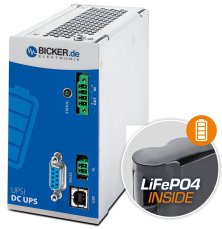
144 W 24 VDC / 6 A UPS backup power supply Bicker, LiFePO4 battery
398,09 EUR Incl. VAT
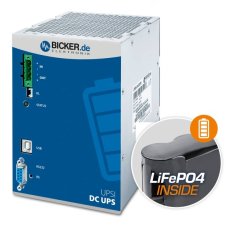
240 W 24 VDC / 10 A UPS backup power supply Bicker, LiFePO4 battery
771,98 EUR Incl. VAT
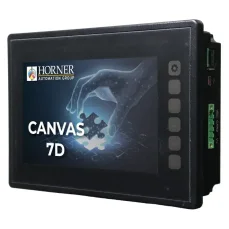
HORNER CANVAS 7D PLC HMI controller with 7″ colour touchscreen, analog / digital inputs and outputs
1 840,41 EUR Incl. VAT

Training PROFINET – Basics, Diagnostics & Network Troubleshooting, 2 days
1 076,90 EUR Incl. VAT

Training PROFIBUS - Basics, Diagnostics & Network Troubleshooting, 2 days
1 076,90 EUR Incl. VAT
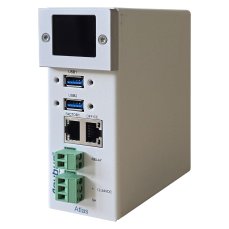
Atlas2 Plus OLED Display: PROFINET Permanent Monitoring Kit 100 tester
5 036,02 EUR Incl. VAT
PNT PROFINET Tool software tester
1 560,90 EUR Incl. VAT
Related products7
144 W 24 VDC / 6 A UPS backup power supply Bicker, LiFePO4 battery
398,09 EUR Incl. VAT
240 W 24 VDC / 10 A UPS backup power supply Bicker, LiFePO4 battery
771,98 EUR Incl. VAT
HORNER CANVAS 7D PLC HMI controller with 7″ colour touchscreen, analog / digital inputs and outputs
1 840,41 EUR Incl. VAT
Training PROFINET – Basics, Diagnostics & Network Troubleshooting, 2 days
1 076,90 EUR Incl. VAT
Training PROFIBUS - Basics, Diagnostics & Network Troubleshooting, 2 days
1 076,90 EUR Incl. VAT
Atlas2 Plus OLED Display: PROFINET Permanent Monitoring Kit 100 tester
5 036,02 EUR Incl. VAT
PNT PROFINET Tool software tester
1 560,90 EUR Incl. VAT