

DATAEAGLE X-treme 6330 Wireless CAN, 869 MHz, IP65
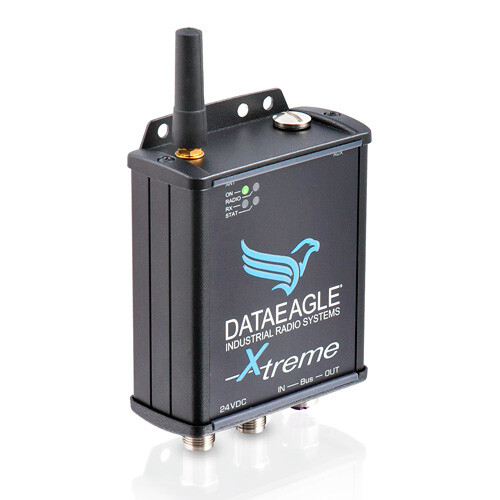
DATAEAGLE X-treme 6330 Wireless CAN, 869 MHz, IP65

Radio module for transparent transmission of CAN, CANopen, SAE J1939 and DeviceNet. 869 MHz, IP65, CAN via M12, 24 V DC power supply. Stand-alone module; we will design the complete assembly and accessories to suit the application. More
Code: SCH-11373
Radio module for transparent transmission of CAN, CANopen, SAE J1939 and DeviceNet. 869 MHz, IP65, CAN via M12, 24 V DC power supply. Stand-alone module; we will design the complete assembly and accessories to suit the application. More
Code: SCH-11373
DATAEAGLE X-treme 6330 - wireless CAN connection for installation directly on the machine
The DATAEAGLE X-treme 6330 transmits CAN messages between separate parts of the system via a radio link. The IP65-rated version, operating at 869 MHz, is designed for installation directly on the machine. Manufacturer’s order number: 11373.
Are you enquiring about a single module or a complete wireless link?
Please send us the distance, the environment and the CAN network parameters. We will recommend the necessary modules and accessories.
Using wireless CAN
Radio connectivity is ideal for use with moving and rotating machine parts, industrial trolleys, cranes or remote process units. It reduces the need for data cables in places where they get in the way or are subject to wear and tear.
The X-treme version, with an IP65 rating, is mounted directly onto the equipment. When designing the installation, it is necessary to take into account the sealing of the connectors, the position of the antenna and the surrounding environment.
Technical specifications
| Manufacturer | SCHILDKNECHT |
|---|---|
| Manufacturer’s order number | 11373 |
| Model | DATAEAGLE X-treme 6330 |
| Radio technology | 869 MHz |
| Mating | IP65 |
| CAN interface | M12, A-coding, 5-pin plug and socket |
| CAN identifiers | 11-bit, 29-bit or mixed mode; CAN 2.0A / CAN 2.0B |
| Power supply | 24 V DC |
| Connecting the power supply | M12, A-coding |
| Mounting | Secured with four screws |
| Operating temperature | -20 to +60°C |
| Dimensions (W × H × D) | 88 × 120 × 42 mm |
| Antenna socket | SMA, female, 50 Ω |
| Approximate range indoors | 300m |
| Approximate range outdoors | 1 to 3 km |
| Configuration | DATAEAGLE Wizard via USB |
The range depends on the installation. The distances given are approximate. The result is affected by antennas, obstacles, the movement of the device and surrounding radio traffic.
Communication and Transmission Design
The DATAEAGLE 6000 series transmits CAN-based communication, such as CANopen, SAE J1939, DeviceNet or a proprietary protocol. It supports CAN 2.0A and CAN 2.0B identifiers. The connection can be configured as a point-to-point link or as a network comprising multiple remote segments.
When making our selection, we will assess the bus speed and load, the message frequency, the required response time and the behaviour in the event of a radio link failure. The speed of the CAN interface does not, in itself, determine the throughput of the radio transmission.
The DATAEAGLE Wizard is used to configure CAN and radio parameters. A whitelist can be used to select the identifiers of messages transmitted via radio and to limit the transmission load. In the event of a high load, it is necessary to assess the available capacity of the radio channel.
The module itself is not a safety device. Transmission relating to the safety function of the machine requires a separate assessment of the entire application.
Module, complete assembly and accessories
This card represents one DATAEAGLE X-treme 6330 (11373) module. To connect two parts of a CAN network wirelessly, two suitably selected and configured radio units are required.
In the quotation for the complete system, we will specify the number and type of modules, the antenna, antenna cables, mounting brackets, power supply, CAN cables and connectors, and the terminations for each segment. We will confirm the exact contents of the delivery in the quotation; the photograph showing the antenna does not determine the contents of the package.
At the start or end of a physical CAN segment, a suitable terminator connected via an M12 connector is required. The antenna and connectors should be selected according to the environment and the specific wiring configuration.
Documentation to download
DATAEAGLE TV videos, tutorials and webinars
Selected videos from the manufacturer in English. Start with a brief introduction, or go for in-depth webinars and tutorials.
Wireless CAN - DATAEAGLE 6000
An introduction to the principle of connecting devices with a CAN interface via radio using the DATAEAGLE 6000 series.
Open the video on YouTubeHow does DATAEAGLE radio transmission work?
The difference between a cable connection and a radio link, and an explanation of data pre-processing in the DATAEAGLE system.
Open the video on YouTubeThe videos demonstrate the principles behind the DATAEAGLE 6000 series and show examples of its use. Specific functions and connections depend on the model selected and its configuration.
Industrial Wireless Webinars - 3 videos in English

1. Design of an industrial wireless link
The basics of power transmission, differences compared to cables and slip rings, project planning and practical demonstrations.
Watch the English webinar
2. WLAN, Bluetooth and their uses
A comparison of radio technologies, signal propagation, network convergence and examples from the field of automation.
Watch the English webinar
3. Applications, diagnostics and antennas
Industry examples, a demonstration of PROFINET/PROFIsafe diagnostics in the DATAEAGLE Wizard, and the selection and positioning of antennas.
Watch the English webinarFirmware update guides - in English
Main firmware update
An older demonstration of how to connect the unit to a PC and update the main CPU’s firmware. The instructions in the video are in English.
Older examples from2016. The programme interface and procedure vary depending on the model. Before updating, please check the exact model, hardware and firmware versions, and ensure you have the correct update file. FOXON’s technical support team will help you with the correct procedure.
More videos on the DATAEAGLE TV channel - The channel also features German videos; the selection in this section is in English.
Frequently Asked Questions
Is one module enough for a wireless connection?
To connect two separate sections of a CAN network, you will need two suitable radio units. This product sheet describes one module. We will assemble the complete system in accordance with the wiring diagram.
How do I choose between the Compact and the X-treme?
The Compact, with an IP20 rating, is designed for installation in a control cabinet. The X-treme has an IP65 rating and M12 connectors for installation near the equipment. The ambient conditions and the location of the antenna are also important.
Is the radio range guaranteed even indoors?
The range depends on the antennas, metal obstacles, movement and interference from other radio systems. Before making your selection, please send us photographs of the environment and the required transmission route.
Is configuration required?
The system can be supplied pre-configured. The settings must correspond to the speed and type of CAN communication, the selected topology and the application requirements. We will determine the required configuration during the design phase.
Can CAN FD or safety communication be used?
Please specify such a requirement in advance in your enquiry. The suitability of the specific design and the application as a whole must be confirmed separately; the module itself is not a safety device.
How can I find out the price and delivery date?
Please send us the order number and quantity, and, if applicable, a description of the entire connection. We will confirm the price, availability, contents of the delivery and delivery date. This product is available on request only.
Why buy DATAEAGLE from FOXON
Schildknecht Distributor
We are the distributor of Schildknecht products for the Czech Republic and Slovakia. We have been representing the manufacturer since 2015.
Products in stock
We hold Schildknecht products in stock. We will confirm the availability of the selected model and the required quantity before you place your order.
From single items to larger batches
We can arrange deliveries ranging from single items to larger batches. We can also help organise deliveries for the repeat production of machinery and equipment.
Technical support and consultancy
We can help you choose modules, communication options, configurations and antennas. We provide technical support and advice on installation and operation.
Enquiry regarding the DATAEAGLE X-treme 6330
Please send us order number 11373, the required quantity and whether you need a standalone module or a complete wireless connection. For the design, please include the CAN protocol and baud rate, the number of segments, the distance, photographs of the environment and the required response time.
Enquire about a module or a complete assemblyBook an online consultation · +420 488 588 749 · poptavka@foxon.cz