

SIA Connect - TOP 1
SIA Connect collects, processes and transfers data between PLCs, databases, OPC UA, MQTT and the cloud. Choose a version according to your data sources, target systems and requirements for reading or writing values.
More about data collection and transfer with SIA Connect
SIA Connect is a platform for collecting, storing, processing and bidirectionally transferring industrial data. It reads values from PLCs, production machines, robots, HMI panels, industrial computers, sensors, measuring instruments, energy meters and BMS/HVAC systems. The collected data can be stored in databases, provided via OPC UA, sent to the cloud through MQTT or REST API and, according to defined rules, values, production orders, recipes or parameters can also be written back.
Which devices do you need to collect data from, and where should it be stored?
We will discuss the data sources, protocols, number of values, reading frequency, databases, OPC UA, MQTT, cloud services and any required write-back of data.
From production equipment to databases, cloud services and IT applications
The main role of SIA Connect is to acquire data from different industrial sources, convert it into a consistent format and securely deliver it to the systems where it should be stored, displayed or further processed. Data flows are configured through a web interface using connectors, source-to-target point mapping and transfer rules.
Control systems, robots, HMIs, sensors, meters, energy systems, BMS/HVAC and other supported devices.
Reading values through built-in drivers, mapping data points, protocol conversion and data-flow control.
Writing to SQL databases, providing data to OPC UA clients and sending it to brokers, APIs or cloud services.
SCADA, MES, ERP, Grafana, BI, OEE, energy management, maintenance and custom IT applications.
Which devices can data be collected from?
SIA Connect supports more than 30 industrial protocols and can simultaneously collect data from multiple devices made by different manufacturers. The specific connection options always depend on the communication interfaces available on the device.
Siemens SIMATIC S7 and LOGO!, Allen-Bradley, Mitsubishi, Omron, Beckhoff, Keyence and other supported platforms.
Production machines, robotic workstations and CNC technologies connected through a supported control system or protocol. Communication with Universal Robots is also supported.
Data can also be collected from HMIs, industrial computers and software systems when they provide OPC UA, Modbus, MQTT or another supported interface.
Temperatures, pressures, flow rates, humidity, levels, quality indicators, laboratory values and process measurements from instruments with supported communication.
Electricity, gas, water, compressed air and other consumption data via Modbus, M-Bus, OPC UA or another available interface.
Heating, cooling, ventilation, energy metering and other equipment communicating through BACnet, M-Bus, Modbus or OPC UA.
What data can you collect?
- Machine states, operation, faults and downtime.
- Production counts and OK/NOK values.
- Cycle times, takt times and operation durations.
- Alarms, error codes and diagnostic values.
- Temperatures, pressures, flow rates and other process variables.
- Consumption of electricity, gas, water and compressed air.
- Order numbers, recipes, batches and production parameters.
- Setpoints, commands and values written back to devices.
What can SIA Connect do with the data?
Data can be read from one or more PLCs, machines, meters and technical systems using different protocols.
The configuration defines where a value is read from, where it is written and in which direction each data flow operates.
SIA Connect can write production values to a database and also read production orders, recipes or parameters from the database.
Different industrial protocols are standardised into interfaces suitable for SCADA, MES, ERP, cloud services and custom applications.
Values can be transferred between PLCs, data can be read from a database into a PLC, or parameters can be sent from the cloud back to a device.
If the connection to a database or cloud service is interrupted, data is stored locally and automatically sent after the connection is restored.
Where can the collected data be stored and delivered?
MS SQL and Azure SQL, MySQL and MariaDB, PostgreSQL, InfluxDB, MongoDB and other supported databases.
SIA Connect can operate as both an OPC UA server and client and deliver data to SCADA, HMI, MES and other applications.
Sending production data via MQTT with support for security, authentication, QoS and retained messages.
Integration with web services, enterprise applications and custom data or analytical tools.
For example Azure IoT Hub, AWS IoT Core, ThingWorx, MindSphere, Cumulocity and other services, depending on the connector used.
Preparing data for dashboards, trends, OEE, energy management, condition monitoring, reporting and long-term analysis.
Choose the SIA Connect variant
A compact industrial DIN-rail gateway with pre-installed software. It has two isolated LAN ports, RS232 and RS485. It reads and writes up to 500 values in total and does not require a separate production computer.
View SIA Connect HWSoftware for a server, industrial computer, virtual machine, Linux, Docker or an embedded device. It is suitable for a higher number of values, centralised collection and larger projects. The licence is selected according to the number of data points.
View SIA Connect SWQuick comparison of the HW and SW variants
| Area | SIA Connect HW | SIA Connect SW |
|---|---|---|
| Solution format | DIN-rail device | Software for your own hardware |
| Number of values | Up to 500 items in total | Licence based on the number of data points |
| Deployment | Fast all-in-one solution | Server, PC, VM, Linux, Docker or embedded device |
| Own computer or server | Not required | Yes |
| Typical project size | Standalone machine and smaller project | Medium-sized and larger data-collection projects |
| Databases, OPC UA, MQTT and cloud | Yes | Yes |
| Bidirectional transfer and Store & Forward | Yes | Yes |
Typical SIA Connect projects
States, production counts, cycles, alarms, recipes and process values transferred to a database or higher-level application.
Automatic storage of operating and production data for reporting, OEE, energy management or maintenance.
Reading production data using SQL SELECT and writing the required values or parameters to the control system.
Data transfer, for example, between Siemens and Allen-Bradley PLCs or between devices using different communication protocols.
Electricity, gas, water, compressed air and technical variables for monitoring and evaluation.
Secure transfer via MQTT, REST API or a specific cloud connector, including temporary local storage during an outage.
We recommend SIA Connect for projects in which one solution needs to collect data from different devices, store it in a database, provide it through OPC UA, send it via MQTT or REST API and optionally write values back. For extensive centralised collection from a large number of PLCs, consider Kepware Server. For complex data transformation and integration with SAP, MES and ERP, we recommend OPC Router.
How can FOXON help?
- We verify the data sources and supported protocols.
- We determine the number of devices and communicated values.
- We select the appropriate HW or SW variant.
- We design the database structure and data flows.
- We configure PLC, database and cloud connectors.
- We assist with OPC UA, MQTT, APIs and security.
- We provide testing, training and commissioning.
- We provide technical support and further development of the solution.
Data processing using a specific example
The PLC sends the temperature as an integer. SIA Connect converts it, adds the machine identifier and passes it to the application in the required format.
PLC value
237The temperature is stored in tenths of a degree.
Unit conversion
23.7 °C237 ÷ 10The mathematical expression divides the input value by ten.
Build the message
{"machine":"demo-01",
"temp_c":23.7}
Add the machine ID and the converted temperature to the JSON message.
Passing to the application
MQTT / SQLSend the message to an MQTT broker or map the value to a database connector.
The change filter will limit duplicate values
PLC inputWith the change filter enabled, the second identical value is not sent. The destination receives 23.7 °C, followed by 24.1 °C.
Data transfer in the event of a target connection failure
23.7 °C → MQTT
Values are collected and passed to the target application.
23.7 · 24.1 · 25.0 °C
When Store & Forward is enabled, values are queued locally.
23.7 → 24.1 → 25.0 °C
In the example using FIFO mode, the oldest stored values are dispatched first.
Queue capacity, read intervals and transmission mode are set according to the project. The diagram illustrates a failure of the target connection whilst SIA Connect is running.
This demonstration explains the principle. It is not a real measurement recording or a finished configuration; you will need to set up the connectors, mappings and storage settings for your own application.
SIA Connect practical videos
Selected manufacturer’s guides show the actual configuration. The videos are in English; the titles and explanations can be found below.
Common data functions for V1, Plus and ANY-Ware. The interface varies depending on the software version.
Siemens S7 with optimised blocks for MQTT
Siemens S7 Plus connector settings, variable selection and value transmission to MQTT. The designation ‘S7 Plus’ here refers to the Siemens communication protocol.
Open on YouTubeSIA Connect manufacturer video · in English
Consolidating data from a PLC into an MQTT message
Prepare PLC values and build a custom message for the destination application. This complements the example of data conversion and formatting.
Open on YouTubeSIA Connect manufacturer video · in English
Data from the REST API on the local OPC UA server
Integrating the REST API and Cumulocity with an OPC UA server in SIA Connect. Demonstration of data transfer from IT to a standard industrial interface.
Open on YouTubeSIA Connect manufacturer video · in English
Connecting PLCs and industrial devices to MQTT
Retrieving data from industrial equipment and making it available via MQTT for other applications.
Open on YouTubeSIA Connect manufacturer video · in English
Grafana and containerised applications: Plus and ANY-Ware. Operation depends on the installation and available resources.
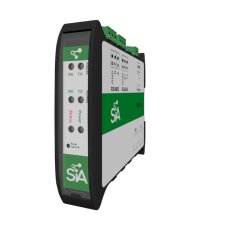
Collects data from PLCs, stores it in a database and converts it to MQTT and OPC UA - SIA Connect HW
847 EUR Incl. VAT

Jaroslav Blažek tested the SIA Connect module.
A device for data transfer between PLCs, databases, and the cloud reads data from machines, enables bidirectional data transmission, and connects devices from different manufacturers. How did Jarda Blažek (blaja.cz) find working with the module from the Danish manufacturer SIA Connect?

SIA Connect: collects data from PLCs, stores it in a database, and sends it via OPC UA and MQTT to IT
SIA Connect makes data from industrial devices available where you need it.
Gain real-time insight into production, technologies, or consumption—without complex integration or programming. SIA Connect (software or compact hardware device) connects OT and IT systems and prepares data for monitoring, reporting, analysis, and downstream automation.
Question or Inquiry
Highlighted items are mandatory.