

SIA Connect Standalone Plus D4E32 - data collection, Grafana and containers, 4 GB / 32 GB


SIA Connect Standalone Plus D4E32 - data collection, Grafana and containers, 4 GB / 32 GB

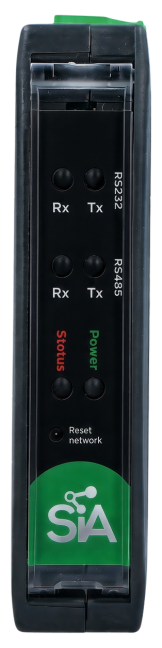
SIA Connect Standalone Plus D4E32 industrial data gateway with 4 GB RAM, 32 GB storage and a quad-core Cortex-A55 processor at 1.8 GHz. Reads and writes PLC data and connects it to databases, OPC UA, MQTT and REST API. Grafana and containerised applications run directly on the device. 2× Gigabit Ethernet, galvanically isolated RS232 and RS485. Price and perpetual licence capacity on request. More
Code: SIA-STANDALONE-PLUS-D4E32
SIA Connect Standalone Plus D4E32 industrial data gateway with 4 GB RAM, 32 GB storage and a quad-core Cortex-A55 processor at 1.8 GHz. Reads and writes PLC data and connects it to databases, OPC UA, MQTT and REST API. Grafana and containerised applications run directly on the device. 2× Gigabit Ethernet, galvanically isolated RS232 and RS485. Price and perpetual licence capacity on request. More
Code: SIA-STANDALONE-PLUS-D4E32
Data collection, dashboards and applications directly on the gateway
Connect PLCs, meters and databases, and monitor the results on a local Grafana dashboard. The Standalone Plus D4E32 combines SIA Connect, 4 GB of RAM and 32 GB of storage in a single DIN-rail device. In addition to data collection, you can also run other containerised applications on it.
We will design a connection for your application.
Please send us the PLC types, a list of values and the required dashboards or applications. We will confirm the licence capacity, availability and price.
Standalone Plus D4E32 Applications
The Plus version is ideal for collecting data from multiple technologies, for local visualisation, and in situations where another application needs to run alongside the communication functions. The hardware does not require a separate computer to run SIA Connect. A device with a web browser is all that is needed for configuration.
Data collection and transmission
Read operational values, store production results and transfer orders or recipes from the database to the PLC.
Local overview in Grafana
View trends, machine statuses and metrics calculated from available data directly on the local network.
Space for custom applications
Use App Hub to manage containers, such as an MQTT broker, InfluxDB or PostgreSQL. Configure the installation, storage and network rules according to the application.
Data flows between manufacturing and IT
SIA Connect can be used for a single machine, a production cell or a small-scale project involving equipment from different manufacturers. There is no need for a separate computer dedicated to data collection. Simply connect the gateway to the network, select the communication connectors and link the source and target values.
Production results and history
Store part counts, temperatures, consumption figures or production batch results in a database. You can then use this data in reports, analyses and when tracing a product’s history.
Orders and recipes
Retrieve a production order or parameters from the database and pass the selected values to the machine. SQL queries are used for reading; you specify the target variables via mapping.
Connecting devices from different manufacturers
Transfer selected values, for example, between Siemens and Allen-Bradley. SIA Connect ensures communication with each party using its own protocol.
Data for the cloud and applications
Send operational data to an MQTT broker, a cloud service or your own API. Customise the message content according to the requirements of the target application.
A unified interface for SCADA and MES
Make data from various machines accessible via an OPC UA server. The host application can then utilise the standard interface for further processing of the values.
Energy and building technology
Collect consumption and operational data from meters or BMSs via supported protocols. For M-Bus and wireless M-Bus, ensure you have the appropriate converter or receiver.
Grafana and containers on a single device
Grafana is pre-installed on the Standalone Plus and works with collected values via the SIA Connect data source. You can design the dashboard to suit your own application. Calculating OEE requires correctly defined statuses, times and production data.
App Hub uses Portainer to manage containers. Alongside SIA Connect, you can run, for example, Mosquitto, InfluxDB or PostgreSQL. Databases and other applications in containers have their own settings, resource requirements and operating conditions.
Connection principle
The method of reading and writing data depends on the connector, data types, permissions and the configuration of the connected device.
Data flow diagrams
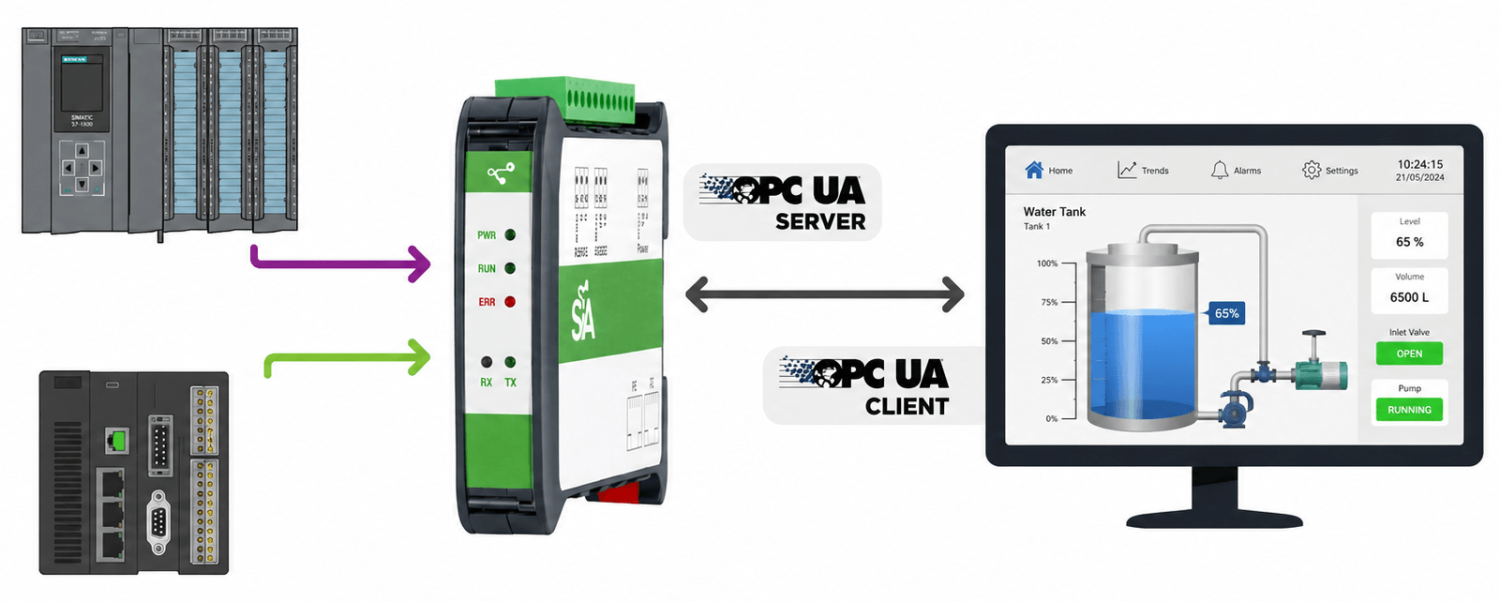
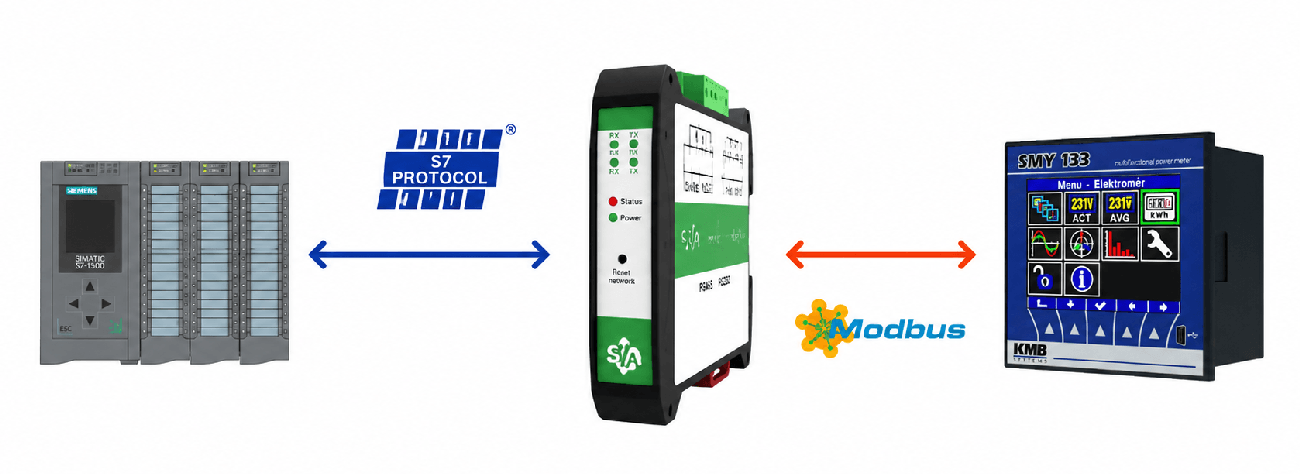
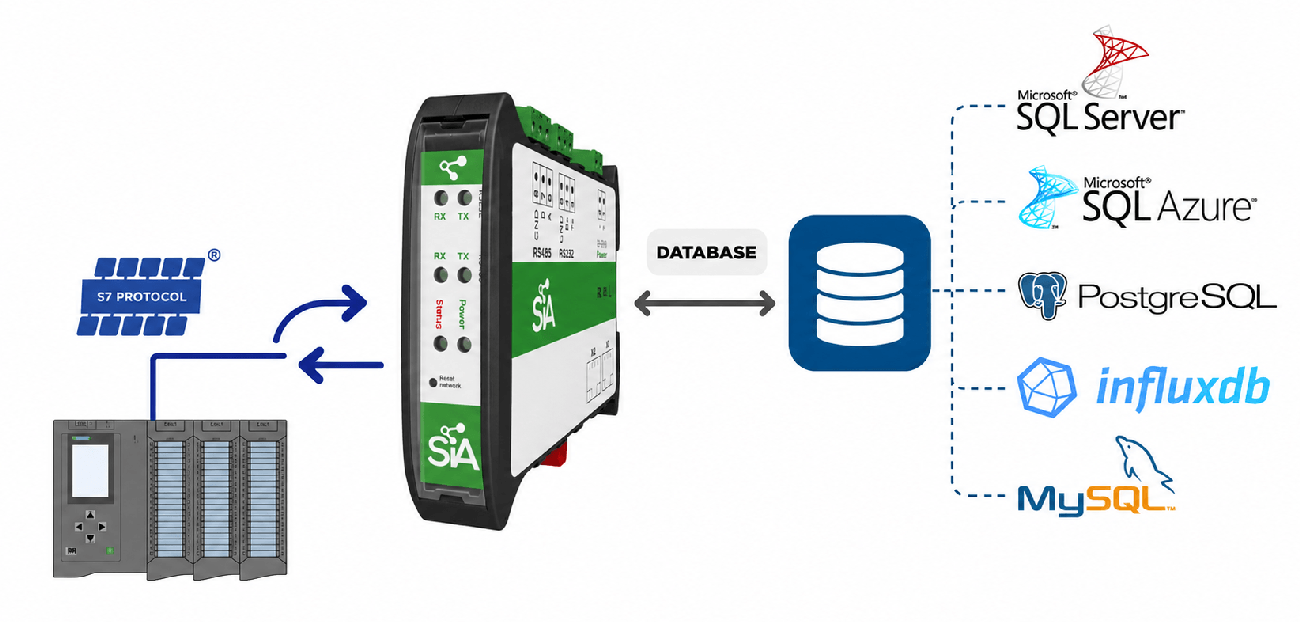
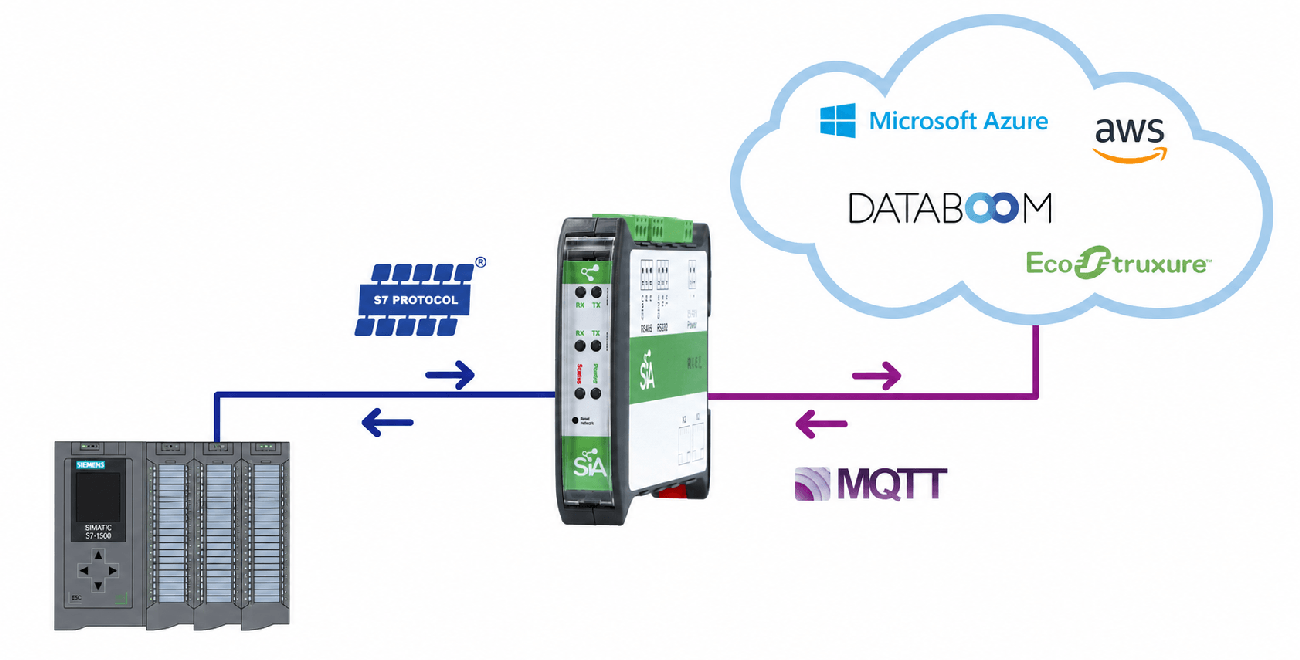
PLC, database and application connectivity
The connector library links industrial devices to databases, OPC UA, MQTT and REST APIs. Under ‘Features’, you will find an overview of Siemens, Allen-Bradley, Mitsubishi, Omron, Beckhoff, Modbus, BACnet and other connections. For a specific model, we will verify the protocol, firmware and available interfaces.
In mapping, you can adjust values, set conditions and compose a message. JavaScript is available for more complex logic. Store & Forward handles temporary interruptions to the target connection according to the selected mode and queue capacity.
Power supply and serial interface
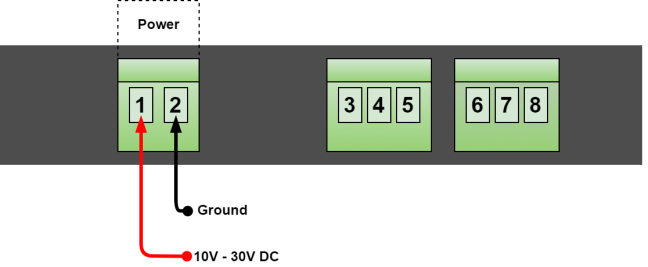
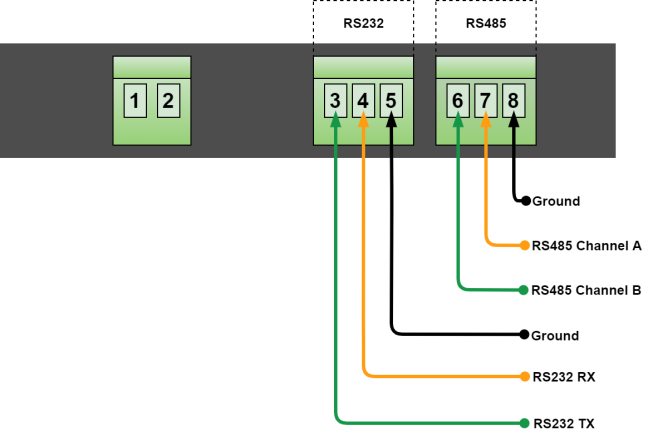
The gateway is powered by an external 10 - 30 V DC power supply. RS232 and RS485 are galvanically isolated; both ports support speeds of up to 115200 baud. RS485 operates in half-duplex mode.
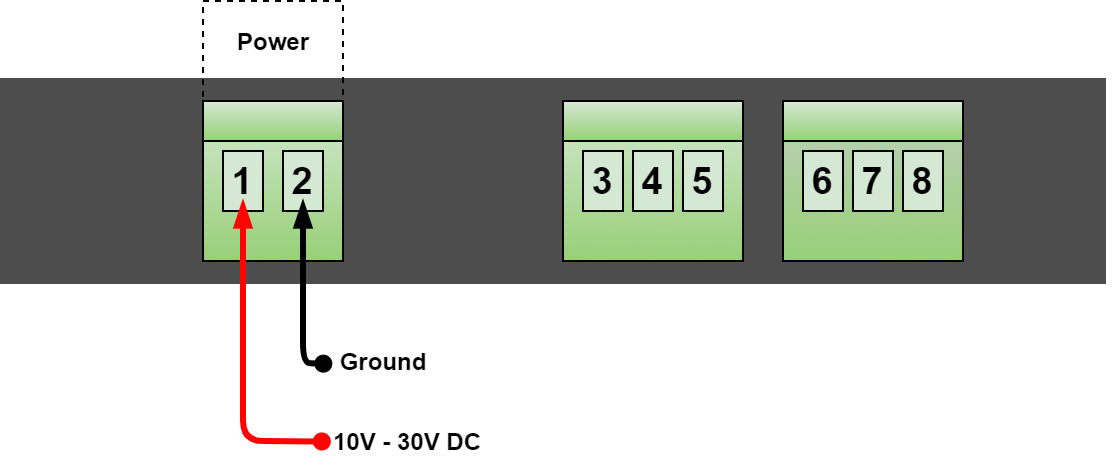
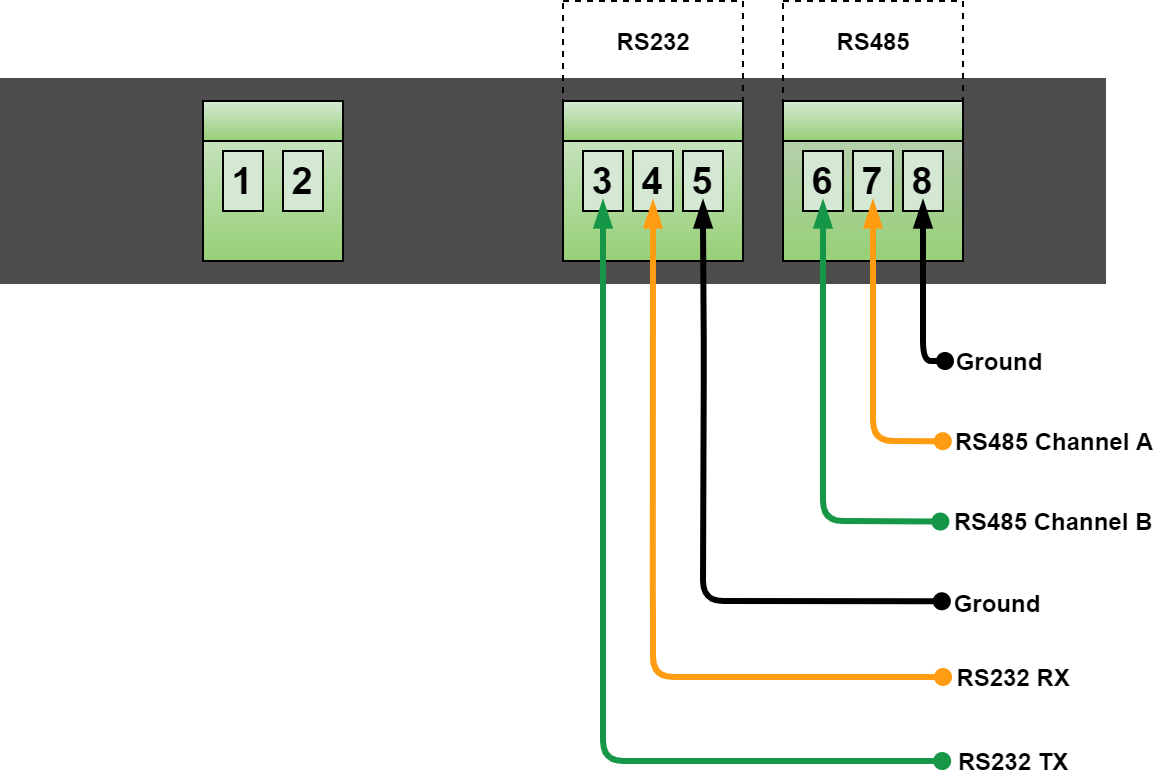
| 1 / 2 | Power supply: +10 to +30 V DC / GND |
|---|---|
| 3 / 4 / 5 | RS232 TX / RX / isolated ground |
| 6 / 7 / 8 | RS485 B (D+) / A (D-) / isolated ground |
We will confirm optional USB ports and any required converters for M-Bus or other physical interfaces according to the specific wiring.
Standalone V1 and Standalone Plus D4E32
Both gateways read and write data, connecting PLCs to databases, OPC UA, MQTT and REST APIs. The ‘Plus’ version adds more powerful hardware, local visualisation and an environment for additional applications.
| Area | Standalone V1 | Standalone Plus D4E32 |
|---|---|---|
| Order code | SIA-STANDALONE-V1 | SIA-STANDALONE-PLUS-D4E32 |
| Processor | Cortex-A7 / A53, 4 cores, 1 GHz | Cortex-A55, 4 cores, 1.8 GHz |
| Memory (RAM) | 512 MB | 4 GB |
| Storage | 8 GB | 32 GB |
| Ethernet | 2 Ethernet ports | 2× 1 Gbit/s |
| Serial ports | 1× RS232 + 1× RS485 | 1× RS232 + 1× RS485, both galvanically isolated |
| Grafana directly on the gateway | No; visualisation in an external application | Yes |
| Containers and App Hub | No | Yes, managed via Portainer |
| Licence capacity | 500 items | Higher capacity; the exact number will be confirmed in the quotation |
| SIA Connect licence | Perpetual | Perpetual |
| Operating temperature | -20 to +70 °C | 0 to +60 °C |
| Idle power consumption | 1.5 W | 3.1 W |
| Dimensions W × H × D | 119.5 × 101 × 22.5 mm | 119.5 × 101 × 22.5 mm |
| Typical applications | Standalone unit, small-scale data collection | More data, local dashboards and other applications |
USB is optional on both models. The number of connected devices and the reading interval are assessed based on specific protocols and data volume.
Licence and contents of delivery
The product consists of SIA-STANDALONE-PLUS-D4E32 hardware with 4 GB RAM, 32 GB storage and SIA Connect pre-installed. The SIA Connect licence is perpetual. The exact item capacity and supplied configuration will be specified in the quotation.
The number of PLCs alone does not determine the project capacity. We need to know the source and destination items, read intervals and other running applications. Before placing an order, we will also confirm the package contents, external power supply and any USB accessories.
FOXON Technical Support
Data flow verification
We will go through the types of PLCs, protocols, data volume, database and read/write requirements.
Configuration selection
We will assess the local dashboards, other applications and the required licence capacity. We will confirm the price and availability in the quotation.
Enquiry for Standalone Plus D4E32
Please provide the device types and firmware, the number of values, the reading interval and data destination. Add your requirements for Grafana, containers and buffering during an outage of the target connection.
Enquire about SIA Connect PlusDocumentation and getting started
The links lead to the manufacturer’s current online documentation in English. The PDF overview of FOXON contains clickable links and our contact details.
Download the FOXON documentation overview (PDF)
Book an online meeting
We will go through the specific machines, protocols, databases and the layout of the local dashboard. We will also specify the scope of configuration and commissioning.
Standalone Plus D4E32 features
The specific SIA-STANDALONE-PLUS-D4E32 model has 4 GB RAM and 32 GB of storage. Below is an overview of the supported connections and technical specifications for this model.
Data processing using a specific example
The PLC sends the temperature as an integer. SIA Connect converts it, adds the machine identifier and passes it to the application in the required format.
PLC value
237The temperature is stored in tenths of a degree.
Unit conversion
23.7 °C237 ÷ 10The mathematical expression divides the input value by ten.
Build the message
{"machine":"demo-01",
"temp_c":23.7}
Add the machine ID and the converted temperature to the JSON message.
Passing to the application
MQTT / SQLSend the message to an MQTT broker or map the value to a database connector.
The change filter will limit duplicate values
PLC inputWith the change filter enabled, the second identical value is not sent. The destination receives 23.7 °C, followed by 24.1 °C.
Data transfer in the event of a target connection failure
23.7 °C → MQTT
Values are collected and passed to the target application.
23.7 · 24.1 · 25.0 °C
When Store & Forward is enabled, values are queued locally.
23.7 → 24.1 → 25.0 °C
In the example using FIFO mode, the oldest stored values are dispatched first.
Queue capacity, read intervals and transmission mode are set according to the project. The diagram illustrates a failure of the target connection whilst SIA Connect is running.
This demonstration explains the principle. It is not a real measurement recording or a finished configuration; you will need to set up the connectors, mappings and storage settings for your own application.
SIA Connect practical videos
Selected manufacturer’s guides show the actual configuration. The videos are in English; the titles and explanations can be found below.
Common data functions for V1, Plus and ANY-Ware. The interface varies depending on the software version.
Siemens S7 with optimised blocks for MQTT
Siemens S7 Plus connector settings, variable selection and value transmission to MQTT. The designation ‘S7 Plus’ here refers to the Siemens communication protocol.
Open on YouTubeSIA Connect manufacturer video · in English
Consolidating data from a PLC into an MQTT message
Prepare PLC values and build a custom message for the destination application. This complements the example of data conversion and formatting.
Open on YouTubeSIA Connect manufacturer video · in English
Dashboard showing collected data in Grafana
Enabling logging, connecting the SIA Connect data source and creating your first visualisation. This demonstration is intended for Plus and ANY-Ware with Docker support.
Open the manufacturer’s instructionsSIA Connect manufacturer video · in English
Application management via Containers and App Hub
In the Edge Portal, you can check the status of containers, start or stop an application, and open App Hub. The container tools are designed for Plus and the corresponding ANY-Ware installation.
View container managementGrafana and containerised applications: Plus and ANY-Ware. Operation depends on the installation and available resources.
Industrial equipment and protocols
| Siemens | Classic S7, LOGO!; S7 Plus for supported S7-1200/1500 models. S7-200 requires a suitable Ethernet module, e.g. CP243. S5 and PROFIBUS require a suitable adapter. |
|---|---|
| Allen-Bradley / Rockwell | EtherNet/IP; supports ControlLogix, CompactLogix, FlexLogix, MicroLogix and Micro8xx. Older PLC5/SLC500 via the corresponding DH+ bridge. |
| Mitsubishi | Supported MELSEC series, including FX, iQ-F, iQ-R, A, L, Q and QnA, depending on the connector. |
| Omron | FINS Ethernet, Host Link and EtherNet/IP, depending on the model and connector. |
| Beckhoff | TwinCAT ADS for supported devices and configurations. |
| Modbus | TCP, RTU and RTU over TCP; register addresses and data types are set in accordance with the device documentation. |
| OPC UA | A client for accessing servers and a server for providing values to higher-level applications. |
| BACnet | IP and MS/TP depending on the connection and configuration. |
| M-Bus / Wireless M-Bus | M-Bus requires a physical layer converter to RS232/RS485. Wireless M-Bus requires a compatible receiver and the appropriate USB version. |
| Other supported systems | Universal Robots RTDE, ifm VSE, Keyence KV, MTConnect, CTi / NITP and Socket TCP, depending on the relevant connector. |
Databases, the cloud and files
Microsoft SQL / Azure SQL
Data is read using queries and stored procedures, and written by submitting SQL commands. Connection settings and permissions are specific to the database in question.
MySQL, MariaDB and PostgreSQL
Database connectivity for storing values and feeding production information back to connected devices.
InfluxDB and other databases
InfluxDB via REST API and database APIs. MongoDB, Oracle, IBM DB2 and SQLite are listed in the manufacturer’s overview as supported on request.
MQTT and REST API
Connection via a broker or the target application’s API. Configurable messages and available authentication methods depending on the selected connector.
Cloud connectors
For example, Azure IoT, AWS IoT Core or Cumulocity. We will verify the availability of a specific connection for the required service and its current API.
File Connector
Reading and writing files to local storage or via FTP/SFTP. Generating CSV or other output formats using mapping.
Data processing and local applications
| Data flows | Two-way mapping between supported connections |
|---|---|
| Calculations and messages | Expressions, conditions, filtering and JavaScript |
| Temporary storage | Store & Forward, depending on the selected mode |
| Visualisation | Grafana pre-installed with the SIA Connect data source |
| Containers | App Hub and management via Portainer |
| API interface | REST API and Shadow API via MQTT |
| Backup | Export and import configurations; excluding historical measurement data |
| Licence | Perpetual; the number of items will be specified in the quotation |
D4E32 technical specifications
| Order code | SIA-STANDALONE-PLUS-D4E32 |
|---|---|
| Processor | Quad-core Arm Cortex-A55, 1.8 GHz |
| Memory (RAM) | 4 GB |
| Storage | 32 GB |
| Power supply | External power supply, 10 - 30 V DC |
| Idle power consumption | 3.1 W |
| Ethernet | 2× 1G Base-T |
| RS232 | 1 port; 2.5 kVrms galvanic isolation; up to 115200 baud |
| RS485 | 1 port; 3 kVrms galvanic isolation; half-duplex; up to 115200 baud |
| USB | Optional: 2 × USB-A 2.0 |
| Installation | DIN rail 35 mm, EN 60715 |
| Dimensions W × H × D | 119.5 × 101 × 22.5 mm |
| Package dimensions | 135 × 110 × 25 mm |
| Weight | 0.4 kg |
| Housing | PC/ABS self-extinguishing compound |
| Operating temperature | 0 to +60 °C |
| Storage temperature | 0 to +70 °C |
| Country of origin | Denmark |
| SIA Connect licence | Perpetual; we will confirm the item capacity in the quotation |
USB is optional. We will confirm the exact accessories and contents of the package before ordering.
FAQ: Standalone Plus D4E32
Practical answers regarding connection, licensing, dashboards and operation.
What does the Standalone Plus D4E32 include?
A standalone gateway with 4 GB RAM, 32 GB of storage and SIA Connect pre-installed. The quotation will specify the permanent licence capacity and accessories.
How does the Plus differ from the Standalone V1?
The Plus model features a more powerful processor, more memory and storage, two Gigabit Ethernet ports, and isolated RS232 and RS485 ports. Grafana and other containerised applications run directly on the gateway. The operating temperature range for the Plus model is 0 to +60 °C; for V1, it is -20 to +70 °C.
How many PLCs and data points can be connected?
This depends on the licence capacity, the connectors used, the reading interval and the load on the gateway from other applications. We will specify the exact number of items for the supplied licence in the quotation. This does not automatically imply an unlimited number of PLC tags.
Can data be transferred from the database back to the PLC?
Yes, supported database and industrial connectors link the read values to writable PLC variables. Before running, verify the data types, permissions and project configuration.
Is Grafana included in the Plus package?
Standalone Plus comes pre-installed with Grafana and the SIA Connect data source. You can design the dashboard and any calculations based on the values you have available.
What applications can be run in containers?
App Hub uses Portainer. Typical examples include the Mosquitto MQTT broker, InfluxDB or PostgreSQL. The specific image must correspond to the platform and available resources; application configuration and maintenance are a separate part of the solution.
Do I need my own server or a permanent connection to the cloud?
SIA Connect runs directly on the gateway. All you need for configuration is a web browser and access to the gateway’s network. Local communication and the dashboard do not require a public internet connection; transmission to the cloud service depends on the available connection.
What happens if the connection to the database is lost?
Store & Forward temporarily stores values according to the set mode. To store individual samples, a corresponding queue is required and its capacity must be verified. The ‘last value’ mode does not store the entire history.
Are the Plus’s RS232 and RS485 ports galvanically isolated?
Yes. RS232 has 2.5 kVrms galvanic isolation and RS485 has 3 kVrms. Both ports support up to 115200 baud; RS485 is half-duplex.
Are USB ports and a power supply included?
USB is an optional configuration. We will confirm the external power supply and other accessories in the specific quotation. The description of the gateway itself does not guarantee their supply.
How do I connect M-Bus or Wireless M-Bus?
M-Bus requires a physical layer converter to RS232/RS485. Wireless M-Bus requires a compatible receiver and the corresponding USB version of the gateway.
Does the Plus support both OPC UA server and client?
Yes, via the relevant connectors. Depending on the application, you can configure addresses, read/write operations, certificates and access permissions.
Is the SIA Connect VPN service included?
SIA Connect does not provide its own VPN service. Any remote access is handled by separate applications and services; we will assess their configuration, security and terms and conditions on a project-by-project basis.
How do you back up the configuration?
Settings can be exported and re-imported. Exporting the configuration does not back up historical measured values or data from standalone containerised applications.
In what kind of environment can the Plus be operated?
The operating temperature is 0 to +60 °C. The gateway is designed for mounting on a DIN rail (35 mm). Plan its placement in the control cabinet and power supply in accordance with the technical specifications.
What do I need to send to receive a quotation?
PLC or meter types and firmware, available protocols, number of values, reading interval, transmission destination and requirements for local applications. Please also specify whether you need to write to the PLC and how long a connection outage the solution must be able to withstand.