

EWON COSY+ - FOXON PLUS
Ewon Cosy+ is an industrial router for secure remote access to PLCs, HMI panels, robots, cameras and industrial computers. You can connect to the machine via the internet just as if you were connected directly on the production floor - without your own VPN server and without a public IP address.
Ethernet, Wi-Fi or 4G LTE?
We will discuss the machine’s internet connection, the type of device, the required method of remote access and security, and recommend a suitable Ewon Cosy+ option.
Manuals and safe connection of the Ewon Cosy+
You can find the procedure for initial connection, network verification and resources for IT administrators in our support guide.
More on selecting, using and securing Ewon Cosy+ routers
Select Ewon Cosy+ based on your internet connection
All variants provide the same basic remote access functions. They differ primarily in the way the router connects from the machine to the internet.
For machines and technologies with an available wired internet connection via Ethernet WAN. Suitable for permanent installations in manufacturing plants.
For sites with an available 2.4 GHz Wi-Fi network. The router can also be connected via Ethernet WAN, which makes it easier to change the connection method.
For remote installations, mobile machinery or locations without access to a corporate network. Connection is via a SIM card or Ethernet WAN.
What can the Ewon Cosy+ be used for?
Programme modifications, uploading new versions, backups and working with PLCs or HMIs in much the same way as with a local connection.
Monitoring device statuses, troubleshooting and customer support without the need for an immediate service call-out.
Connection to an industrial computer, visualisation system, service interface or the device’s web server.
Suitable for machine manufacturers, system integrators, PLC programmers and industrial maintenance technicians.
Key benefits of Ewon Cosy+
- Connection without your own public IP address.
- It is not necessary to run your own VPN server.
- Encrypted remote connection via Talk2M.
- Access rights for individual users.
- Connect from a computer, tablet or mobile phone.
- Quick set-up using the configuration wizard.
- Fewer service call-outs and faster fault resolution.
- Technical support and configuration from FOXON.
Comparison of Ewon Cosy+, Flexy 205 and SIA Connect
| Features | Ewon Cosy+ | Ewon Flexy 205 | SIA Connect |
|---|---|---|---|
| Remote access and PLC programming | Yes | Yes | Yes |
| Data acquisition from PLCs and devices | No | Yes | Yes |
| Alarms and storage of historical data | No | Yes | Yes |
| OPC UA | No | Yes | Yes |
| MQTT | No | Limited | Yes |
| Direct storage in databases | No | No | Yes |
| Cloud service | Talk2M | Talk2M | Optional |
| Typical uses | Remote machine servicing | Remote service and basic data collection | Data acquisition and OT/IT integration |
For the actual programming and remote servicing of the machine, the following is usually sufficient Ewon Cosy+. If you also require alarms, historical data and readings from the PLC, consider Ewon Flexy 205. For more extensive integration of PLCs with OPC UA, MQTT, databases, APIs or other IT systems, it is more suitable SIA Connect.
Why choose the Ewon Cosy+ from FOXON?
- We have been working with Ewon products for over 17 years.
- We’ll help you choose the right connection option.
- We can help with configuring Ewon and your Talk2M account.
- We will arrange commissioning and user training.
- We provide technical support in Czech.
- We have selected variants in stock in Liberec.
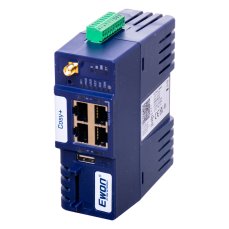
Ewon Cosy+ 4G LTE EU / Ethernet router
982,52 EUR Incl. VAT
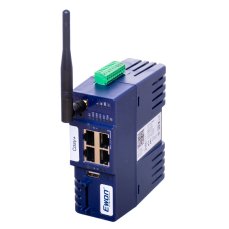
Ewon Cosy+ WiFi / Ethernet router
817,96 EUR Incl. VAT
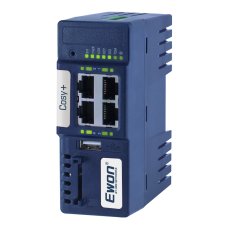
Ewon Cosy+ Ethernet router
705,43 EUR Incl. VAT
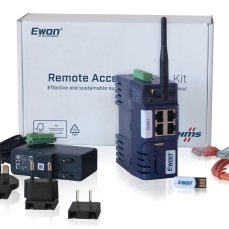
Ewon Cosy+ Starter Kit
487,63 EUR Incl. VAT
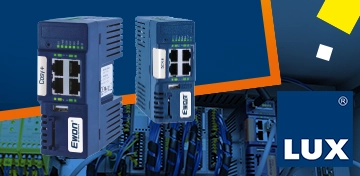
Ewon in Practice: Commissioning a Machine on Réunion Island from an Office in Jablonné
Are you considering remote access to machines and equipment, whether they operate on the other side of the world or simply in another building at your facility? Then choose a simple, reliable and secure connection with encrypted communication to all your routers, just like machine manufacturer LUX.
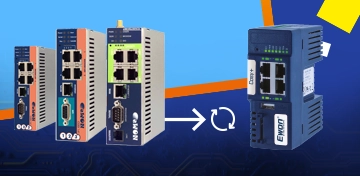
Talk2M connectivity for Ewon 141 and CD routers will end in 2027. Get a new replacement now at a better price.
Do you have an older Ewon Cosy 141 or Ewon CD device in production or “sitting in a drawer”? Then pay attention. For these older models, remote access via the Talk2M service will only be available until the end of 2027.

How to Meet NIS2 Requirements: Secure Remote Access with Ewon Routers and W&T Firewalls
The European NIS2 directive introduces new obligations for companies in protecting against cyber threats. Below, we compare these requirements with the technical measures in IEC 62443 and show how to meet them easily using Ewon industrial routers, the secure Talk2M cloud service, and firewalls from the German manufacturer W&T.
How to upgrade from Talk2M free to Talk2M light or pro and add Ewon routers
Do you use one or more Talk2M free accounts? Have you found that this solution is no longer enough and that you need Talk2M light or Talk2M pro? This guide will show you:
- how to upgrade your existing Talk2M free account to Talk2M light or Talk2M pro,
- how to import Ewon devices from one or more Talk2M free accounts into the upgraded account,
- how to create a group of routers in the upgraded account and assign users to it, including access rights.

The New LIGHT Account Type in Talk2M on Ewon Routers Is a Happy Medium
The Talk2M cloud service allows EWON router users to easily and securely connect to their devices/machines remotely via the Internet from anywhere in the world. Until now, two types of service have been available – Talk2M free and Talk2M pro. From 2 May 2024, a new, affordable account type – Talk2M light – will be available. In addition, the rules for the free account will change.
TALK2M Free, Light or Pro? Which service should you choose for Ewon devices, and why?
Do you use Ewon Cosy or Flexy routers for remote management and are you wondering which Talk2M remote access service is right for you? We’ve put together a few points to help you decide.
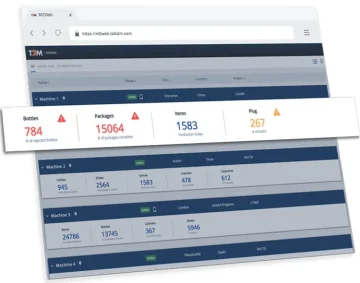
Remote access to Ewon routers from a web browser via M2Web
M2Web provides browser access to web interfaces, HMIs and device remote desktops via Ewon and Talk2M. See supported protocols, LAN device configuration, six Flexy KPIs and current service limits.

VIDEO guide to remote management of PLCs/HMIs/PCs via Ewon routers
Ewon industrial routers are rightly among the most widely used global solutions for the remote management of PLC control systems, robots, industrial computers and HMI panels via the Internet. Simply managing systems remotely is no longer enough, and Ewon routers are the only ones that can offer you so much more. They can read (and write) data from remote PLC control systems such as SIEMENS, Allen-Bradley, Mitsubishi, Omron, Schneider, Modbus and others. This data is sent via the Internet to your computer, where you can store it in a database and display it in visualisations or in Power BI reports. Find out more in our video guide.
Advisor
Ewon videos
Watch several videos on how to configure, manage and secure Ewon and Talk2M. There are tutorials on how to set up Ewon for remote management over Ethernet, WiFi or mobile network. We also cover managing and securing your Talk2M Free+ account, including two-factor authentication. You'll also learn about connecting to devices remotely via Ewon and watch a few videos about Talk2M Pro security.
Question or Inquiry
Highlighted items are mandatory.