

OPC Router 5.4: Now with Project Versioning and Plugin Dashboard

The new version of the data connector focuses especially on management efficiency, increased security and better system monitoring. New features make everyday work with OPC Router easier and improve its deployment in large industrial environments. There are many improvements — what are the main ones?
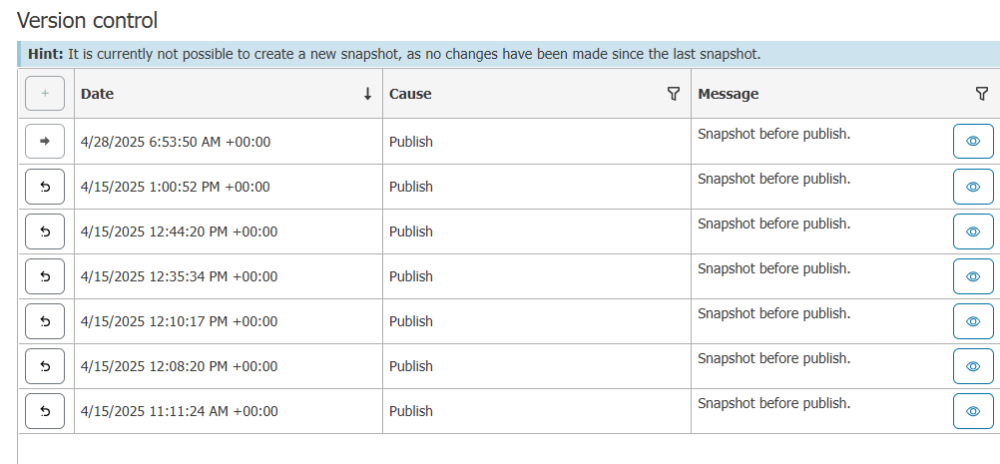
Take Advantage of Advanced Project Versioning
- Automatic Backups:
Before saving changes, a backup of the current project version is always created. This function can be disabled, but the ability to revert to an older version saves time. - Manual Version Creation:
Users can manually save a new version (create a snapshot) anytime and name it for better orientation. - Easy Switching Between Versions:
Quickly restoring older versions greatly simplifies troubleshooting and reduces the risk of errors.
Keep OPC Router Under Control with the New Plugin Dashboard
The new dashboard gives customers complete control over the entire OPC Router from one place — from performance monitoring to efficient fault diagnostics.
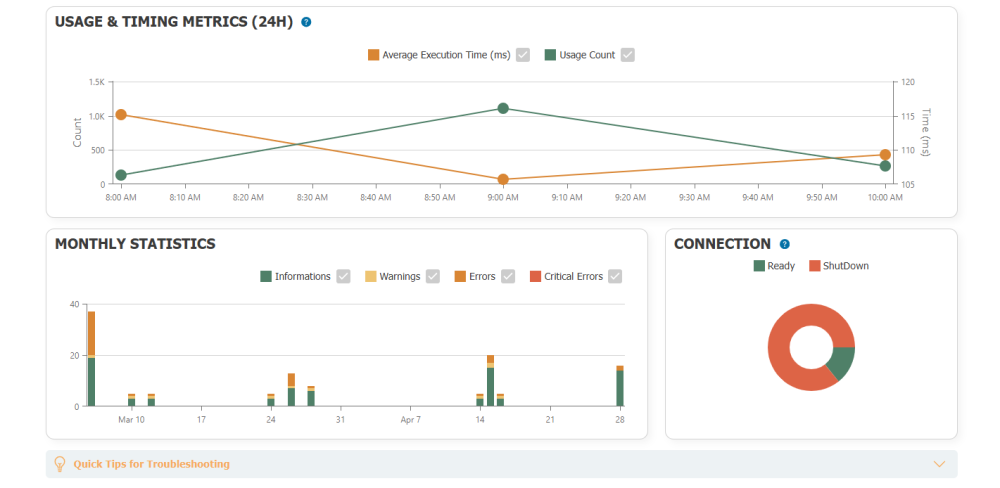
- Metrics on utilisation:
Clear tracking of plugin activity over the last 24 hours - Statistics and graphs:
Long-term analysis of connections, plugin errors and trigger errors in a monthly overview - Automatic alerts:
Notifications about problems along with suggestions for quick resolution - Data export:
Option to export logged data to Excel for further processing
Top 5 System Core Improvements
- Optimization for large scale deployments:
Full support for container deployment (Docker) and secure redundancy with environment variables - Improved Redundancy with Project Synchronization:
Now supports project synchronization between the main and backup servers. This ensures the backup always has the latest project configuration. Currently available in Safe Redundancy Mode only. - New Project Format (YAML):
Projects are now saved in a readable YAML format, allowing for easy management and editing outside the application. - Secure Password Storage (Secret Store):
Passwords and tokens are securely encrypted and stored in an internal database, improving the protection of sensitive data. - License Testing:
The two-hour trial allows you to easily identify which licenses are really needed based on currently used plugins.
Explore Extended OPC UA/DA Client Plugin Functionality
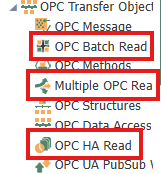
- OPC Batch Read:
Until now, data structures could be individually defined and configured in the OPC Router. The new Batch Read TO function makes this process even more efficient: It enables the use of placeholders in data structures such as line [no.] or machine [no.], so that recurring patterns are automatically recognized and adopted. This reduces manual effort and speeds up configuration considerably. - Multiple OPC Read:
With OPC Read Multiple TO, complete directories and subfolders of an OPC server can now be read in one step. There are also filter options, e.g. to read only temperature values or to exclude certain data. - Multi Data Change Trigger:
A new trigger type that monitors changes at multiple points using AND/OR logic - OPC UA Historical Access (HA):
Reading historical data including timestamps with the ability to define a time interval
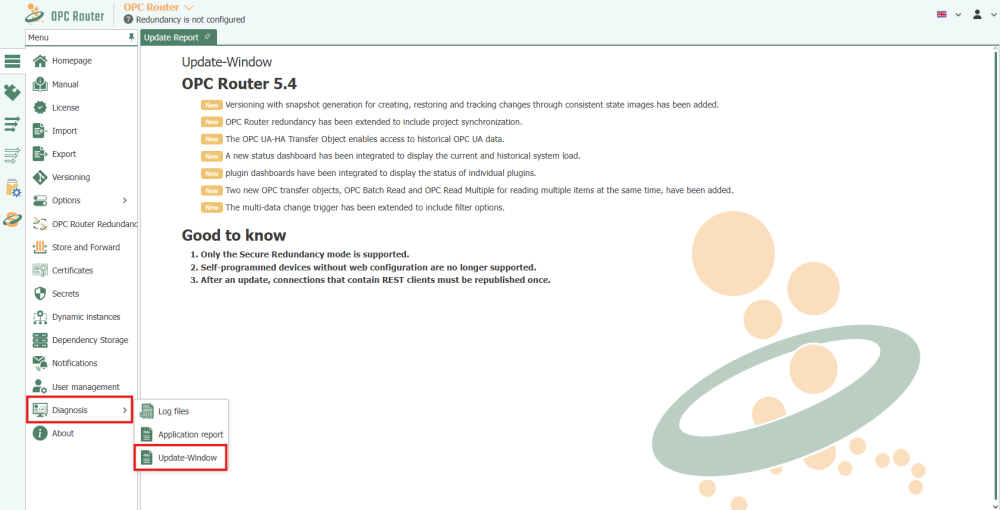
Where to Find the Summary of New Features? Directly in OPC Router
You can now view the Update Report directly in the program under Diagnosis in the left menu.
OPC Router 5.4 brings not only increased reliability and efficiency through new features but also more ways to simplify and secure data flow management. A detailed overview of the new features is available in a recorded webinar on Inray’s website.
 Try the TRIAL Version Before Fully Switching to Version 5.4
Download the TRIAL version of OPC Router 5.4 for free from our online shop and try out the new features. It’s the full version of the software with a time limit of two hours. You can test it to see how it works for you. You decide when to switch to the full version in production.
👉 Not yet an OPC Router user and curious how the basic module of this data connector, a plug-in, or add-on works? You can find all the information about OPC Router in our online shop or on the website opc-router.cz.
❓Have a technical question? Contact our support team: support@foxon.cz
Recommended products3

OPC Router – Basic Module
286,77 EUR Incl. VAT
All in One Enterprise License of OPC Router
6 655 EUR Incl. VAT
TOP 30 OPC UA and OT/IT Data converters in a Single OPC Router License
2 407,90 EUR Incl. VAT