

Converter EtherCAT Master / Modbus TCP Slave - HD67E54-A1
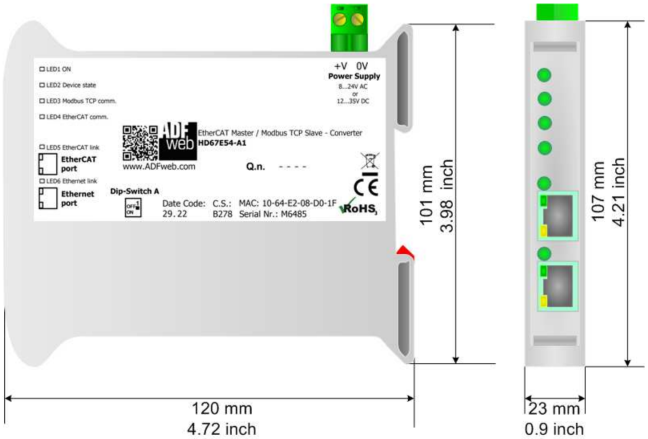
Converter EtherCAT Master / Modbus TCP Slave - HD67E54-A1

The ADFweb HD67E54-A1 is an industrial EtherCAT Master / Modbus TCP Slave converter. It connects both communication sides through a configured data map. More
Code: HD67E54-A1
The ADFweb HD67E54-A1 is an industrial EtherCAT Master / Modbus TCP Slave converter. It connects both communication sides through a configured data map. More
Code: HD67E54-A1
ADFweb HD67E54-A1
EtherCAT Master / Modbus TCP Slave
The ADFweb HD67E54-A1 is an industrial EtherCAT Master / Modbus TCP Slave converter. It connects both communication sides through a configured data map.
We will check your selection and prepare a quotation
Send us the device models, required connection and quantity.
Converter applications
Expose selected EtherCAT device data to a PLC or SCADA system acting as a Modbus TCP Master. The converter handles the EtherCAT network and responds as a Slave on Modbus TCP.
Technical specifications HD67E54-A1
| Order code | HD67E54-A1 |
|---|---|
| Protocol connection | EtherCAT Master / Modbus TCP Slave |
| Converter roles | EtherCAT Master; Modbus TCP Slave |
| Interfaces | Ethernet RJ45 |
| Converter power supply | 8-24 V AC / 12-35 V DC |
| Consumption at 24 V DC | 3.5 W |
| Operating temperature | -40 °C to +85 °C |
| Mounting | 35 mm DIN rail |
| Dimensions of the illustrated version (depth × width × height) | 120 × 23 × 107 mm |
| Device weight | approximately 200 g |
| Configuration software | SW67E54 |
For an older device, check the hardware version and connections against its label.
Communication and configuration
Prepare the configuration in SW67E54. Configure EtherCAT devices and objects from ESI files, Modbus TCP network settings and object mapping to register addresses.
Prepare exact EtherCAT device types, their ESI files, node addresses and the object list to transfer. Configuration imports the subordinate device structure and defines the data map. We will confirm device count, required data areas and timing requirements for the actual installation.
Supply and accessories
Please provide the complete order code. If you need a power supply, connection cables or help with configuration, include them in your enquiry. We will confirm the scope of supply and required accessories for your installation in the quotation.
Documentation and software
Diagrams and hardware version
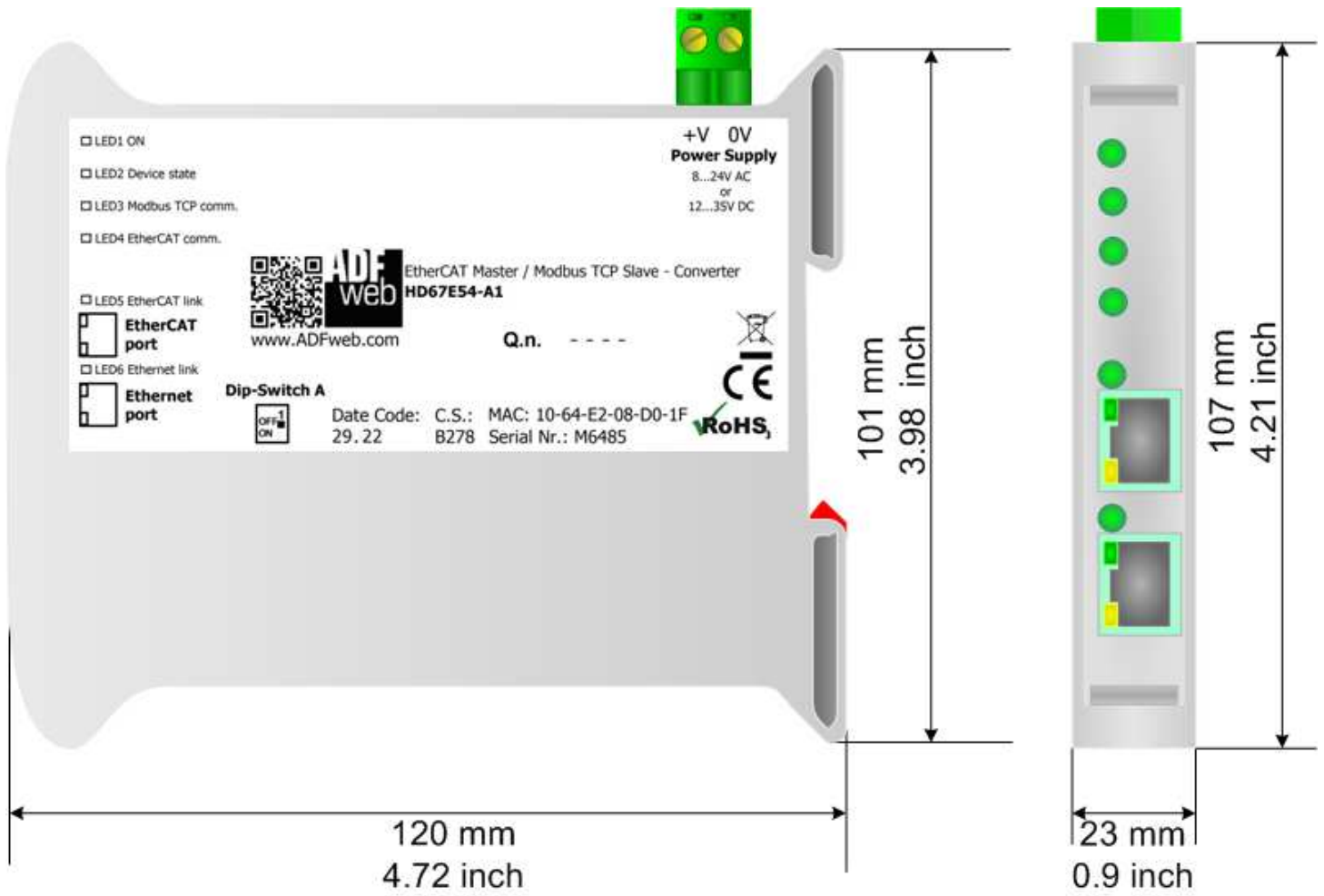
The images help identify the hardware version. When replacing an older unit, compare its label, connectors and dimensions; we will confirm the version to be supplied in the quotation.
Frequently asked questions
Is knowing the two protocols enough?
The device roles, physical interfaces and data to be transferred must also be checked. Prepare exact EtherCAT device types, their ESI files, node addresses and the object list to transfer. Configuration imports the subordinate device structure and defines the data map. We will confirm device count, required data areas and timing requirements for the actual installation.
How is this converter configured?
Prepare the configuration in SW67E54. Configure EtherCAT devices and objects from ESI files, Modbus TCP network settings and object mapping to register addresses.
What information should I send to check the selection?
Send the exact device models at both ends, the protocols and communication roles, the number of devices and the required values. For a PLC, include the firmware and method of accessing its data.
FOXON support with selection and ordering
Selection based on your devices
We will review the specific connection, communication roles and required data.
Availability check
Before you place an order, we will confirm current availability and the possible delivery date.
Documentation for the exact order code
We select the documentation and configuration tool using the complete order code.
Accessories for your installation
We will include the requested accessories in the quotation to suit the connection arrangement.
Choosing the correct version
Two devices with the same protocols can have different functions. Check the gateway role on each side, the connectors and the complete order code.
Prepare exact EtherCAT device types, their ESI files, node addresses and the object list to transfer. Configuration imports the subordinate device structure and defines the data map. We will confirm device count, required data areas and timing requirements for the actual installation.
Converter enquiry HD67E54-A1
Provide the order code, quantity and the devices you need to connect. We will check the suitable version and prepare a quotation.
Request the converterTechnical specifications HD67E54-A1
| Order code | HD67E54-A1 |
|---|---|
| Protocol connection | EtherCAT Master / Modbus TCP Slave |
| Converter roles | EtherCAT Master; Modbus TCP Slave |
| Interfaces | Ethernet RJ45 |
| Converter power supply | 8-24 V AC / 12-35 V DC |
| Consumption at 24 V DC | 3.5 W |
| Operating temperature | -40 °C to +85 °C |
| Mounting | 35 mm DIN rail |
| Dimensions of the illustrated version (depth × width × height) | 120 × 23 × 107 mm |
| Device weight | approximately 200 g |
| Configuration software | SW67E54 |
For an older device, check the hardware version and connections against its label.