

from 653,40 EUR Incl. VAT
6GK5124-0BA00-2AC2
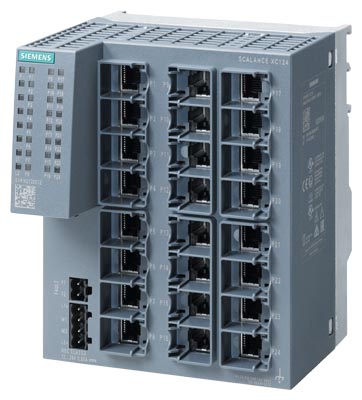
6GK5124-0BA00-2AC2

SCALANCE XC124, Unmanaged IE switch, 24x 10/100 Mbit/s RJ45 ports, LED diagnostics, error-signaling contact with set pushbutton, redundant power supply Manual available as a download . More
Code: 6GK5124-0BA00-2AC2
SCALANCE XC124, Unmanaged IE switch, 24x 10/100 Mbit/s RJ45 ports, LED diagnostics, error-signaling contact with set pushbutton, redundant power supply Manual available as a download . More
Code: 6GK5124-0BA00-2AC2
Part Sales 2
| Condition | Code | Warranty | Availability |
Delivery Express? | Price excl. VAT | |
|---|---|---|---|---|---|---|
| New in sealed box (NC) | 6GK5124-0BA00-2AC2 NC | 12/24 months | In external stock 3 pcs |
Within 2-4 days / Express
|
On request
|
|
| Refurbished (R) | 6GK5124-0BA00-2AC2 R | 12/24 months | In external stock 1 pcs |
Within 2-4 days / Express
|
On request
|
Repair of the part
| Name | Code | Delivery | Warranty | Price excl. VAT | |
|---|---|---|---|---|---|
| Complete part repair | 6GK5124-0BA00-2AC2 O | 3-6 weeks | 24 months | On request | Enquire a repair |
6GK5124-0BA00-2AC2 – SCALANCE XC124 Industrial Ethernet switch
SCALANCE XC124, Unmanaged IE switch, 24x 10/100 Mbit/s RJ45 ports, LED diagnostics, error-signaling contact with set pushbutton, redundant power supply Manual available as a download .
Looking to buy or repair this switch?
We check spare part availability and options for diagnostics and professional repair of your faulty switch.
Switch applications
The switch connects devices and sections of an industrial Ethernet network. Compare the required ports, communication speed, power supply and mounting space. The complete order number identifies the exact version.
When replacing a device, compare the complete order number, connections, mounting and configuration. An identical port count alone does not prove interchangeability.
Technical specifications from Siemens
| Manufacturer | SIEMENS |
|---|---|
| Order number | 6GK5124-0BA00-2AC2 |
| Model | SCALANCE XC124 |
| Ports and version | SCALANCE XC124, Unmanaged IE switch, 24x 10/100 Mbit/s RJ45 ports, LED diagnostics, error-signaling contact with set pushbutton, redundant power supply Manual available as a download . |
| Transfer rates | 10, 100 Mbit/s |
| Rated power supply | 24 V DC |
| Supply voltage range | 9.6 ... 31.2 V DC |
| Rated power loss | 7.8 W |
| Maximum current consumption | 0.65 A |
| Operating temperature | -40 ... +70 °C |
| IP protection | IP20 |
| Dimensions (width × height × depth) | 120 × 147 × 125 mm |
| Switch net weight | 0.85 kg |
| PROFINET conformity class | A |
| Redundant supply connection | Yes |
| Mounting | 35 mm DIN rail; S7-300 mounting rail; S7-1500 mounting rail; wall |
Communication, diagnostics and network functions
An unmanaged switch connects Ethernet devices without network management configuration. Passing PROFINET traffic does not mean the switch supports PROFINET IO Device diagnostics or IRT communication.
Scope of delivery and accessories
The quotation covers the switch with the stated order number. We confirm the condition, actual scope of delivery, accessories and warranty before ordering.
Frequently asked questions
Is this switch a direct replacement for my existing device?
We check the complete order number, interfaces, power supply, mounting and network requirements. Send a photo of the nameplate and describe the connections.
How do I check the firmware and configuration?
For a managed switch, compare the actual firmware, configuration backup and functions in use. For PROFINET integration, also check the GSDML and STEP 7 / TIA Portal project.
Do I need to transfer the existing switch settings?
Back up the configuration of a managed switch before working on it. After replacement, check the ports, device name, IP addressing and network functions in use. An unmanaged version has no such network management configuration.
Which accessories should I order?
Check the power connections, mounting components, cabling and any memory or optical modules. We confirm accessories for the exact order number and offered unit.
Do you provide diagnostics and repair?
Yes. Send the order number, fault description and network symptoms. We check options for diagnostics, professional repair and a replacement part.
Why buy from FOXON
Spare part availability
We check current availability and confirm the possible delivery date before you order.
New original and refurbished parts
We check a suitable option for your required condition, deadline and the actual offer.
Warranty
We confirm the warranty terms for the selected part in the quotation.
Diagnostics and repair
We check options for diagnostics and professional repair of your faulty switch.
Product condition options
You can request a new original or refurbished part. We confirm the available condition, accessories, warranty and delivery date in the actual quotation.
Sales, repairs and purchasing of automation parts
FOXON supplies spare parts, provides diagnostics and repairs, and checks opportunities to purchase surplus automation parts. We ship products worldwide.
Need this switch or a repair?
Send the complete order number, required condition or fault description. We check availability and options for diagnostics and professional repair.
Request a part or repairHighlighted items are mandatory.

Training PROFIBUS - Basics, Diagnostics & Network Troubleshooting, 2 days
1 076,90 EUR Incl. VAT

Training PROFINET – Basics, Diagnostics & Network Troubleshooting, 2 days
1 076,90 EUR Incl. VAT

Diagnostics, troubleshooting and monitoring of PROFIBUS networks
from 367,84 EUR Incl. VAT
Diagnostics, troubleshooting and monitoring of PROFINET Networks
from 367,84 EUR Incl. VAT
Related products4
Training PROFIBUS - Basics, Diagnostics & Network Troubleshooting, 2 days
1 076,90 EUR Incl. VAT
Training PROFINET – Basics, Diagnostics & Network Troubleshooting, 2 days
1 076,90 EUR Incl. VAT
Diagnostics, troubleshooting and monitoring of PROFIBUS networks
from 367,84 EUR Incl. VAT
Diagnostics, troubleshooting and monitoring of PROFINET Networks
from 367,84 EUR Incl. VAT