

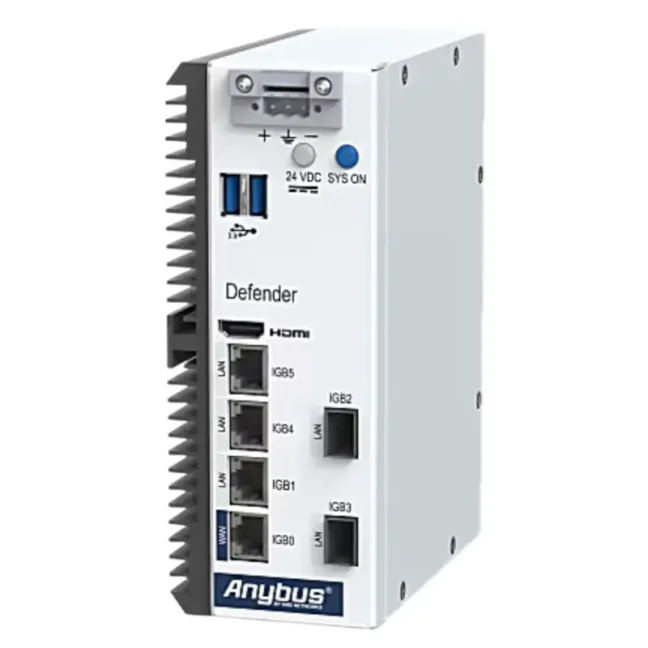
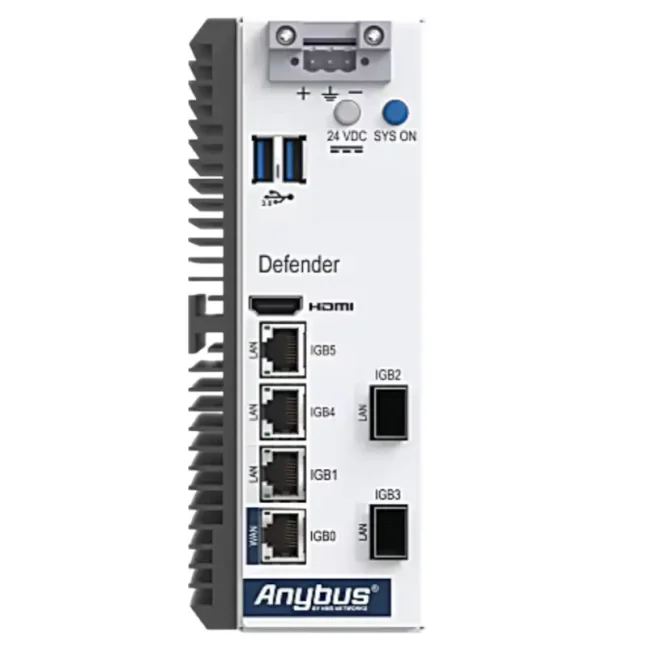


Anybus Defender 6024 - License type: NAT/FW

Industrial firewall and security router for segmenting and protecting machines, production lines and other parts of an OT network. It provides 1× WAN, 3× Gigabit LAN ports and 2× SFP ports for additional RJ45 or fiber-optic connections, for a total of 6 physical network segments, and supports VLANs. It is available in 3 variants: NAT/FW for NAT and network segmentation, DPI/FW with deep inspection of industrial communication and IPS protection, or PRO/FW with advanced VPN, routing, traffic management and high-availability features. More
Code: ABD6024-NATFW
Industrial firewall and security router for segmenting and protecting machines, production lines and other parts of an OT network. It provides 1× WAN, 3× Gigabit LAN ports and 2× SFP ports for additional RJ45 or fiber-optic connections, for a total of 6 physical network segments, and supports VLANs. It is available in 3 variants: NAT/FW for NAT and network segmentation, DPI/FW with deep inspection of industrial communication and IPS protection, or PRO/FW with advanced VPN, routing, traffic management and high-availability features. More
Code: ABD6024-NATFW
Options 3
| License type | Code | Availability | Price excl. VAT | |
|---|---|---|---|---|
| NAT/FW | ABD6024-NATFW | Delivery in 1-2 weeks |
2 320 EUR
|
|
| DPI/FW | ABD6024-DPIFW | Delivery in 1-2 weeks |
3 190 EUR
|
|
| PRO/FW | ABD6024-PROFW | Delivery in 1-2 weeks |
5 075 EUR
|
Anybus Defender 6024
Anybus Defender 6024 is an industrial firewall and security router for isolating and securing machines, production lines, and other parts of the OT network. It helps control communication between network segments, resolve IP address conflicts, and limit the spread of cyber threats. Depending on the selected variant, it also provides detailed inspection of industrial protocols, protection of vulnerable devices without requiring updates, VPN, and advanced networking features.
Why choose Anybus Defender 6024?
- Combines copper and fiber connections – provides 1× WAN, 3× LAN, and 2× SFP ports for fiber or additional Gigabit RJ45 connections.
- Separates individual parts of the OT network – allows communication between machines, the production network, and higher-level systems to be controlled.
- Helps resolve IP address conflicts – NAT allows devices and networks with identical or overlapping IP addressing to be connected.
- Can be added to an existing network – supports both transparent bridge operation and gateway operation with NAT and routing.
- Protects industrial communication – the DPI/FW and PRO/FW variants support detailed inspection of EtherNet/IP CIP, Siemens TCP/IP, and Modbus protocols and use IPS to protect vulnerable devices against known attacks without requiring updates.
- Provides visibility of connected devices – Asset Discovery & Inventory discovers and identifies devices in the OT network.
- Simplifies configuration – configuration is performed through a web interface with wizards, diagnostics, and the option to create rules directly from firewall logs.
Anybus Defender 6024 variants
Anybus Defender 6024 is available in three variants with the same hardware but different ranges of security and networking features:
- NAT/FW – basic protection for network isolation, communication control, and IP address translation,
- DPI/FW – all NAT/FW features + industrial communication inspection, IPS, protection of vulnerable devices without requiring updates, and VPN,
- PRO/FW – all DPI/FW features + advanced routing, network traffic management, support for multiple WAN connections, and high availability.
Comparison of Anybus Defender variants
| Feature / what it solves | NAT/FW Basic protection and network isolation |
DPI/FW Advanced industrial network protection |
PRO/FW Advanced networking features and high availability |
|---|---|---|---|
| Connecting networks with different or identical IP addresses (NAT 1:1, 1:∞) | ✔ | ✔ | ✔ |
| Firewall with connection state tracking (Stateful Firewall) | ✔ | ✔ | ✔ |
| Network protection without changing IP addresses (Transparent / Bridge Mode) | ✔ | ✔ | ✔ |
| Security certificate management (Certificate Management) | ✔ | ✔ | ✔ |
| Central management of multiple Defenders (Anybus Cybersecurity Console) | ✔ | ✔ | ✔ |
| Automatic discovery and inventory of network devices (Asset Discovery & Inventory) | ✔ | ✔ | ✔ |
| Event notifications by email, Syslog, Telegram, and Pushover | ✔ | ✔ | ✔ |
| Secure remote user connection via VPN (Remote Client VPN) | — | ✔ | ✔ |
| User authentication via corporate accounts (RADIUS, LDAP / Active Directory) | — | ✔ | ✔ |
| Industrial communication inspection and easier rule creation (DPI for EtherNet/IP CIP, Siemens TCP/IP, and Modbus) | — | ✔ | ✔ |
| Protection of vulnerable and legacy devices against known attacks without requiring updates (IPS / Virtual Patching – Snort, Suricata) | — | ✔ | ✔ |
| Connecting networks through secure VPN tunnels (WireGuard, OpenSSL, IPsec) | — | ✔ | ✔ |
| Automatic IP address assignment and forwarding of DHCP requests (DHCP Server / Forwarding) | — | ✔ | ✔ |
| Enabling and disabling rules based on time (Rules / Policy Scheduler) | — | ✔ | ✔ |
| Login page for granting network access (Captive Portal) | — | — | ✔ |
| Advanced automatic routing between networks (RIP, BGP) | — | — | ✔ |
| Multiple network or internet connections and traffic distribution between them (Load Balancing, Multi-WAN) | — | — | ✔ |
| Management of network traffic priority and bandwidth (Traffic Shaping) | — | — | ✔ |
| Backup firewall to reduce downtime in case of failure (High Availability Redundancy) | — | — | ✔ |
Anybus Defender 6024 NAT/FW
The NAT/FW variant is designed for isolating machines, production lines, and other network segments, controlling communication between them, and resolving IP address conflicts.
It includes a stateful firewall, NAT, bridge operation, certificate management, Asset Discovery & Inventory, and support for central management. It is suitable for applications where it is necessary to precisely define which devices and services can communicate between individual parts of the OT network.
Typical applications include segmenting several parts of production, separating production and enterprise networks, or connecting devices and networks with identical or overlapping IP addresses.
Anybus Defender 6024 DPI/FW
The DPI/FW variant includes all NAT/FW features and extends them with detailed inspection of the industrial protocols EtherNet/IP CIP, Siemens TCP/IP, and Modbus. The firewall therefore evaluates not only IP addresses and ports, but can also inspect the industrial communication itself.
The integrated traffic analyzer with automatic learning helps identify the industrial communication being used and simplifies rule creation. The Snort and Suricata IPS systems can detect known threats and protect, for example, legacy PLCs, HMIs, and other vulnerable devices without requiring a patch to be installed directly on the device (Virtual Patching).
DPI/FW also supports remote VPN access, secure VPN tunnels using WireGuard, OpenSSL, and IPsec, user authentication via RADIUS and LDAP / Active Directory, DHCP server and DHCP request forwarding, and time-based rule scheduling.
The DPI/FW variant is suitable where network isolation and standard communication filtering alone are not sufficient and more detailed inspection of industrial traffic, protection of vulnerable devices, or secure remote access is also required.
Anybus Defender 6024 PRO/FW
The PRO/FW variant includes all DPI/FW features and extends them with advanced routing, network traffic management, and high availability.
It supports the RIPv1, RIPv2, and BGPv4 routing protocols, Load Balancing, Multi-WAN, and Traffic Shaping. This makes it possible to manage data paths, the use of multiple network connections, bandwidth, and network traffic priority.
The PRO/FW variant also includes a Captive Portal, which can require users to log in before access to the protected network is granted.
Two devices can be configured in active-standby high-availability mode. If the active unit fails, the backup Defender can take over its function, reducing the risk of network connection interruption.
The PRO/FW variant is suitable for larger OT networks and applications with higher requirements for availability, routing, multiple network paths, and network traffic management.
Not sure which Defender to choose?
Tell us about your network and what you need to secure. We will recommend the right model and variant.
Consult your Defender selection
Copper and fiber connections
Anybus Defender 6024 is equipped with one Gigabit WAN port, three Gigabit LAN ports, and two SFP ports. In total, it can therefore work with up to six physical network segments. Depending on the module used, the SFP ports can be used for 1Gb fiber connections in multimode or singlemode configurations, or for additional Gigabit RJ45 connections.
The LAN ports are independently configurable, and for suitable applications one of them can be reconfigured as a second WAN port. VLAN support also makes it possible to create additional logically isolated network segments.
Firewall and OT network isolation
Anybus Defender 6024 uses a stateful firewall and can isolate machines, production cells, or entire parts of the OT infrastructure. It follows the principle “what is not allowed is denied”, so both inbound and outbound communication is blocked unless it is explicitly permitted by configured rules.
The device can be used, for example, to separate OT and IT networks or to create security zones and controlled communication paths according to IEC 62443 principles.
NAT, bridge, and routing
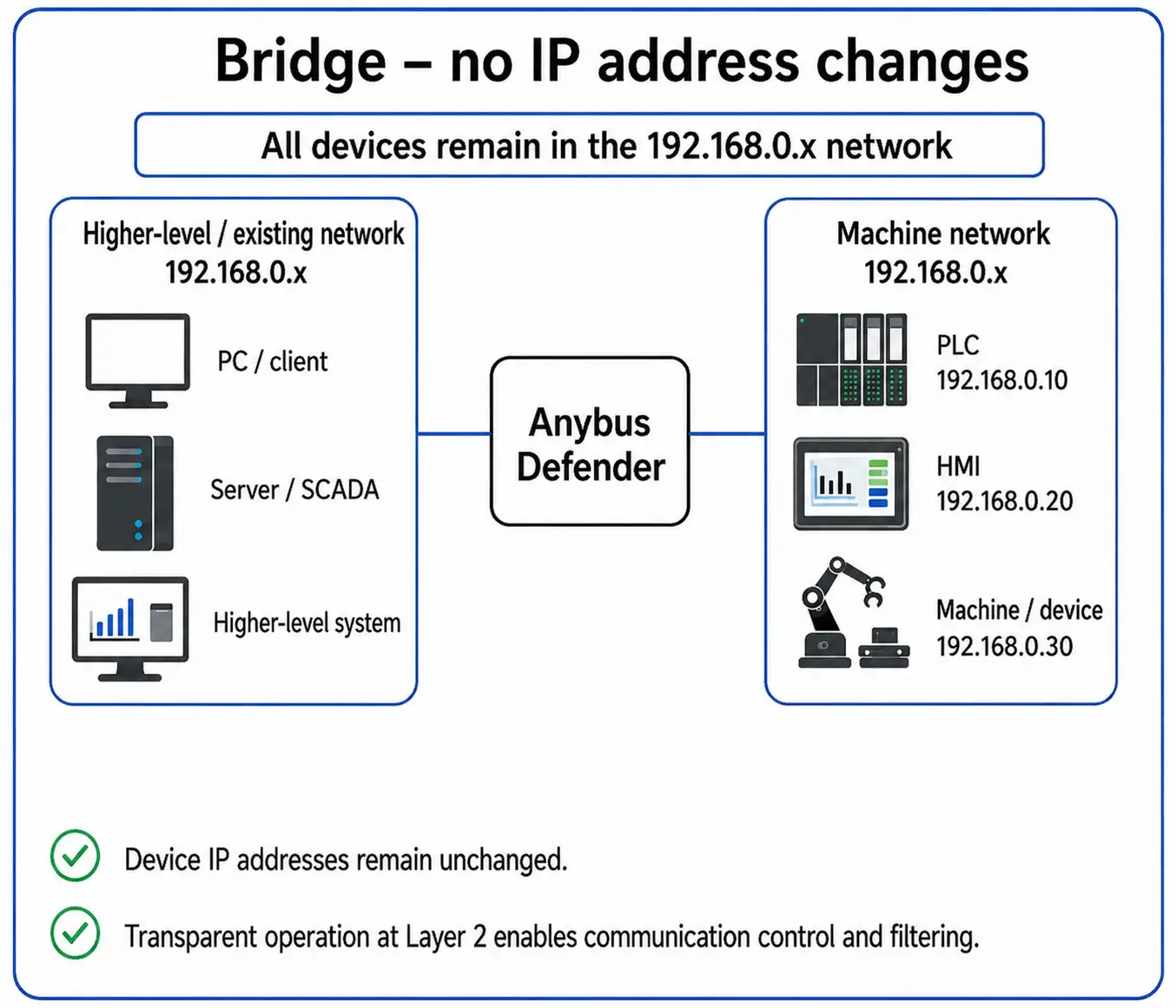
Anybus Defender 6024 supports both bridge and gateway configurations. In transparent bridge operation, network interfaces can be connected and communication filtered at Layer 2 without changing the IP addressing of connected devices.
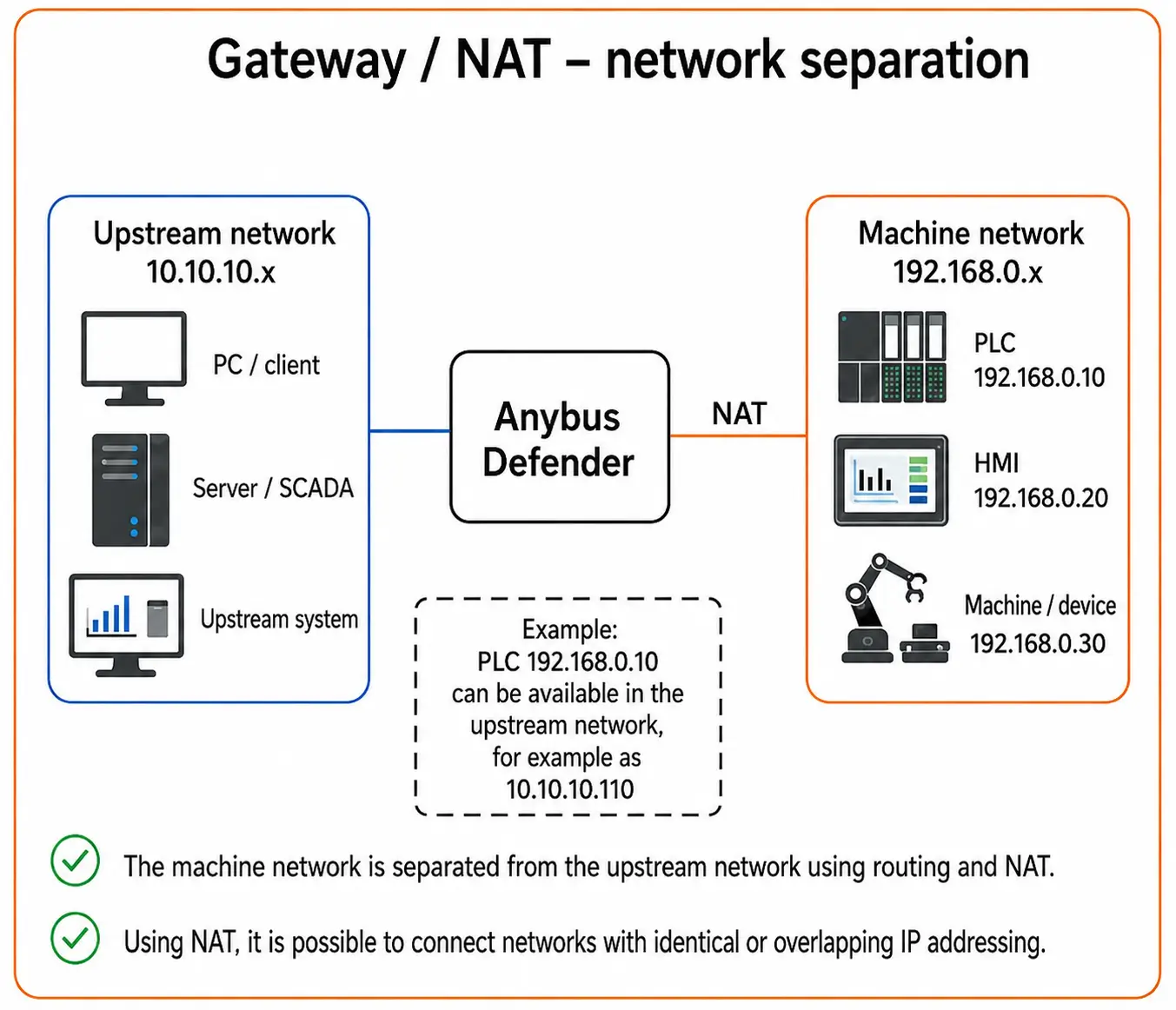
In a gateway configuration, NAT and routing can be used. Simplified NAT configuration supports individual IP addresses, multiple addresses, or entire subnets. The Defender can therefore help, for example, when connecting machines with conflicting IP addressing to a higher-level network.
 |
 |
Detailed inspection of industrial communication
The DPI/FW and PRO/FW variants extend the basic firewall with Deep Packet Inspection. The Defender can analyze EtherNet/IP CIP, Siemens TCP/IP, and Modbus industrial communication in greater detail and, using a traffic analyzer with automatic learning, make it easier to create the corresponding security rules.
It also includes an Intrusion Protection System using Snort and Suricata technologies. IPS can protect, for example, legacy PLCs, HMIs, and other vulnerable devices against known attacks without requiring a patch to be installed directly on the device (Virtual Patching).
Visibility of devices in the OT network
The Asset Discovery & Inventory feature discovers and identifies devices connected to OT and ICS networks. It uses industrial protocols and methods to obtain available information about network devices.
Depending on the available data, it can display the manufacturer, device type, software version, update level, and serial number. The result also includes an identification confidence rating. The information can be displayed directly in the web interface or optionally sent to the Anybus Cybersecurity Console.
Web interface and management
Anybus Defender 6024 is configured through the integrated web interface. Wizards are available for common application scenarios, along with diagnostic tools and the One-Click Easy Rule feature, which allows a rule to be created directly from a firewall log entry.
The Floating Rules feature allows common rules to be applied across multiple interfaces. A REST API is available for integration with higher-level systems, while service tasks can also be performed through the CLI via SSH or a local console. Multiple Anybus Defender devices can optionally be managed through the central Anybus Cybersecurity Console.
Online documentation
Online documentation from the manufacturer is available for configuring and working with Anybus Defender features. It contains information on installation, firewall configuration, NAT, DPI, VPN, routing, and other functions depending on the specific model and variant.
Technical specifications
Network interfaces and connection
- WAN: 1× RJ45, Gigabit Ethernet
- LAN: 3× RJ45, Gigabit Ethernet
- SFP: 2× SFP for 1Gb fiber connections or additional Gigabit Ethernet via RJ45, depending on the module used
- Fiber connection: LC, multimode or singlemode
- Number of physical network interfaces: 6
- Additional WAN: one of the LAN ports can be configured as a second WAN port for suitable applications
- Connection mode: bridge or gateway
- Network protocols: IPv4 and IPv6
NAT and firewall
- NAT: Simple NAT Wizard, 1:1 and 1:∞
- NAT configuration: for individual IP addresses, multiple IP addresses, or entire subnets
- Firewall type: stateful firewall
- Default security policy: Deny by Default – inbound and outbound communication is blocked unless explicitly permitted
- Transparent bridge operation: Layer 2 communication filtering between bridged interfaces
- Certificate management: yes
Asset Discovery & Inventory
- Function: discovery, querying, and identification of devices in the OT/ICS network
- Detected information: depending on availability, manufacturer, device type, software version, update level, and serial number
- Identification confidence rating: yes
- Data display: in the web interface or optionally via Anybus Cybersecurity Console
Configuration and management
- Configuration: integrated web interface
- Setup wizards: yes, for common application scenarios
- One-Click Easy Rule: creates a rule directly from a firewall log entry
- Floating Rules: common rules that can be applied across multiple interfaces
- Diagnostics: tools for network traffic diagnostics and analysis
- REST API: yes
- CLI: SSH or local console for service tasks
- Central management: optionally via Anybus Cybersecurity Console
Monitoring and notifications
- Notifications: email, Syslog, Telegram Messenger, and Pushover
- ARP monitoring: available via API
- Bandwidth monitoring: available via API
- NetFlow: optional integration
NAT/FW variant features
- Simple NAT Wizard, 1:1 and 1:∞ NAT: yes
- Stateful firewall: yes
- Transparent bridge operation: yes
- Certificate management: yes
- Asset Discovery & Inventory: yes
- Central management: support for the optional Anybus Cybersecurity Console
- Notifications: email, Syslog, Telegram Messenger, and Pushover
Extended features of the DPI/FW and PRO/FW variants
- Remote Client VPN: yes
- User authentication: RADIUS and LDAP/Active Directory
- Deep Packet Inspection (DPI): detailed inspection of supported industrial communication
- Supported industrial DPI protocols: EtherNet/IP CIP, Siemens TCP/IP, and Modbus
- Traffic analyzer with automatic learning: yes
- IPS: Snort and Suricata
- Virtual patching: yes
- VPN: WireGuard, OpenSSL, and IPsec
- DHCP: DHCP server and DHCP forwarding
- Rule scheduling: by date, time, or duration
Extended features of the PRO/FW variant
- Captive Portal: yes
- Routing protocols: RIPv1, RIPv2, and BGPv4
- Load Balancing: yes
- Multi-WAN: yes
- Traffic Shaping: yes
- High Availability Redundancy: yes
Power supply
- Supply voltage: 24 VDC
- Maximum current consumption: 1,100 mA at 24 VDC
- Maximum power consumption: 26.4 W
Mechanical and operating specifications
- Dimensions including connectors: 140.4 × 69.6 × 179.7 mm
- Weight: 1,270 g
- Enclosure material: metal
- Cooling: passive, fanless
- Degree of protection: IP20
- Operating temperature: 0 to +50 °C at full CPU load, up to +60 °C under typical load
- Relative humidity: 0–85%, non-condensing
- Mounting: DIN rail according to EN 50022
Certifications and compliance
- Certifications and compliance: CE and RoHS 2011/65/EU
Frequently Asked Questions (FAQ) – Anybus Defender 6024
Use and network connection
What is Anybus Defender 6024 and what is it used for?
Anybus Defender 6024 is an industrial firewall and security router for isolating and protecting machines, production lines, and other parts of the OT network. It is used for network segmentation, communication control, resolving IP address conflicts, and, depending on the variant, also for detailed inspection of industrial protocols, VPN, and advanced networking features.
How can I connect copper and fiber parts of a production network through one industrial firewall?
Anybus Defender 6024 has 1× WAN and 3× LAN RJ45 ports and 2× SFP ports. Depending on the module used, the SFP ports can be used for 1Gb fiber connections in multimode or singlemode configurations, or for additional Gigabit connections via RJ45. This allows up to 6 physical network segments to be created, with additional logical segments available through VLANs.
How can I isolate machines from the enterprise network and allow only the required communication?
Anybus Defender 6024 uses a stateful firewall and the Deny by Default principle. Communication that is not explicitly permitted by firewall rules is blocked. This makes it possible to allow only the connections that are actually required between individual parts of the network.
How can I add security to an existing network without changing device IP addresses?
Anybus Defender 6024 can be used in a transparent bridge configuration. Network interfaces can be bridged at Layer 2 and communication between them filtered without changing the IP addressing of connected PLCs, HMIs, and other devices.
How can I use multiple network interfaces to isolate parts of a production network?
Anybus Defender 6024 provides 6 physical network interfaces and supports VLANs. Individual interfaces or logical VLAN segments can be used to isolate machines, production cells, and other parts of the OT network, with communication between them subsequently controlled by firewall rules.
How can I use a second WAN connection on an industrial firewall?
Anybus Defender 6024 has independently configurable network interfaces, and one of the LAN interfaces can be reconfigured as an additional WAN interface depending on the network scenario. The PRO/FW variant also provides Multi-WAN and Load Balancing features for working with multiple connections.
Selecting a variant according to the application
What is the difference between the Anybus Defender 6024 NAT/FW, DPI/FW, and PRO/FW variants?
Anybus Defender 6024 NAT/FW provides NAT, a stateful firewall, routing, and transparent bridge operation. DPI/FW adds Deep Packet Inspection of industrial protocols, IPS, VPN, and other security features. PRO/FW further extends the feature set with advanced VPN and routing, Load Balancing, Multi-WAN, Traffic Shaping, and high availability.
How can I handle identical or overlapping IP addresses on multiple machines?
Anybus Defender 6024 supports NAT for individual IP addresses, multiple addresses, and entire subnets. NAT can be used, for example, when connecting multiple machines with identical or overlapping IP addressing without changing the addresses directly in PLCs, HMIs, or other devices.
How can I inspect not only IP addresses and ports, but also industrial communication?
Anybus Defender 6024 in the DPI/FW and PRO/FW variants supports Deep Packet Inspection of industrial protocols. The firewall can therefore inspect not only IP addresses and ports, but also the industrial communication itself. The traffic analyzer can learn from actual communication and make it easier to create corresponding rules.
How can I protect older PLCs or HMIs that can no longer be updated?
Anybus Defender 6024 in the DPI/FW and PRO/FW variants includes Snort and Suricata IPS systems and supports virtual patching. The firewall can therefore block known methods of exploiting vulnerabilities before they reach the protected PLC, HMI, or other device.
How can I provide secure remote access to a machine or production network?
Anybus Defender 6024 in the DPI/FW and PRO/FW variants supports VPN for secure remote access. The Defender can operate as a VPN server and allow remote users to access only the required parts of the OT network according to configured firewall and access rules.
How can I allow an external technician remote access only for a limited period?
Anybus Defender 6024 in the DPI/FW and PRO/FW variants allows rules to be scheduled by date, time, or duration. Access for an external technician or a specific communication rule can therefore be enabled only for the required period.
When is the Anybus Defender 6024 PRO/FW variant suitable?
Anybus Defender 6024 PRO/FW is suitable where, in addition to firewall, NAT, DPI, and IPS, advanced VPN and routing features, Load Balancing, Multi-WAN, Traffic Shaping, or high availability are also required. It is therefore particularly suitable for more complex OT networks and connecting multiple sites.
Firewall, NAT, and traffic management
What NAT options does the Anybus Defender 6024 industrial firewall provide?
Anybus Defender 6024 supports NAT for individual IP addresses, multiple addresses, and entire subnets. Simplified NAT configuration makes it easier to connect isolated networks and handle situations with identical or overlapping IP addressing.
Why does the firewall block communication when there are no allow rules configured?
Anybus Defender 6024 uses the Deny by Default principle. Removing rules therefore does not mean that all communication is allowed – traffic without a corresponding allow rule remains blocked. This also applies, for example, to ICMP traffic used by the ping command.
How are industrial firewall rules created?
Anybus Defender 6024 is configured through the integrated web interface. The One-Click Easy Rule feature allows a rule to be created directly from a firewall log entry, while Floating Rules can be used as common rules across multiple interfaces.
How can I manage traffic across multiple WAN connections?
Anybus Defender 6024 PRO/FW supports Multi-WAN and Load Balancing for working with multiple network connections. Advanced routing features are also available, including the RIPv1, RIPv2, and BGPv4 protocols.
How can I prioritize important network traffic?
Anybus Defender 6024 PRO/FW supports Traffic Shaping, which can be used to manage bandwidth utilization and prioritize more important network communication.
How can I maintain network availability if the industrial firewall fails?
Anybus Defender 6024 PRO/FW supports High Availability Redundancy. Two Defenders can operate as an active-standby pair, with the standby device taking over if the primary unit fails. This solution is designed for networks where high communication availability is required.
VPN and remote access
How can I create a private VPN for remote access to a production network?
Anybus Defender 6024 in the DPI/FW and PRO/FW variants can be used as a VPN server. Remote users or devices can connect through a secure VPN tunnel, while subsequent firewall rules determine which devices and networks they can access.
How can I connect Anybus Defender with an Ewon Flexy or Cosy+ router through a private VPN?
Anybus Defender 6024 in the DPI/FW and PRO/FW variants can be used as an OpenVPN server to which an Ewon Flexy or Cosy+ can connect. This makes it possible to create a private VPN network between the Defender and remote machines and control access to them using Defender rules.
Network visibility and management
How can I find out which devices are connected to the OT network?
Anybus Defender 6024 provides the Asset Discovery & Inventory feature for discovering and identifying devices in OT/ICS networks. Depending on the available data, it can identify details such as the manufacturer, device type, software version, and update level, and also provides an identification confidence rating.
How is the Anybus Defender 6024 industrial firewall configured?
Anybus Defender 6024 is configured through the integrated web interface. Wizards for typical application scenarios, firewall logs, and diagnostic tools are available. A REST API is provided for integration, while the CLI can also be accessed via SSH or a local console for service tasks.
How can I centrally manage multiple Anybus Defender industrial firewalls?
Multiple Anybus Defender devices can optionally be managed from one place using the Anybus Cybersecurity Console. Central management is particularly suitable when Defenders are deployed across multiple machines, production lines, or sites.
Highlighted items are mandatory.