

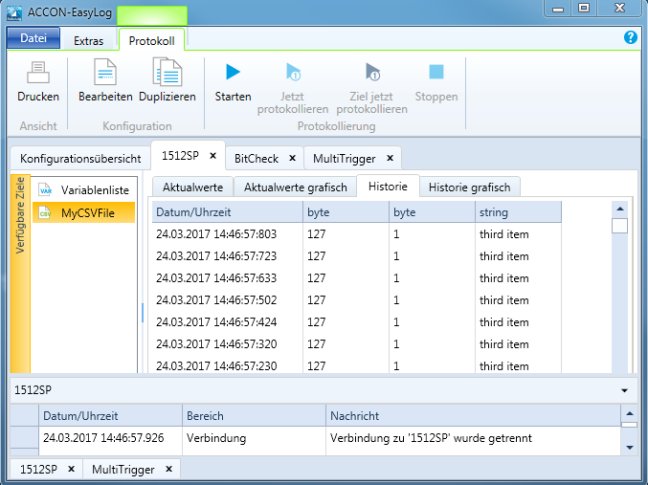
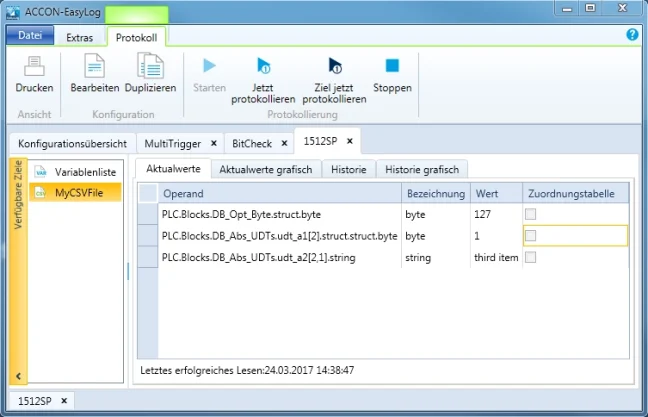


ACCON-EasyLog for data collection and storage from PLC a LOGO!

The ACCON Easy Log is ideal for fast, simple read of SIMATIC S7 / LOGO! 0BA7 / SIGMATEK data and for saving this data to a CSV file, the Arburg Management System (ALS) or an SQL database. The tool enables time-controlled and event-driven read operations. The ACCON Easy Log is a successor to the ACCON S7 Easy Log. In addition to its predecessor's capabilities, it offers some new ones, plus a modern design. The ACCON Easy Log is licensed via a hardware key. More
Code: Accon-easylog
Product is no longer available
The ACCON Easy Log is ideal for fast, simple read of SIMATIC S7 / LOGO! 0BA7 / SIGMATEK data and for saving this data to a CSV file, the Arburg Management System (ALS) or an SQL database. The tool enables time-controlled and event-driven read operations. The ACCON Easy Log is a successor to the ACCON S7 Easy Log. In addition to its predecessor's capabilities, it offers some new ones, plus a modern design. The ACCON Easy Log is licensed via a hardware key. More
Code: Accon-easylog
Product is no longer available
Product highlights 
- Support of Siemens TIA Portal V15 SP1: TIA project format * .ap15_1 (TIA module)
- Support for major SQL databases: MS SQL, MySQL, PostgreSQL and Oracle Database
- Support of the latest PLC firmware versions of the PLC families S7-1500 (FW 2.6)
- Support for the software controllers S7-CPU 1507S and S7-CPU 1505S
- Support for the PLC simulation SIMATIC S7-PLCSIM Advanced V2.0
- Support of TIA Portal multi user projects (V14, V15 and V15.1)
- For CSV files, the year can be saved with the calendar week
- Storage is possible as a CSV file without Byte Order Mark and as an ASCII text file.
- Data buffering in RAM can optionally be disabled. This allows direct feedback in the event of a fault
- Protected operation: "/ prevent_config_changes" can be used to deactivate menu items that allow a configuration change.
- Support for Windows 2008 R2, 7, 8.1, 10, 11, 2012 R2, Windows Server 2016 and 2022
- Support Siemens S5 output format floating point S5-KG
ACCON-EasyLog consists of several modules, see the following table
For proper operation, a base module + input module (at least one arbitrary variant) + output module (at least one arbitrary variant) are required. In addition, it is possible to select additional expansion modules that are no longer mandatory.
For example, the basic set for ordering is a combination of:
Basic module
+
Input module for access to S7 and LOGO! 0BA7 devices.
+
Output module for recording to CSV file
=
ordering codes 130001WUX + 130031WXX + 130061WXX.
| Order Combinations – ACCON-EasyLog | |||||||
| * Basic Module | License Extension | * Input Module | * Output Module | Graphic Module | Price (excl. VAT) |
||
| License Type | |||||||
| Basic Module (up to 32 PLC, 256 tags per 1 PLC) | 130001WUX | 330 € | |||||
| License Extension Options | |||||||
| Extension to 1024 tags per PLC | 130011WXX | 325 € | |||||
| Extension to 4096 tags per PLC | 130012WXX | 650 € | |||||
| Extension to 64 supported PLCs | 130021WXX | 325 € | |||||
| Extension to 128 supported PLCs | 130022WXX | 650 € | |||||
| Input Module | |||||||
| Access to S7 and LOGO! 0BA7 devices | 130031WXX | 105 € | |||||
| Access to S7-1200/1500 devices via TIA Portal | 130032WXX | 315 € | |||||
| Access to SIGMATEK devices | 130033WXX | 105 € | |||||
| Output Module | |||||||
| Record to CSV file | 130061WXX | 105 € | |||||
| Record to Arburg ALS system | 130063WXX | 210 € | |||||
| Record to SQL database | 130064WXX | 210 € | |||||
| Graphic Module | |||||||
| Graphical display of current and historical values | 130091WXX | 105 € | |||||
* The marked modules are the minimum necessary for the correct functionality of ACCON EasyLog.
Please, if you want to purchase individual modules to extend the functionality of a previously purchased ACCON EasyLog, please indicate the license number of the basic module you already have in your order.
The fast and simple data logger
ACCON-EasyLog continues easy operation known by his predecessor product ACCON-S7-EasyLog and also brings new possibilities in addition to a modern design. Thus ACCON-EasyLog is ideally suited to quickly and simply read and save data from the PLC. This is possible either time-controlled or event-driven.
Further you can use ACCON-EasyLog to connect your existing or new machines with an Arburg Management System (ALS) for visualizing and archiving the process data. Our long seller is constantly enhanced according to market requirements and is also available as a special customisation at a low price.
If you have a SQL server from Microsoft or a MySQL server in use, you can write your data directly into it. ACCON-EasyLog support this SQL server through the ODBC interface. You have the choice in which format you want to write your data.
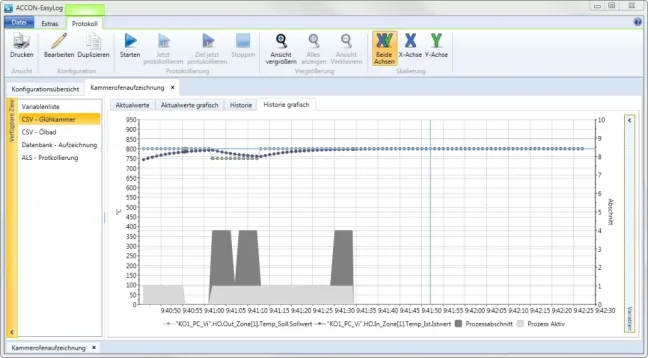
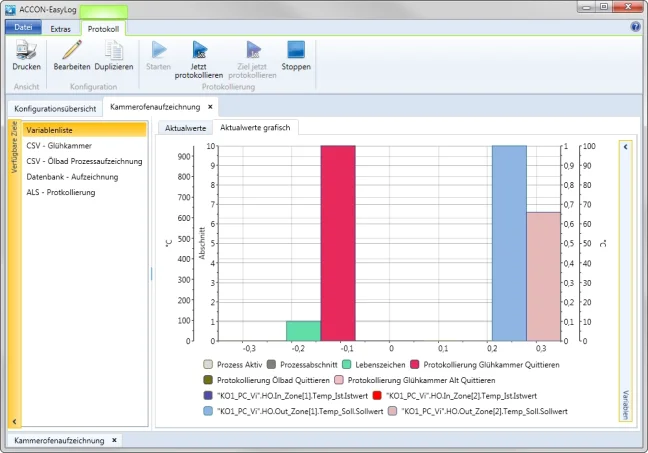
To be able to quickly identify deviations offers ACCON-EasyLog a graphical representation of the data. Thus, you can quickly pinpoint trends and can respond immediately.
As multilingual software ACCON-EasyLog offers the user interface in German or English.
Perfect fields of application
ACCON-S7-EasyLog allows the (mandatory) archiving of process data for quality assurance and quality control.
Varied ranges of application
Recording and logging of a wide variety of data and formats, e.g. logging the machine down times for documentation or logging the operating history, e.g. recording the temperatures of a cold storage house or filling levels in silos or reservoirs.
Due to the graphical representation of the data you can quickly identify whether values drift.
Convincing and varied
The data are saved as a CSV file and can then be viewed and further processed e.g. with Excel. Alternatively, or in addition to CSV logging, the data can be written to a SQL database or sent via TCP/IP to the Arburg control system for archiving. The currently read process data are displayed directly in the software ACCON-EasyLog. All common communication channels to the S7-200, S7-1200, S7-300, S7-400, S7-1500, LOGO! 0BA7 and LOGO! 0BA8 are supported. Communication to SIGMATEK controls is possible via TCP/IP.
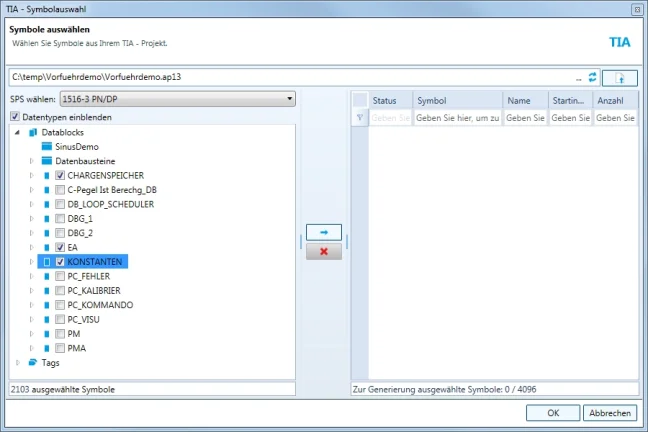
ACCON-EasyLog also supports the S7-1200/S7-1500 with optimized data access and is capable of importing symbols directly from the TIA Portal. Supported are the version 11,12 and 13.
Technical highlights
- Software easy to use
- Logging of a wide variety of data and formats
- Displaying the current and the historical values
- Display the data as a bar chart (current values) and line or area chart (historical values)
- Saving data in the CSV format
- Sending the data to the Arburg control system
- Storing the data in a Microsoft SQL database
- Storing the data in a MySQL database
- Storing the data in a Oracle Database
- Storing the data in a PostgreSQL database
- Data buffering, if writing is not possible
- Free processing and interpretation e.g. in Excel
- Time-controlled logging possible
- Event-driven logging possible
- Logging on exceeding thresholds (minimum and maximum monitoring) possible
- Archiving on occurrence or disappearance of events (edge triggered)
- Archiving while events are present (gate triggered)
- File, path and table names can contain actual values from the PLC
- File, path and table names can contain system variables (date, time, ...)
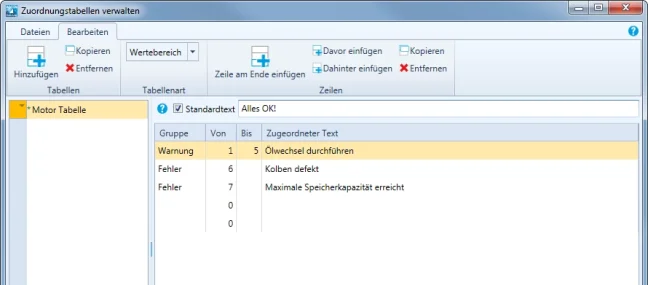
- Assignment tables (Replace values with text, i.e. for Messages)
- Shows archiving standby on the PLC via life bit (only S7)
- Time synchronization with the PLC is possible (in S7-200, S7-300 and S7-400)
- Acknowledgement to PLC possible after logging
- Supports the PLCs S7-200, S7-1200, S7-300, S7-400, S7-1500, LOGO! 0BA7 and LOGO! 0BA8 via MPI, PROFIBUS, PPI, and TCP/IP
- Supports S7-1200 and S7-1500 with symbolic access via TCP/IP and TIA project import
- Symbol import for S7-300 and S7-400 from TIA Portal project
- Supports SIGMATEK controllers via TCP/IP
- Several configurations can be active simultaneously
- Virtual variables (constant values, post processed variables) can be used
- Special customisations available for a reasonable price
- Support of Siemens TIA Portal V15 SP1: TIA project format * .ap15_1 (TIA module)
- Support for major SQL databases: MS SQL, MySQL, PostgreSQL and Oracle Database
- For CSV files, the year can be saved with the calendar week
- Storage is possible as a CSV file without Byte Order Mark and as an ASCII text file
- Data buffering in RAM can optionally be disabled. This allows direct feedback in the event of a fault
- Protected operation: "/ prevent_config_changes" can be used to deactivate menu items that allow a configuration change
- Support for Windows Server 2016
- Support Siemens S5 output format floating point S5-KG
- ACCON-AGLink implemented
| Supported Operating Systems | Windows 2008 R2, 7, 8.1, 10, 11, 2012 R2, Windows Server 2016 and 2022 |
| Hardware requirements | At least Pentium III 1.200 MHz, 1 GB RAM, 70 MB free hard disk space for software and sufficient hard disk space for log files |
| Supported PLCs | S7-200, S7-1200, S7-1500, S7-300, S7-400, S7-400H (S7-300/400 compatible PLCs, e.g. Vipa, Saia, Berthel), LOGO! 0BA7, LOGO! 0BA8, SIGMATEK through TCP/IP |
| Max. number of supported PLCs | 32, expandable to 128 |
| Max. number of variables for each PLC | 256, expandable to 1024 or 4096 |
Supported communication channels
| PLC interface | PC interface | |||
| TCP/IP | USB | RS-232 | Siemens CP | |
| S7-300/400/400H via MPI | ACCON-NetLink-PRO compact ACCON-NetLink-S7 |
ACCON-NetLink-USB compact ACCON-MPI-Adapter USB |
PC-Adapter ACCON-MPI-Adapter |
* |
| S7-300/400/400H via PROFIBUS | ACCON-NetLink-PRO compact ACCON-NetLink-S7 |
ACCON-NetLink-USB compact | PC-Adapter ACCON-MPI/PROFIBUS Modem |
* |
| S7-300/400/400H via TCP/IP (PN/IE) | * | - | - | * |
| S7-300/400/400H Modem | - | - | ACCON-MPI/PROFIBUS Modem | - |
| S7-1200/1500 via TCP/IP (PN/IE) |
* | - | - | - |
| S7-200 via PPI |
ACCON-NetLink-PRO compact ACCON-NetLink-S7 |
ACCON-NetLink-USB compact | PPI-Kabel (via S7-PC/CP) |
* |
| S7-200 via PROFIBUS |
ACCON-NetLink-PRO compact ACCON-NetLink-S7 |
ACCON-NetLink-USB compact | - | * |
| S7-200 via TCP/IP |
* | - | - | * |
| LOGO! 0BA7, LOGO! 0BA8 |
* | - | - | - |
| SIGMATEK via TCP/IP | * | - | - | - |
+ Possible without adapter
- Not possible
Available modules
| Basic module | ACCON-EasyLog basic module |
| INput modules | Module IN S7 classic for ACCON-EasyLog Module IN S7 Sigmatek for ACCON-EasyLog Module IN S7 TIA for ACCON-EasyLog |
| OUTput modules | Module OUT CSV for ACCON-EasyLog Module OUT Graphic for ACCON-EasyLog Module OUT ALS for ACCON-EasyLog Module OUT SQL for ACCON-EasyLog |
| Extensions | Module ACCON-EasyLog Cfg 64 Module ACCON-EasyLog Cfg 128 Module ACCON-EasyLog Var 1k Module ACCON-EasyLog Var 4k |
Highlighted items are mandatory.