



Talk2M Free

Free remote access via Ewon routers. One concurrent VPN connection per account. Unlimited number of routers and users, 5 concurrent mobile connections, max. 3 GB of VPN traffic and 5 million DataMailbox data points per month. The Free plan is valid for 12 months from the registration of a new device; further new registrations will renew this period. More
Code: zdarma / free of charge
Free remote access via Ewon routers. One concurrent VPN connection per account. Unlimited number of routers and users, 5 concurrent mobile connections, max. 3 GB of VPN traffic and 5 million DataMailbox data points per month. The Free plan is valid for 12 months from the registration of a new device; further new registrations will renew this period. More
Code: zdarma / free of charge
Talk2M Free is a free cloud service for occasional remote servicing via Ewon routers. It allows one active VPN connection across the entire account, five concurrent mobile connections and an unlimited number of registered routers and users. It includes up to 3 GB of VPN traffic and 5 million DataMailbox data points per month.
What does Talk2M Free offer?
- Secure remote access via an Ewon router
- No public IP; the IT administrator will authorise the necessary outbound traffic
- Simple connection via eCatcher or M2Web
- For routine servicing, diagnostics and PLC modifications
- Free for 12 months
What is the Talk2M cloud and how does it work?
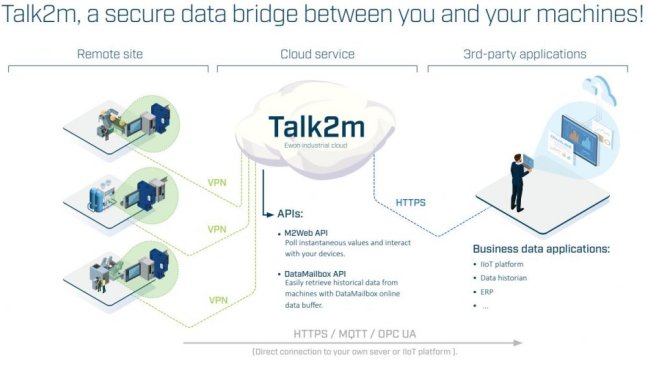
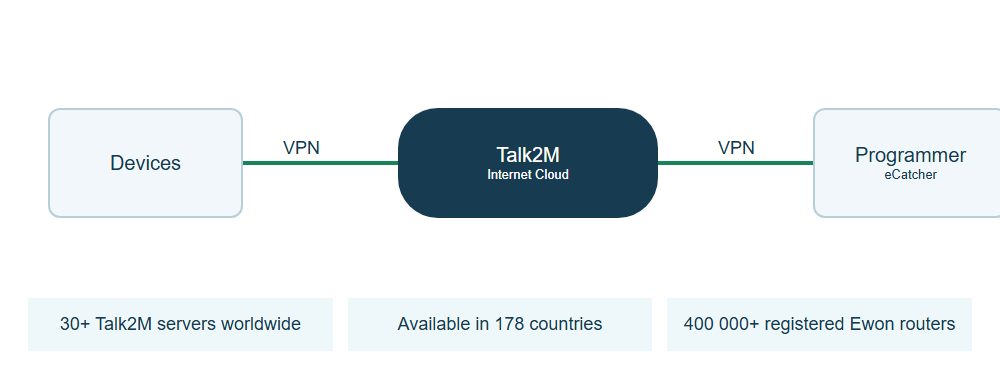
Talk2M is a cloud service provided by Ewon (HMS Networks) that ensures a secure connection between the user and remote Ewon routers.
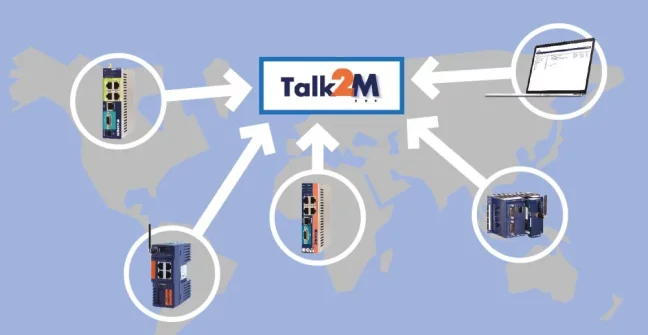
Talk2M operates a geographically distributed cloud infrastructure to connect technicians and Ewon routers. You do not need to run your own VPN server for remote servicing.
Connection mode
An Ewon router can be connected to the Talk2M service permanently or only when required. The connection can be activated, for example, by a service intervention, a digital input or according to a scheduled task. Once the task is complete, the router can be disconnected again.
User access
eCatcher for Windows is used to connect a local programming or diagnostic tool to the PLC. Portal M2Web It allows you to use supported device websites and access remote screens via VNC or RDP in your browser. Mobile access is also provided by eCatcher Mobile for Android and iOS.
Talk2M service options
Talk2M Free can be used free of charge for 12 months from the date of registering a new Ewon device to your account. Registering another new device will start a new twelve-month period. If 12 months have elapsed since the last registration, you must either register a new device or switch to the paid Light or Pro plan.
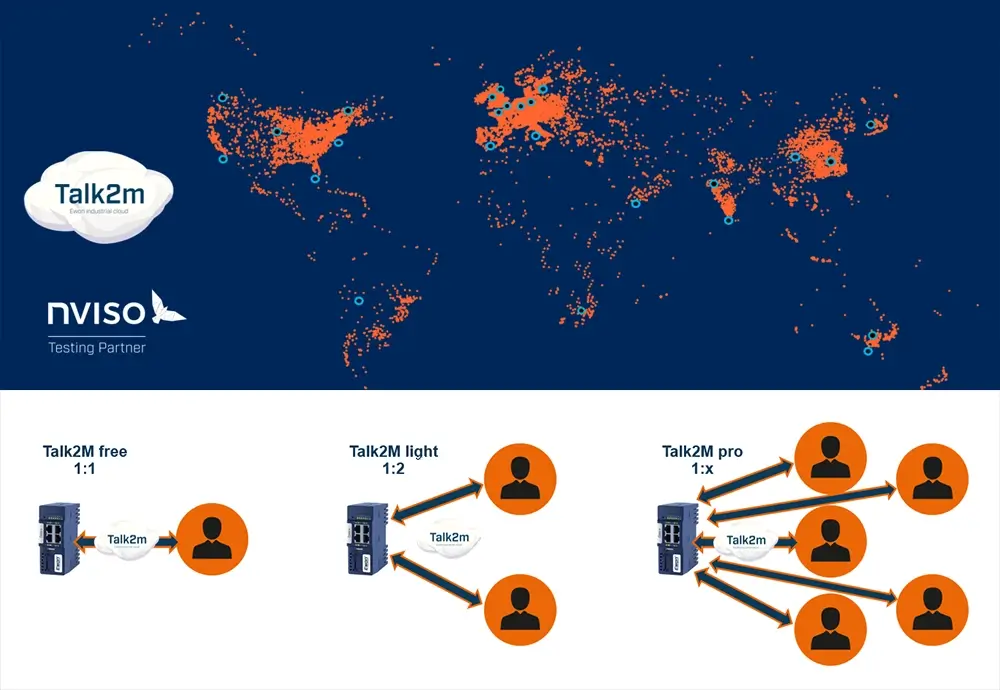
Comparison of Talk2M Free, Talk2M Light and Talk2M Pro
- Talk2M Free - one concurrent VPN connection for the entire account
- Talk2M Light - up to 2 users simultaneously within a single account, access to multiple routers
- Talk2M Pro - five VPN connections included as standard, with the option to expand and advanced access management
On a mobile, swipe the table to the side. The parameter names remain on the left.
| Parameter | Talk2M Free | Talk2M Light | Talk2M Pro |
|---|---|---|---|
| Price (EUR / month) | Free | 40 € / month | 75 € / month |
| Number of Ewon routers and users | Unlimited | Unlimited | Unlimited |
| Number of concurrent M2Web / mobile connections | 5 | 5 | Unlimited |
| Number of concurrent eCatcher VPN connections | 1 | 2 | 5 |
| Detailed control of access to Talk2M | No | No | Yes |
| Monthly VPN usage | Max. 3 GB | Max. 5 GB | 20 GB |
| SMS per month (wake-up and alarm notifications) | 0 | 50 | 50 |
| SLA - Service Level Agreement | No | Yes | Yes |
| DataMailbox per month | Up to 5 million data points | Up to 7 million data points | 10 million data points |
| Advanced user management | No | No | Yes |
| Visualisation in Talk2M | No | No | Yes |
| Centralised management of Cosy+ firmware | No | No | Yes |
| Duration of service use | 12 months from the registration of a new device to the account | Paid service for 1 year | Prepaid service based on credit usage |
Monthly prices in EUR are provided for the purpose of comparing tariffs. You can find the current price in CZK and the terms and conditions of ordering on the product pages Talk2M Light a Talk2M Pro.
How to use Talk2M
- On the machine or production line side, it is necessary to have installed Ewon router (for example Cosy+ or Flexy). Devices that will later need to be accessed remotely - typically a PLC or HMI panel - are connected to the router.
- When performing a remote intervention, the user logs into their Talk2M account, selects the relevant Ewon router and connects. The Talk2M service creates a secure VPN tunnel between the user and the remote installation.
For a direct VPN connection to local programming tools, install eCatcher for Windows. eCatcher Mobile is a separate access option for Android and iOS.
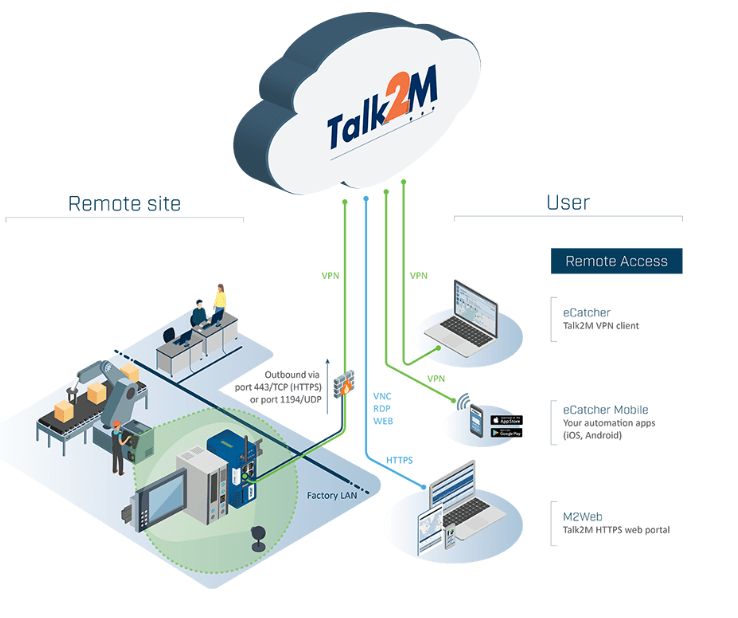
What do I need for remote management using an Ewon router?
- Ewon industrial router connected to the internet via LAN, Wi-Fi or a mobile connection
- A computer or mobile device with the eCatcher app, or access via M2Web
- Account created in the Talk2M cloud service
How do I create an account on the Talk2M cloud service?
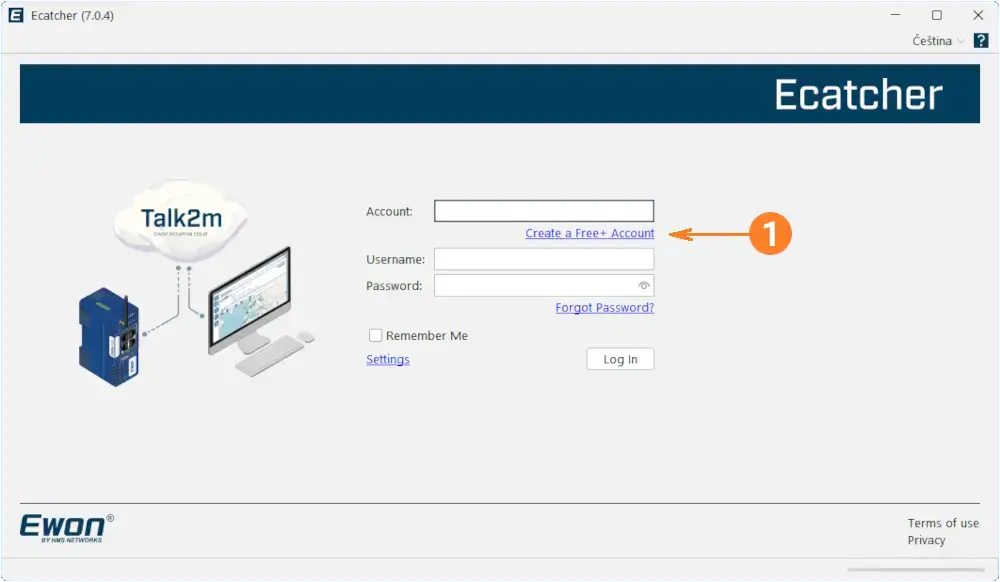
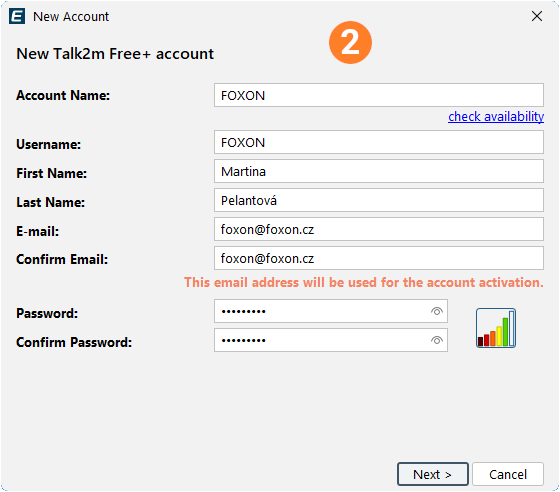
A Talk2M account is created directly within the app eCatcher. After installation, launch the app and click on the option to create an account Talk2M Free+ (1). You will then enter your account name, username, email address and password (2). You will then provide your company details and address, and confirm the terms of service. Once you have confirmed the activation email, your account is ready to use.
How do I add Ewon to my Talk2M account?
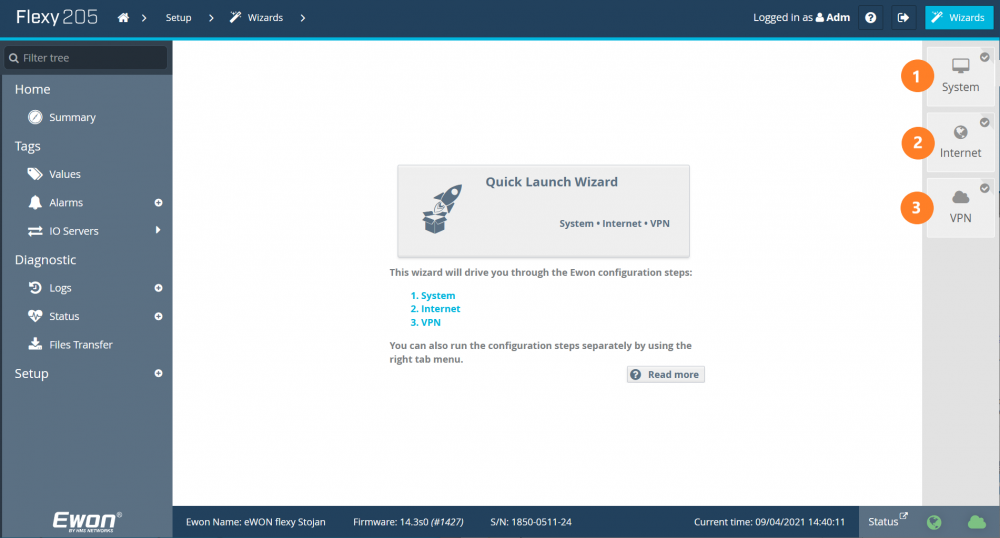
To add an Ewon router to your account, you need to connect to the device, for example using the eBuddy tool, and go through Quick Launch Wizard, i.e. the basic configuration guide. In it, you will set the router’s name and password (1), internet connection (2) and finally, use the activation key from eCatcher to pair the router with your Talk2M account (3).
How do I connect remotely to a machine using an Ewon router?
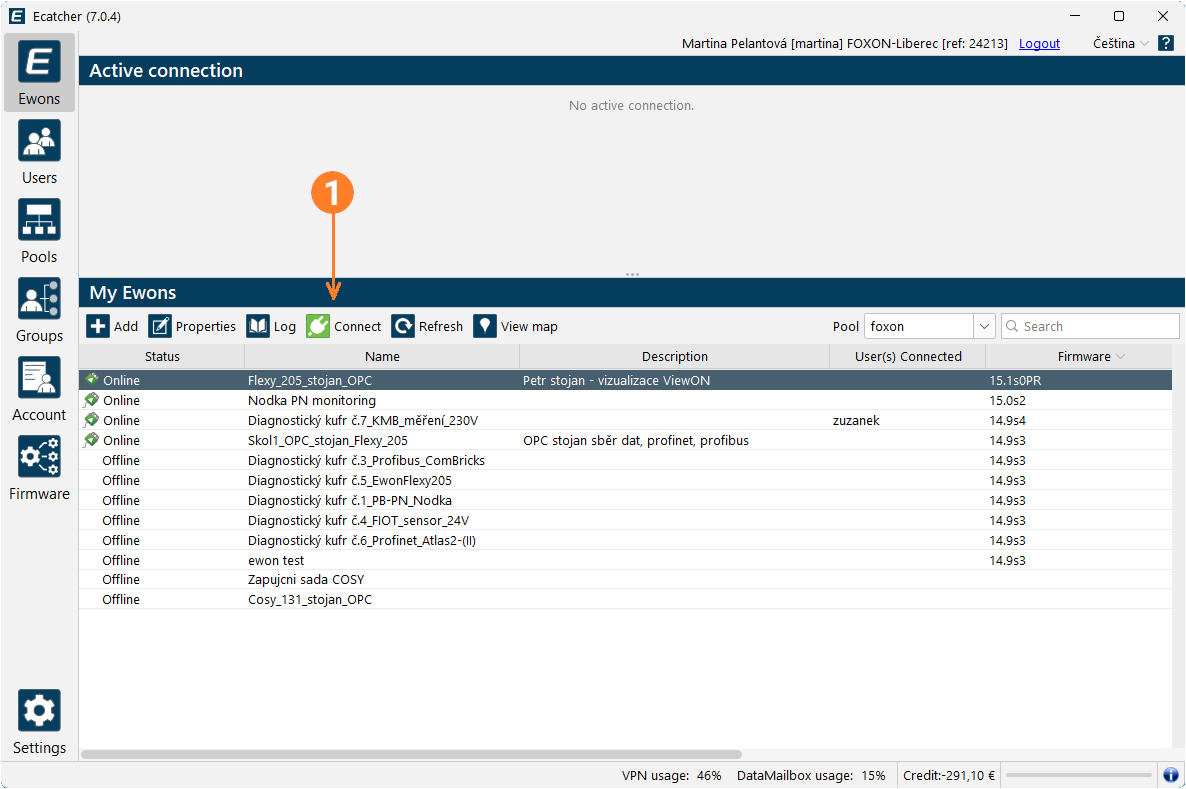
Once you have registered the router with your Talk2M account, simply run the programme on your computer eCatcher and log in with your account. Then select the relevant Ewon router and click the button Connect (1). Once a VPN connection has been established, you can connect to the device using the relevant software or via the web interface by entering its IP address.
Security and communication principles
Both the router and the computer establish an outbound connection to Talk2M. UDP 1194 or TCP 443 is used for VPN; HTTPS communication uses TCP 443. Neither a public IP address nor port forwarding for incoming traffic is required for standard connections. The IT administrator must enable the necessary outbound communication in accordance with Talk2M’s network requirements.
Create a personalised access account for each technician and enable multi-factor authentication. Configure the scope of access to devices behind the router according to service role and network configuration. For advanced organisation of users and routers into groups with different permissions, choose Talk2M Pro.
Technical specifications for Talk2M
| Compatibility with Ewon routers | Ewon routers supporting Talk2M, such as Cosy+ and Flexy. Check the connection procedure for your specific model and firmware version. |
|---|---|
| Compatibility with PLCs | Remote access to devices behind an Ewon router. The available interfaces and protocols depend on the specific router, the target device and the configuration. |
| Users | The account administrator can create, edit and delete users. Each user has their own login details. |
| Remote access (free version) | One concurrent VPN connection per account. Talk2M Free can be used free of charge for 12 months from the registration of a new Ewon device to the account. Registering another new device will start a new twelve-month period. If 12 months have elapsed since the last registration, you must either register a new device or switch to the paid Light or Pro plan. |
| VPN tunnel | Secure communication via VPN with encryption and user authentication |
| Communication ports | VPN via UDP 1194 or TCP 443; HTTPS via TCP 443. Enabling outbound communication in accordance with Talk2M requirements. |
| Firewall / network requirements | No public IP or inbound port forwarding required for standard connections; the necessary outbound communication must be authorised by IT. |
| Proxy | Talk2M also supports connection via a proxy server with authentication |
| Hosting | Professional data centres with geographically distributed infrastructure |
| Required software | eCatcher for direct VPN connections; M2Web for supported web interfaces, VNC and RDP. |
| Licence | Talk2M Free is a free version of the service intended for users of Ewon routers |
| Mobile access | The eCatcher app is also available for Android and iOS mobile devices |
Account limits and service usage
Concurrent VPN connections and included monthly data allowances are calculated for the entire account, not for each router individually.
Exceeding monthly limits
The Free and Light plans have fixed limits on VPN traffic and DataMailbox uploads. Once these limits are reached, access will be restricted until the end of the month; if you repeatedly exceed these limits, switch to the Pro plan. Monitor your status in eCatcher under ‘Credit & Contract’.
A data point is a single value of a variable at a specific point in time. Five or seven million data points therefore do not represent the same number of different PLC variables.
Guides and corporate IT access authorisation
Set up the initial connection, user permissions and network requirements for your IT. FOXON will help you choose a tariff and configure the settings.
Talk2M Free features
Capacity of the entire account
- Version / order code
- Free Talk2M account
- Number of routers and users
- Unlimited registered routers and users
- Concurrent VPN connections
- 1 concurrent VPN connection for the entire account
- Mobile access
- 5 concurrent connections via M2Web and eCatcher Mobile
- VPN traffic
- Max. 3 GB per month for the entire account
- DataMailbox upload
- Up to 5 million data points per month
- SMS
- No regular monthly allowance; SMS credit can be purchased separately
Service terms and administration
- Duration and payment
- Free is valid for 12 months after registering a new Ewon device to the account. Registering another new device starts a new twelve-month period. After 12 months since the last new registration, you must add a new device or switch to a paid plan.
- Capacity and expansion
- Fixed VPN traffic and DataMailbox limits. Switch to a paid plan for higher capacity.
- SLA
- No SLA
- Permission management
- Basic account and user management; advanced group-based access control is included in Pro
Connection and security
- Routers and target devices
- Ewon routers supporting Talk2M, such as Cosy+ and Flexy. Check interfaces and accessible devices for the exact model and configuration.
- Service tools
- For direct access from a local programming tool such as TIA Portal, use eCatcher for Windows. M2Web provides browser access to supported device web pages and screens via VNC or RDP. eCatcher Mobile is also available for Android and iOS.
- Network requirements
- A standard connection requires neither a public IP address nor inbound port forwarding. Both the router and the computer establish outbound connections to Talk2M. IT must allow the required destination addresses and communication: VPN via UDP 1194 or TCP 443 and HTTPS via TCP 443. The exact requirements are listed in the IT documentation.
- Security
- Encrypted VPN connections, individual technician accounts and multi-factor authentication. Set permissions and the network layout according to the service role.
FOXON support
We will discuss account capacity, the connection method and your IT requirements. To order credit, have the account name and reference number ready.
FAQ - Talk2M Free
Is Free free of charge forever?
Free is valid for 12 months after registering a new Ewon device to the account. Registering another new device starts a new twelve-month period. After 12 months since the last new registration, you must add a new device or switch to a paid plan.
How many technicians can connect at the same time?
One eCatcher VPN connection can be active across the entire account. This is not one connection per router. Five concurrent mobile connections via M2Web and eCatcher Mobile are included separately.
What monthly volumes are included?
Up to 3 GB of VPN traffic and 5 million DataMailbox data points per month for the entire account. Registered routers and users are unlimited.
What happens when data limits are reached?
Free has fixed limits. Once reached, the service is restricted until the end of the month. Monitor usage in eCatcher under Credit & Contract; choose Light or Pro for higher capacity.
Does Free include a regular SMS allowance?
Free does not include a regular monthly SMS allowance. For SMS via Talk2M you can purchase a pack of 250 SMS. Purchasing SMS does not increase data limits or extend the free period.
When should I switch to Light or Pro?
FOXON offers Light as a paid annual service with two VPN connections and higher limits. Pro adds more capacity and advanced group permissions. The number of registered routers alone does not require a switch to Pro.
Which routers and devices does the service work with?
With Ewon routers supporting Talk2M, such as Cosy+ and Flexy. Access to a PLC, HMI or industrial PC depends on the interfaces supported by the router, the target device and the configuration. Check compatibility for the exact model and firmware.
How do I set up the account and router?
Create the account in eCatcher. Connect the router to the Internet and use its wizard to link it to the account, for example with an activation key from eCatcher. Detailed instructions are available in the Ewon guides.
Will M2Web replace eCatcher when programming PLCs?
For direct access from a local programming tool such as TIA Portal, use eCatcher for Windows. M2Web provides browser access to supported device web pages and screens via VNC or RDP. eCatcher Mobile is also available for Android and iOS.
What connections must corporate IT allow?
A standard connection requires neither a public IP address nor inbound port forwarding. Both the router and the computer establish outbound connections to Talk2M. IT must allow the required destination addresses and communication: VPN via UDP 1194 or TCP 443 and HTTPS via TCP 443. The exact requirements are listed in the IT documentation.
How do I configure secure access?
Create individual access for every technician, enable multi-factor authentication and restrict permissions according to the service role. Review the network design and remote access rules with IT. Pro provides advanced separation of teams and routers into groups with different permissions.
Is the remote connection speed guaranteed?
Speed depends on the Internet connections of both the machine and the technician, network load and conditions along the route. When designing the connection, also consider the data plan of the SIM card or local Internet provider.
What do DataMailbox data points mean?
A data point is the value of one variable at a particular time. The monthly volume therefore does not represent the number of distinct PLC variables. DataMailbox temporarily stores historical data sent from Flexy and read by a downstream application via the DMWeb API; it is a different service from a direct VPN connection.
FOXON support
We will discuss account capacity, the connection method and your IT requirements. To order credit, have the account name and reference number ready.
How to Meet NIS2 Requirements: Secure Remote Access with Ewon Routers and W&T Firewalls
The European NIS2 directive introduces new obligations for companies in protecting against cyber threats. Below, we compare these requirements with the technical measures in IEC 62443 and show how to meet them easily using Ewon industrial routers, the secure Talk2M cloud service, and firewalls from the German manufacturer W&T.
How to upgrade from Talk2M free to Talk2M light or pro and add Ewon routers
Do you use one or more Talk2M free accounts? Have you found that this solution is no longer enough and that you need Talk2M light or Talk2M pro? This guide will show you:
- how to upgrade your existing Talk2M free account to Talk2M light or Talk2M pro,
- how to import Ewon devices from one or more Talk2M free accounts into the upgraded account,
- how to create a group of routers in the upgraded account and assign users to it, including access rights.
The New LIGHT Account Type in Talk2M on Ewon Routers Is a Happy Medium
The Talk2M cloud service allows EWON router users to easily and securely connect to their devices/machines remotely via the Internet from anywhere in the world. Until now, two types of service have been available – Talk2M free and Talk2M pro. From 2 May 2024, a new, affordable account type – Talk2M light – will be available. In addition, the rules for the free account will change.
TALK2M Free, Light or Pro? Which service should you choose for Ewon devices, and why?
Do you use Ewon Cosy or Flexy routers for remote management and are you wondering which Talk2M remote access service is right for you? We’ve put together a few points to help you decide.
Highlighted items are mandatory.

250 SMS messages included with Talk2M Free, Light and Pro accounts
90,75 EUR Incl. VAT
Related products1
250 SMS messages included with Talk2M Free, Light and Pro accounts
90,75 EUR Incl. VAT