

Wireless PROFINET on 2.4 GHz Bluetooth
DATAEAGLE 473x · Bluetooth 5 · 2.4 GHz
Configure Wireless PROFINET in Three Steps
The DATAEAGLE 473x system transmits PROFINET and industrial Ethernet wirelessly between fixed and moving parts of a machine. First select the unit design, then the communication option and finally the number of transmitters and receivers.
- Bluetooth 5 in the 2.4 GHz band
- Typical range of 100 to 300 metres
- Compact IP20 or X-treme IP65
- Point-to-Point, Multipoint and PROFIsafe
Select the Basic Module
Choose the Compact IP20 version for control-cabinet installation or the robust X-treme IP65 version for direct installation on the machine.
Step 1 – select moduleSelect Communication
Choose PROFINET or EtherNet/IP transmission, Point-to-Point or Multipoint topology and, where required, a version supporting safety protocols.
Step 2 – select communicationSelect the System Configuration
Specify the number of wireless units according to the application topology, for example one transmitter and one to four receivers.
Step 3 – select configurationSend us the network topology, number of devices, required range and whether you need PROFINET, PROFIsafe or Multipoint.
How should DATAEAGLE 473x be selected and what should be considered during design?
Compact or X-treme?
What Must Be Defined During Design?
- PROFINET or EtherNet/IP
- Standard or safety communication
- Point-to-Point or Multipoint
- Number of connected devices
- Range and direct line of sight
- Antenna location and type
- IP20 cabinet or IP65 environment
- Power supply for each unit
For a Multipoint system, all wireless units should remain permanently powered to ensure the fastest communication response. If parts of the machine are regularly switched off, it may be more suitable to divide the application into several independent wireless systems.
Configure Wireless PROFINET in Three Steps
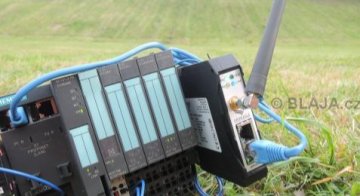
Test of Schildknecht wireless PROFINET solution between SIMATIC S7-1200 and ET 200S
We will test the wireless DATAEAGLE Bluetooth (2.4 GHz) PROFINET IO solution from Schildknecht. We will show how to configure these modules using a PC and you will see that it really couldn’t be any easier. Everything is also available online in a video demonstration.
Question or Inquiry
Highlighted items are mandatory.