

9015-8GT2GS-I - VOLKTEK industrial managed switch, 8× Gigabit RJ45 + 2× SFP


9015-8GT2GS-I - VOLKTEK industrial managed switch, 8× Gigabit RJ45 + 2× SFP
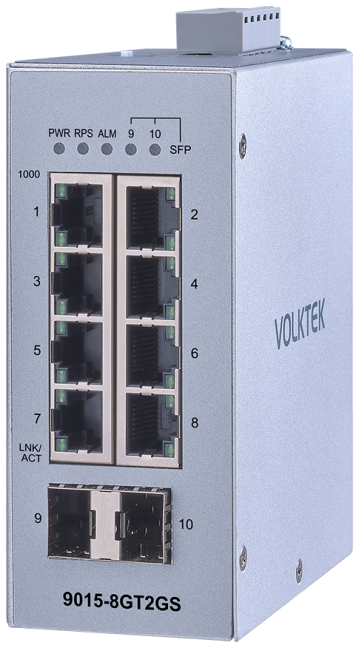
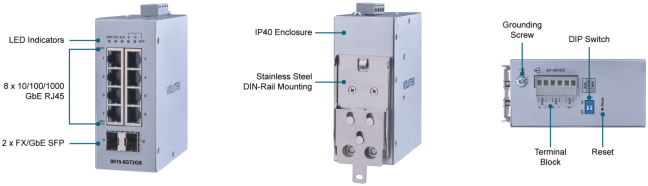
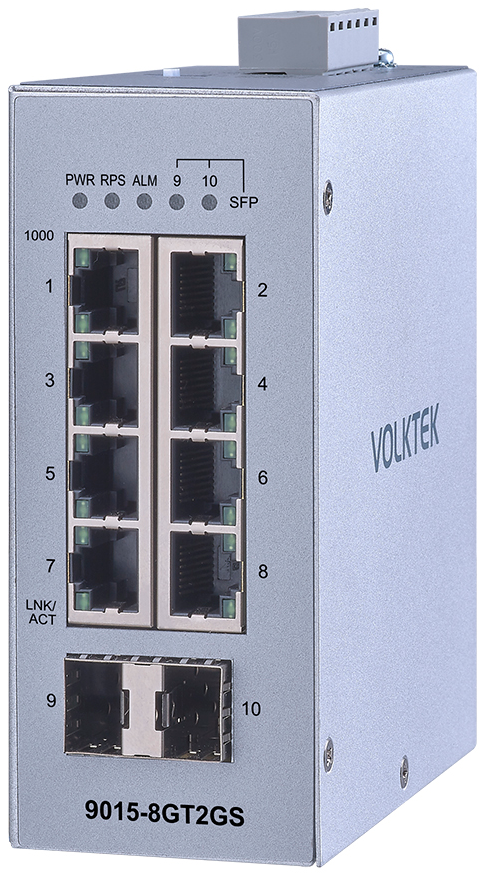
8× RJ45 and 2× SFP.
Management and software monitoring
Industrial managed switch with eight Gigabit RJ45 ports and two 100/1000 Mbit/s SFP slots. It provides web and CLI management, VLAN, QinQ, LACP and Modbus TCP. SSH, HTTPS, SNMPv3 and TACACS+ enable management access control. Two 24-48 V DC inputs, IP40 housing and operation from -40 to +75 °C.
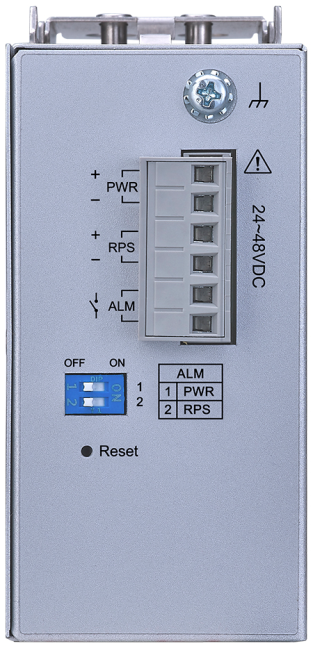
2 DIP switches for power alarms.
Enable monitoring of the primary PWR and redundant RPS inputs separately. Configure ports, VLANs and other network functions through the web interface or CLI.
We’ll select a switch for your industrial network
We can help you choose the right model and power supply. We will confirm the price, current stock availability and delivery date.
Managed Ethernet for machines and control cabinets
9015-8GT2GS-I connects PLCs, HMIs and industrial computers. Adapt VLANs, communication priorities and redundant network paths to the application. Two SFP slots allow optical uplinks to be selected according to fiber type and required distance.
Topology map
Topology Map shows connected devices and network connections. It helps operators understand the network layout.
Web and CLI management
Configure the switch in a web browser or through the command line. Use HTTPS and SSH for secure access.
Technical specifications
| Order reference | VOLKTEK 9015-8GT2GS-I |
|---|---|
| Model | Industrial managed switch |
| Copper ports | 8× 10/100/1000BASE-T, RJ45 connector |
| Optical interface | 2× SFP slot for 100/1000 Mbit/s |
| Automatic adaptation | Auto-negotiation and Auto MDI/MDI-X on all copper ports |
| Switching capacity | 20 Gbit/s |
| MAC address table | 8K entries |
| Jumbo frames | 10 Kbytes |
| Management and monitoring | Web interface, CLI, SSH, HTTPS, SNMP v1/v2c/v3, Syslog, LLDP, Modbus TCP |
| Configuration | Configuration backup and restore; firmware updates; remote reboot; port settings |
| VLAN | IEEE 802.1Q VLAN, Management VLAN, port isolation, MAC-based VLAN, QinQ |
| Network redundancy | STP/RSTP, ERPS v1/v2, Dual Homing |
| Link aggregation | LACP, Static Trunk |
| Traffic control | QoS, Flow Control, Storm Control, IGMP Snooping, rate limiting |
| Access security | IEEE 802.1X, TACACS+, ACL, Port Security, DHCP Snooping |
| DHCP services | DHCP Client, Relay and Option 82 |
| Power supply | Two inputs: primary PWR and redundant RPS, each 24-48 V DC |
| Power connection | 6-pole PWR/RPS/ALM terminal block |
| Power consumption | Max. 11 W |
| Alarm output | 1 relay contact, rated at 1 A at 24 V DC |
| DIP switches | 2 switches to enable or disable PWR and RPS alarms |
| Topology map | Topology Map |
| Signalling | PWR, RPS, ALM, SFP, 1000 and LNK/ACT |
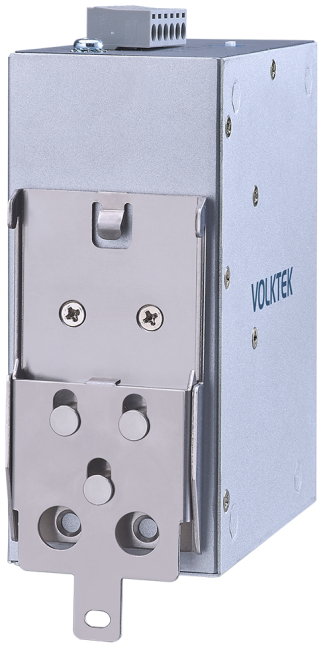
| Housing and installation | IP40 metal housing; DIN rail mounting |
| Operating temperature | -40 to +75 °C |
| Storage temperature | -40 to +85 °C |
| Relative humidity | 5-95 %, non-condensing |
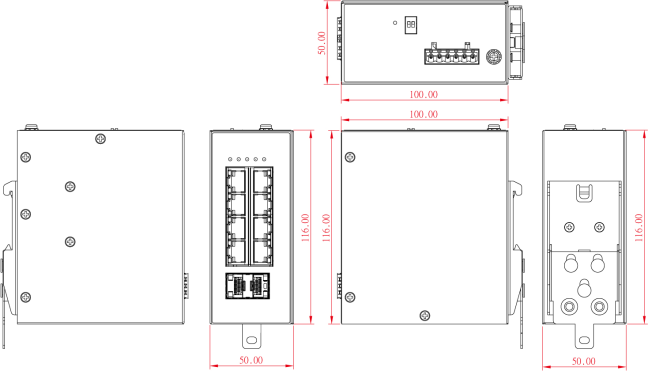
| Dimensions (width × height × depth) | 50 × 116 × 100 mm |
| Weight | 550 g |
Management, network functions and security
VLAN and QinQ
IEEE 802.1Q VLAN and port isolation organize communication within the network. QinQ supports frames with nested VLAN tags.
Network redundancy
STP/RSTP, ERPS and Dual Homing support redundant network paths. Adapt the settings to the topology and other devices.
LACP link aggregation
Combine multiple physical links into one logical group. Configure the aggregation settings on the remote device as well.
Authentication and access control
Use SSH, HTTPS and SNMPv3 for management. IEEE 802.1X, TACACS+, ACL and DHCP Snooping help control access and protect communication.
IGMP Snooping
Limit multicast forwarding to interested ports. This helps reduce load on other links.
Monitoring and configuration
SNMP, Syslog and Modbus TCP provide switch status information to supervisory systems. Configuration can be backed up and restored; DHCP Relay and Option 82 are also supported.
Power supply, alarm and DIP switches
PWR and RPS each accept 24-48 V DC. If one power supply fails, the other powers the switch. The relay alarm can signal a monitored power supply fault in the control cabinet.
Main input monitoring
DIP switch 1 enables or disables the main PWR supply alarm.
Redundant input monitoring
DIP switch 2 enables or disables the redundant RPS supply alarm.
The alarm contact is rated at 1 A at 24 V DC and opens when a monitored fault occurs. The two power inputs do not store energy; use a separate backed-up supply to bridge a complete mains power failure.
Interfaces and installation
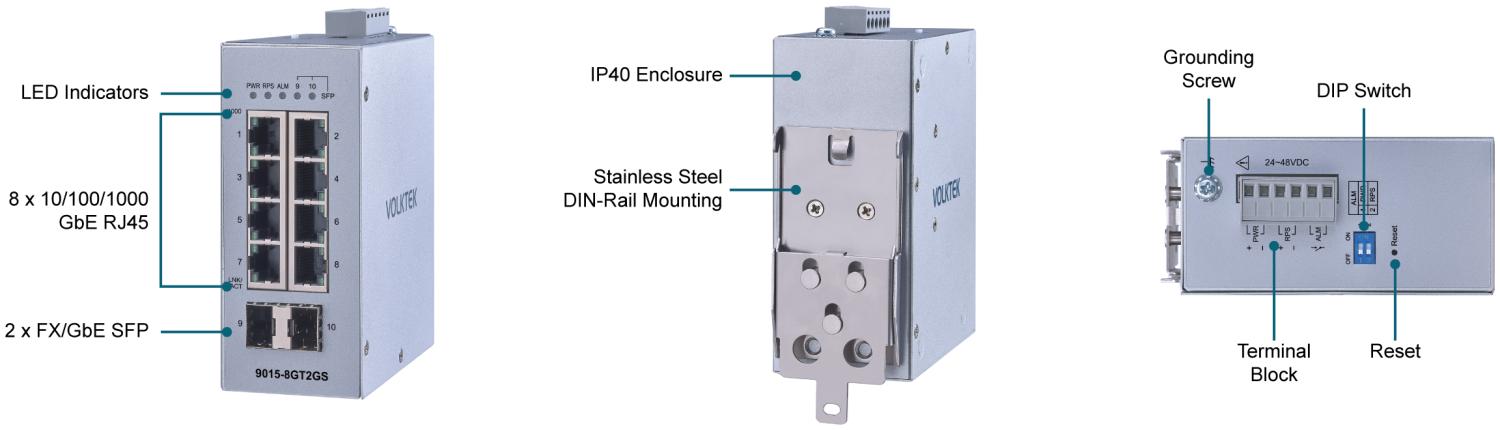
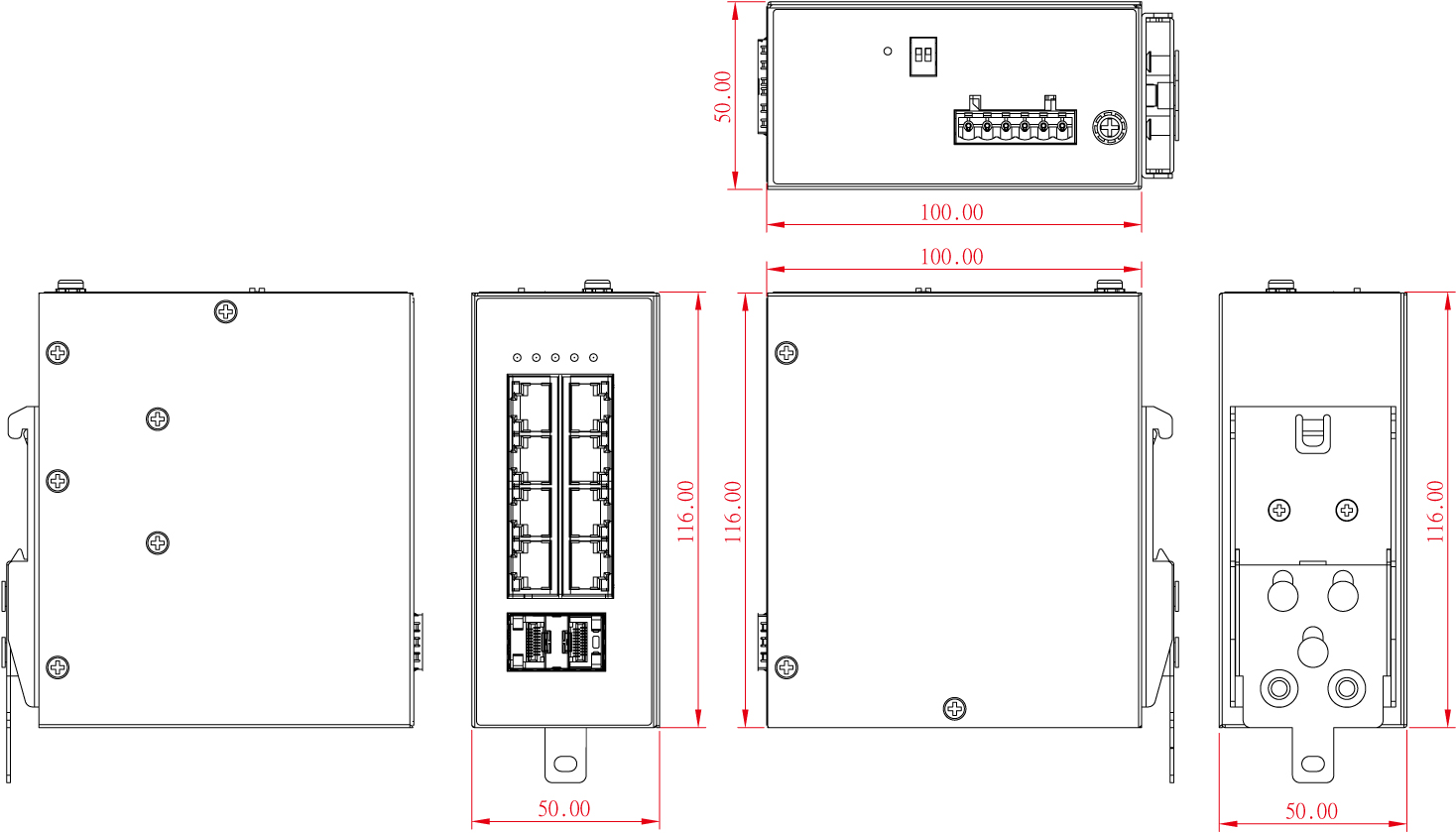
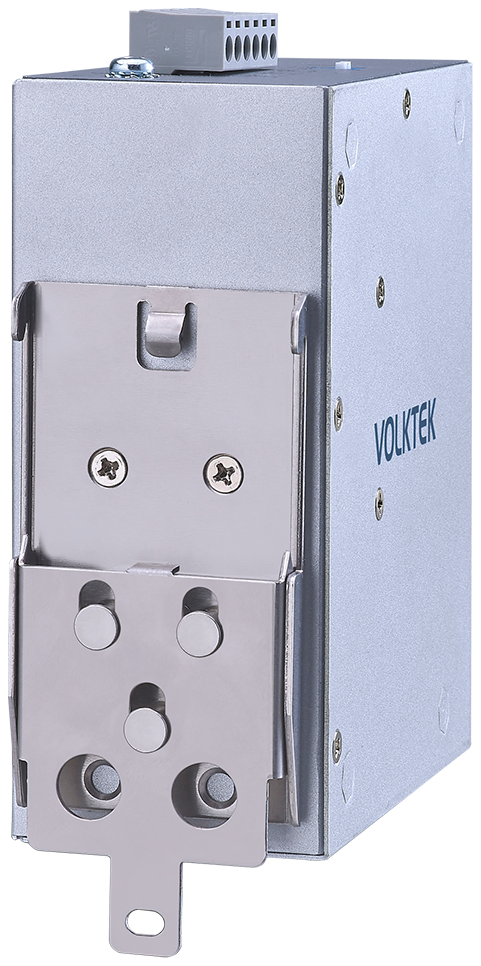
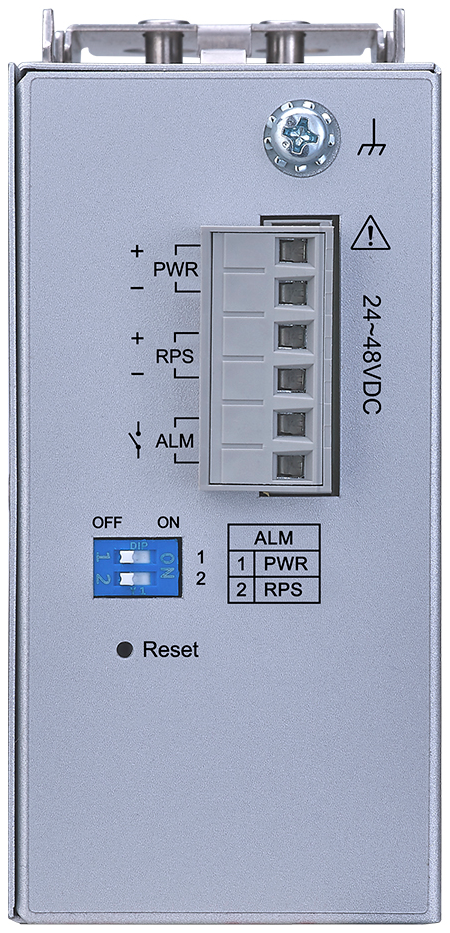
IP40 does not protect against water. Use a 24-48 V DC SELV supply, grounding and Category 5e or higher Ethernet cabling. Leave at least 50 mm at the sides and between switches for ventilation.
Contents of the package
- 1× VOLKTEK 9015-8GT2GS-I industrial switch
- 1× DIN rail mounting kit
- 1× brief installation guide
The power supply and SFP modules are ordered separately.
Documents to download
Original manufacturer documentation in English. All files are also available in the Downloads tab.
Industrial Ethernet videos
Official VOLKTEK videos explain Ethernet principles, DHCP and the industrial networking portfolio. These are general demonstrations; functions and interfaces vary by model. The videos are in English.
Ethernet switches and their applications
DHCP in an Ethernet network
VOLKTEK’s industrial portfolio
Frequently Asked Questions
Which management functions does the switch offer?
Configure the network through the web interface or CLI. VLAN, QinQ, QoS, STP/RSTP, ERPS and LACP link aggregation are available. Use SNMP and Modbus TCP for monitoring; access can be controlled through 802.1X, TACACS+ and ACL.
How do I start configuration?
Connect a computer to an Ethernet port and open the default address 192.168.0.254. Set the addressing for your network and change the default login credentials. Prepare VLAN, redundancy and access permissions before connecting to the production network.
What is Modbus TCP used for?
After the service is enabled, the switch provides operating and status data via Modbus TCP for a monitoring system. The user manual contains the register overview and communication settings.
How do the backup power supply and alarm work?
Connect two 24-48 V DC supplies to PWR and RPS. If one fails, the switch remains powered by the other. The DIP switches independently enable each input alarm. A monitored fault opens the 1 A / 24 V DC relay contact. Use a separate backup supply to bridge a complete mains outage.
Are SFP modules included?
The SFP interface supports modules for 100BASE-FX and Gigabit Ethernet. SFP modules are selected separately according to the remote device, fiber type, distance and operating temperature. The RJ45 ports do not provide PoE power.
What’s included in the pack, and can you help me choose accessories?
The package contains one 9015-8GT2GS-I switch, a DIN rail mounting kit and a quick installation guide. The power supply and SFP modules are selected separately. We advise on power, wiring and initial setup for your application.
Why buy from FOXON?
We are a VOLKTEK distributor. We supply new, genuine products and assist with their selection and use in industrial networks.
New products with a warranty
We supply the 9015-8GT2GS-I as a new, genuine VOLKTEK switch with a warranty and manufacturer documentation.
Technical support
We can advise you on selecting a switch, power supply and accessories. We will discuss the wiring and requirements of your application.
Stock availability and delivery
We will check current stock availability and confirm the price and estimated delivery date before you place your order.
Pre-purchase consultation
We help select a model based on device count, transfer speed, power supply and operating conditions. We will discuss network management, VLAN and traffic monitoring requirements.
Delivery of the 9015-8GT2GS-I switch
A new, original VOLKTEK product. This offer is for model 9015-8GT2GS-I. Price, current stock availability and accessories are confirmed on enquiry.
Industrial networking consultancy
Please describe the connected devices, the number of ports required and the desired communication speed. We will discuss power supply, the control cabinet environment and network management requirements. We will help you select a suitable VOLKTEK switch and the necessary accessories.
Enquiry for 9015-8GT2GS-I
Send us the required quantity, connected devices, power supply and network management requirements. We will prepare a quotation for a new switch and help select the accessories.
We’ll select a switch for your industrial network
We can help you choose the right model and power supply. We will confirm the price, current stock availability and delivery date.
Technical specifications of the 9015-8GT2GS-I
| Order reference | VOLKTEK 9015-8GT2GS-I |
|---|---|
| Model | Industrial managed switch |
| Copper ports | 8× 10/100/1000BASE-T, RJ45 connector |
| Optical interface | 2× SFP slot for 100/1000 Mbit/s |
| Automatic adaptation | Auto-negotiation and Auto MDI/MDI-X on all copper ports |
| Switching capacity | 20 Gbit/s |
| MAC address table | 8K entries |
| Jumbo frames | 10 Kbytes |
| Management and monitoring | Web interface, CLI, SSH, HTTPS, SNMP v1/v2c/v3, Syslog, LLDP, Modbus TCP |
| Configuration | Configuration backup and restore; firmware updates; remote reboot; port settings |
| VLAN | IEEE 802.1Q VLAN, Management VLAN, port isolation, MAC-based VLAN, QinQ |
| Network redundancy | STP/RSTP, ERPS v1/v2, Dual Homing |
| Link aggregation | LACP, Static Trunk |
| Traffic control | QoS, Flow Control, Storm Control, IGMP Snooping, rate limiting |
| Access security | IEEE 802.1X, TACACS+, ACL, Port Security, DHCP Snooping |
| DHCP services | DHCP Client, Relay and Option 82 |
| Power supply | Two inputs: primary PWR and redundant RPS, each 24-48 V DC |
| Power connection | 6-pole PWR/RPS/ALM terminal block |
| Power consumption | Max. 11 W |
| Alarm output | 1 relay contact, rated at 1 A at 24 V DC |
| DIP switches | 2 switches to enable or disable PWR and RPS alarms |
| Topology map | Topology Map |
| Signalling | PWR, RPS, ALM, SFP, 1000 and LNK/ACT |
| Housing and installation | IP40 metal housing; DIN rail mounting |
| Operating temperature | -40 to +75 °C |
| Storage temperature | -40 to +85 °C |
| Relative humidity | 5-95 %, non-condensing |
| Dimensions (width × height × depth) | 50 × 116 × 100 mm |
| Weight | 550 g |
Frequently asked questions about the 9015-8GT2GS-I
Which management functions does the switch offer?
Configure the network through the web interface or CLI. VLAN, QinQ, QoS, STP/RSTP, ERPS and LACP link aggregation are available. Use SNMP and Modbus TCP for monitoring; access can be controlled through 802.1X, TACACS+ and ACL.
How do I start configuration?
Connect a computer to an Ethernet port and open the default address 192.168.0.254. Set the addressing for your network and change the default login credentials. Prepare VLAN, redundancy and access permissions before connecting to the production network.
What is Modbus TCP used for?
After the service is enabled, the switch provides operating and status data via Modbus TCP for a monitoring system. The user manual contains the register overview and communication settings.
How do the backup power supply and alarm work?
Connect two 24-48 V DC supplies to PWR and RPS. If one fails, the switch remains powered by the other. The DIP switches independently enable each input alarm. A monitored fault opens the 1 A / 24 V DC relay contact. Use a separate backup supply to bridge a complete mains outage.
Are SFP modules included?
The SFP interface supports modules for 100BASE-FX and Gigabit Ethernet. SFP modules are selected separately according to the remote device, fiber type, distance and operating temperature. The RJ45 ports do not provide PoE power.
What’s included in the pack, and can you help me choose accessories?
The package contains one 9015-8GT2GS-I switch, a DIN rail mounting kit and a quick installation guide. The power supply and SFP modules are selected separately. We advise on power, wiring and initial setup for your application.