

How to capture sporadic faults on Siemens S7 PLCs
Sporadic faults are among the most difficult issues to solve in automation. Most of the time, the machine works correctly, but once in a while there is a failure, an incorrect sequence, an unexpected state or a technology stop. When the technician connects online to the PLC, the problem is often no longer visible.
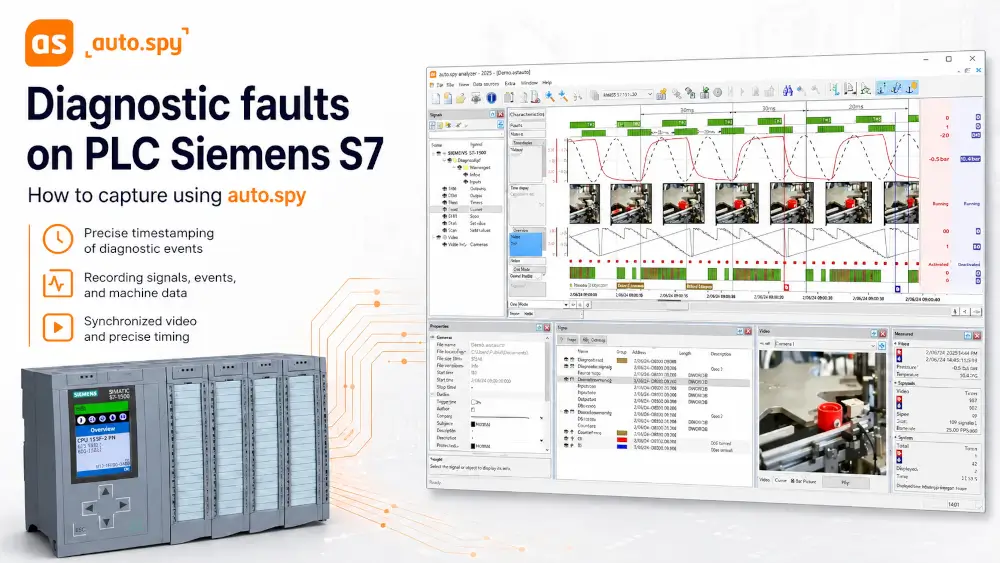
auto.spy analyzer helps solve these situations by creating a time-based recording of signals from the PLC and other data sources. The technician can return to the event afterwards and evaluate what happened before, during and after the fault.
Why online diagnostics is often not enough
Standard online monitoring of PLC values mainly shows the current state. If the fault lasts only for a short time, appears irregularly or is acknowledged by the operator in the meantime, the technician often sees only its consequences.
A typical scenario is a call from the operator saying that the machine stopped a few minutes ago. After connecting to the PLC, however, all values are back to normal and it is not clear which signal caused the problem.
Such situations may look like this:
- the machine stops once every few hours or days without an obvious cause,
- part of a sequence occasionally does not run correctly,
- a sensor signal briefly drops out, but works normally during inspection,
- a drive or valve reacts later than the PLC program expects,
- the fault is caused by a combination of several signals that cannot be reliably monitored manually.
Without a time-based recording, the technician is often just guessing blindly what actually happened before the fault.
Time-based recording instead of assumptions
auto.spy enables selected signals from the PLC and other data sources to be recorded into a time-based trace. The technician is therefore not limited to the current state of the machine, but can return to the entire event afterwards, compare the individual value trends and determine which signal changed first and what followed.
It often turns out that the originally suspected signal was only a consequence of the fault and that the real cause occurred a moment earlier somewhere else.
The measured data can also be used not only when fixing the fault, but also as a basis for a service report, communication with the machine manufacturer or internal documentation.
One recording for PLC data, video and external measurements
PLC data alone is sometimes not enough. The PLC may send the command correctly, but the mechanical part of the machine may react late, differently than expected, or not react at all.
Depending on the license used, the recording can therefore also include video from an IP or USB camera, data from an OPC server, or externally measured analog and digital signals. All information is then evaluated on a common time axis. The technician can compare the PLC signal trends with the actual behavior of the machine.
Two levels of recording precision
For Siemens SIMATIC S7 PLCs, two basic recording methods can be used. The manufacturer refers to them as polling-precise and cycle-precise. In Czech, it is more practical to describe them as recording with precision at the sampling instant and recording with precision to one PLC cycle.
Recording with precision at the sampling instant
This method reads values from the PLC by repeatedly polling them from the computer. It is mainly suitable for monitoring operating states, analog values, trends and for service diagnostics of common faults. The advantage is simple deployment. It is usually not necessary to modify the PLC program.
Recording with precision to one PLC cycle
This method is intended for fast events where it is necessary to determine the exact order of changes in individual signals in the PLC program. It is used, for example, for analyzing fast sequences, monitoring bit edges, verifying the sequence of conditions in the program or finding faults that would be missed by standard sampling.
For Siemens S7-1200 and S7-1500 PLCs, this type of recording may require a corresponding version of STEP 7 TIA Portal and TIA Portal Openness.
When standard recording is enough and when PLC-cycle precision is needed
| Situation | More suitable method |
|---|---|
| Monitoring temperature, pressure or other analog values | Recording with precision at the sampling instant |
| Longer-term service monitoring of operation | Recording with precision at the sampling instant |
| Analysis of a fast PLC program sequence | Recording with precision to one PLC cycle |
| Finding a short signal dropout | Recording with precision to one PLC cycle |
| Analysis of the order of changes in individual bits | Recording with precision to one PLC cycle |
| Comparing PLC data with video | Depending on the application |
Support for Siemens SIMATIC S7 PLCs
auto.spy supports data recording from Siemens SIMATIC S7-300/-400/-1200/-1500 PLCs. The specific options depend on the PLC type, communication used, selected driver and required recording precision.
For older S7-300/-400 systems, the main points are often the connection method, communication interface type and availability of symbolic information. For newer S7-1200/-1500 systems, the TIA Portal environment, project settings and secure communication requirements are also important.
Analyzing the recording after the fault
After the event has been captured, the recording can be opened in auto.spy analyzer and analyzed in detail. Signals can be displayed in a graph or table, specific states can be searched for, important moments can be marked, and time differences can be measured using cursors.
In practice, this means that the technician can, for example, accurately compare the moment when a PLC output changed with the reaction of a sensor or another monitored signal, move a few seconds back and find out what changed first. This often significantly reduces the time needed to find the root cause of the problem.
When auto.spy makes the most sense
auto.spy is not primarily intended for long-term storage of production data or standard trend monitoring in a SCADA system. It makes the most sense as a diagnostic tool for situations where a specific problem needs to be captured and analyzed afterwards.
Typical cases include situations where:
- the fault appears only occasionally and cannot be reliably reproduced,
- online diagnostics does not provide enough information,
- you need to determine the order of changes in individual signals,
- PLC data must be compared with video or external measurements,
- you are dealing with fast events that standard trends may not capture,
- you need a portable diagnostic tool without building an extensive data acquisition system.
Demo version and viewer
Try auto.spy for free in demo mode. The demo version includes all the features of the full version, but is limited in terms of the number of data sources, the number of signals recorded and displayed, and the length of video recordings. You can easily download the software directly from the product page in our online store.
A free auto.spy viewer is also available for viewing already created recordings. If auto.spy is only needed to open and view recordings, the viewer may be sufficient. To create new recordings, however, a full analyzer license and the corresponding driver are required.
Note on the AutoSPY name
The software was previously known as AutoSPY or AutoSPY Analyzer. Since version 2025.1, the manufacturer has used the new name auto.spy analyzer. The older name may therefore still appear in older documentation, licenses, projects or search results.
Do you need to capture a fault that cannot be reproduced?
Send us the PLC type, communication method and a short description of the problem to podpora@foxon.cz. We will help you choose the right auto.spy analyzer version and the corresponding drivers for your application.
Question or Inquiry
Highlighted items are mandatory.
Recommended products1

auto.spy - software for diagnostics of SIMATIC S7-300/-400/-1200/-1500 and S5 PLCs, OPC UA/DA data and camera recordings
from 713,90 EUR Incl. VAT