

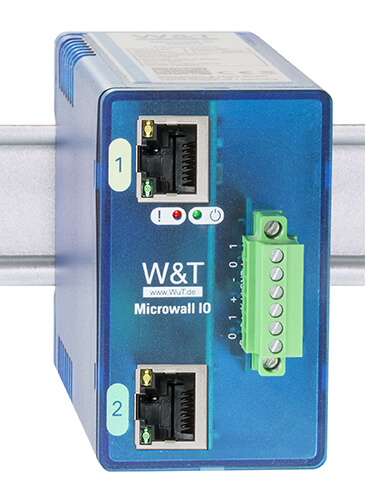
Microwall IO - Firewall router with VPN and digital IO

An industrial solution for creating a VPN connection with a whitelist-based firewall. This allows it to be used not only for remote connections, but also to separate devices that do not have, for example, the latest OS from the rest of the network. In addition, it has digital I/O that can be used to set up certain device functions. More
Code: 55212
An industrial solution for creating a VPN connection with a whitelist-based firewall. This allows it to be used not only for remote connections, but also to separate devices that do not have, for example, the latest OS from the rest of the network. In addition, it has digital I/O that can be used to set up certain device functions. More
Code: 55212
Microwall IO for machine network segmentation and remote access
The W&T Microwall IO 55212 isolates the machine network from the corporate network using a router, firewall and WireGuard VPN. Two Gigabit interfaces support standard routing and NAT; only explicitly configured connections are permitted. Two digital inputs and two outputs enable local control and signalling.
Do you need to select or order the W&T 55212?
Please send us the required quantity and a description of the wiring configuration. We will check availability and suitable accessories.
Usage
It is used to connect a machine or a separate technological network to the corporate infrastructure and for controlled remote servicing. In NAT mode, it is also possible to connect multiple separate networks with the same internal IP ranges.
Technical specifications for W&T 55212
| Network interface | 2x 100/1000BaseT with auto-detection/Auto-MDIX RJ45 IPv6 on request |
|---|---|
| Digital outputs | 2× digital outputs, 6–30 V, 500 mA Short-circuit protection |
| Digital inputs | 2 x digital inputs Maximum input voltage ±30 V Reverse polarity protection within this range Switching threshold 8 V ± 1.5 V Current when switched on = 2.2 mA |
| Data throughput | Router mode (unidirectional TCP): max. 900 Mbit/s VPN tunnel (unidirectional TCP): max. 300 Mbit/s |
| Galvanic isolation | Network interface section: min. 1500 V |
| Power supply | Power-over-Ethernet (PoE) or 24–48 V DC (±10 %) |
| Connectors and terminal blocks | 1 x 6-pole screw terminal block, plug-in, I/O, RM 3.5 mm 1 x 2-pole screw terminal, plug-in, external power supply, RM 5.08 mm 2 x RJ45 for the network |
| Current consumption | PoE Class 2 (3.84 W to 6.49 W) When using an external power supply: typ. 160 mA at 24 V DC max. 200 mA at 24 V DC |
| Signalling | 2x LED Systems and Services 4x LED I/O status indicators |
| Housing and mounting | Compact plastic housing for DIN rail mounting 105 × 45 × 75 mm (d × w × h) |
| Degree of protection | IP20 |
| Weight | approx. 180 g |
| Ambient temperature | Storage: -40 to +85 °C Operating temperature 0 to +50 °C (when not installed in a stack) |
| Permissible relative humidity | 5 to 95 per cent RH, non-condensing |
| Contents of the delivery | 1x Microwall IO 1× quick start guide |
Routing, VPN and security policies
- A standard router handles routing within a corporate network. NAT mode assigns a single corporate IP address to the network of devices; static NAT also allows for 1:1 mapping.
- Firewall rules are based on source and destination IPv4 addresses and TCP/UDP ports. For outbound connections, hostnames can also be used via a DNS proxy. Unauthorised connections remain blocked.
- WireGuard operates as a VPN client or server. Access by VPN clients is protected by a separate firewall; Box-to-Box mode connects two appropriately configured networks.
- Discover mode logs outgoing connection attempts, including hostnames, and facilitates the creation of rules. HTTPS management, Secure Boot and mandatory password settings form part of device management.
- The manufacturer specifies a maximum of 900 Mbit/s in router mode and 300 Mbit/s via VPN for unidirectional TCP transmission. This is not a guaranteed speed for any particular application.
- Digital inputs can control VPNs, rule groups or network interfaces. Outputs are used, for example, to indicate VPN status; each has a current of up to 500 mA.
Commissioning and accessories
Design the addressing for both networks, the necessary connections and the method of remote access. After setting the IP addresses using WuTility or DHCP, create a password, firewall rules and any necessary WireGuard configurations. Only enable the services required for operation.
Contents of the delivery
- 1x Microwall IO
- 1× quick start guide
Frequently Asked Questions
Do I need to change the machine’s internal addresses?
In NAT mode, a machine network can be integrated via a single corporate IP address, including the use of repeated internal ranges for multiple separate networks. Specific communication must be verified according to the protocol and topology.
Does it support both VPN client and server devices?
Yes, WireGuard can be used as either a client or a server. The manufacturer also mentions Box-to-Box connectivity.
Does connecting to a VPN automatically grant access to everything?
No. VPN client access is governed by separate firewall rules. Permitted destinations and services must be configured.
Why order from FOXON?
Before placing an order, we will check the current availability of the part and confirm the estimated delivery date. We will assist you in selecting the equipment and necessary accessories based on the wiring configuration and required communication. We will confirm the warranty terms and the scope of any diagnostics or repairs for the specific quotation.
Documentation and technical consultancy
Technical data and documentation W&T 55212
Manuals, firmware and tools for this model can also be found in the Downloads tab. For service enquiries, please use sale and repair of FOXON industrial parts.
Do you need to select or order the W&T 55212?
Please send us the required quantity and a description of the wiring configuration. We will check availability and suitable accessories.
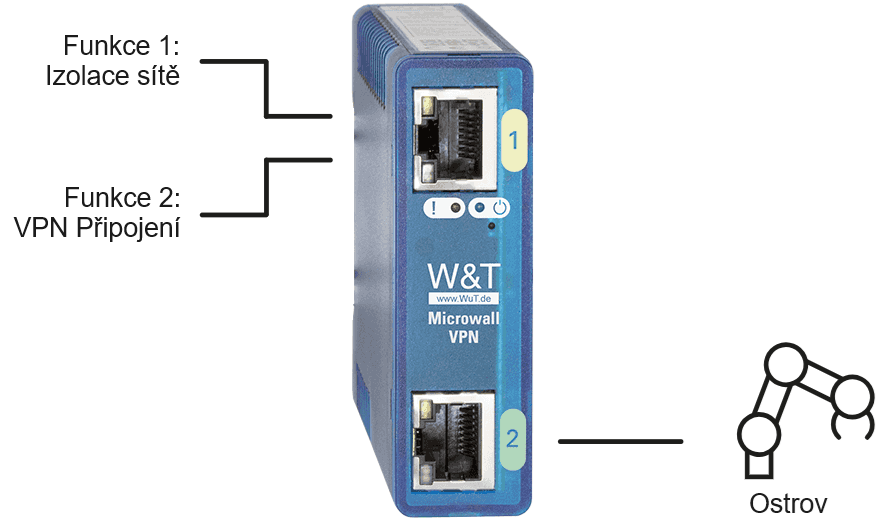
Diagrams and illustrations
Further related links
Technical specifications for the W&T 55212
| Network interface | 2x 100/1000BaseT with auto-detection/Auto-MDIX RJ45 IPv6 on request |
|---|---|
| Digital outputs | 2× digital outputs, 6–30 V, 500 mA Short-circuit protection |
| Digital inputs | 2 x digital inputs Maximum input voltage ±30 V Reverse polarity protection within this range Switching threshold 8 V ± 1.5 V Current when switched on = 2.2 mA |
| Data throughput | Router mode (unidirectional TCP): max. 900 Mbit/s VPN tunnel (unidirectional TCP): max. 300 Mbit/s |
| Galvanic isolation | Network interface section: min. 1500 V |
| Power supply | Power-over-Ethernet (PoE) or 24–48 V DC (±10 %) |
| Connectors and terminal blocks | 1 x 6-pole screw terminal block, plug-in, I/O, RM 3.5 mm 1 x 2-pole screw terminal, plug-in, external power supply, RM 5.08 mm 2 x RJ45 for the network |
| Current consumption | PoE Class 2 (3.84 W to 6.49 W) When using an external power supply: typ. 160 mA at 24 V DC max. 200 mA at 24 V DC |
| Signalling | 2x LED Systems and Services 4x LED I/O status indicators |
| Housing and mounting | Compact plastic housing for DIN rail mounting 105 × 45 × 75 mm (d × w × h) |
| Degree of protection | IP20 |
| Weight | approx. 180 g |
| Ambient temperature | Storage: -40 to +85 °C Operating temperature 0 to +50 °C (when not installed in a stack) |
| Permissible relative humidity | 5 to 95 per cent RH, non-condensing |
| Contents of the delivery | 1x Microwall IO 1× quick start guide |
How to Meet NIS2 Requirements: Secure Remote Access with Ewon Routers and W&T Firewalls
The European NIS2 directive introduces new obligations for companies in protecting against cyber threats. Below, we compare these requirements with the technical measures in IEC 62443 and show how to meet them easily using Ewon industrial routers, the secure Talk2M cloud service, and firewalls from the German manufacturer W&T.
Highlighted items are mandatory.